Taxes on Bitwarden Purchases
This article describes how taxes are assessed, and how to provide the appropriate tax information, for paid Bitwarden subscriptions. Information about your Bitwarden subscription is available:
For personal users, from the Password Manager Settings → Subscription menu.
To change or update your tax information, open the Payment details tab and select the Change payment method button. From here, change your billing address.
For organizations, from the Admin Console Billing → Subscription menu.
To change or update your tax information, you must be an owner. As an owner, navigate to Billing → Payment details and select Edit billing address.
United States
If your billing address is in the United States, sales tax for your subscription is assessed based on the ZIP / Postal code associated with your payment method. Tax liability and applicable rates are subject to change as required by your location. The sales tax on your subscription can be viewed in the invoices available on the Billing history tab.
Value added tax (VAT)
If your billing address is in Australia, Canada, the European Union (EU), or the United Kingdom (UK) you may be subject to value added tax (VAT) depending on your subscription type:
Personal subscriptions
note
In 2025, Bitwarden has begun assessing VAT separately from the cost of personal-use subscriptions.
For personal subscriptions, including Premium individual and Families organization subscriptions, VAT is assessed and included as a separate line item on your invoice.
Business subscriptions
Business subscriptions, including Teams and Enterprise organizations, are subject to VAT or GST rates according to your billing country. If tax is assessed, it's included on invoices as a separate line item. Organization owners can remove tax from future payments by entering a valid tax ID for their registered business during sign-up or at any time in the Admin Console.
To add or update a business subscription's VAT or GST tax ID:
Within the web app Admin Console, go to Billing → Payment details.
Select Change payment method.
Add or edit an existing number within VAT/GST Tax ID:
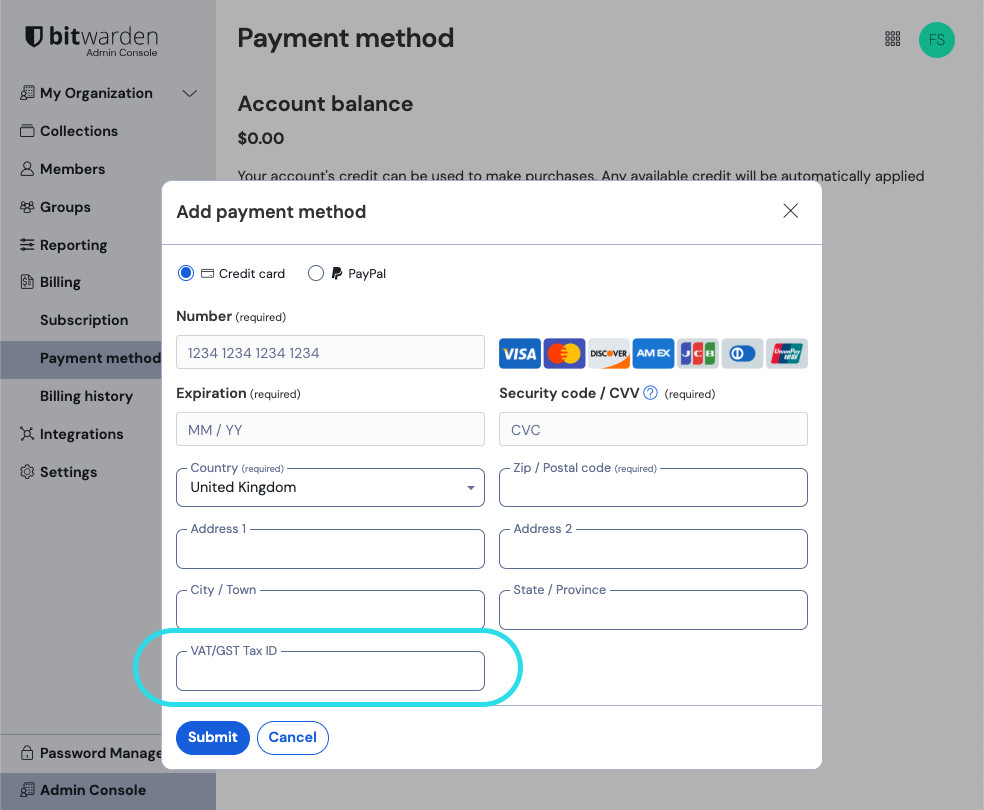
Tax information for organizations Select Submit.

If you need assistance adding your VAT or GST number, contact Customer Support.