Assign Users to Collections
When you create a collection, you can assign access to existing groups or members. You can, at any time, modify who has access to a collection from the Password Manager web app:
In the web app, open the collection and select the button to see your options:
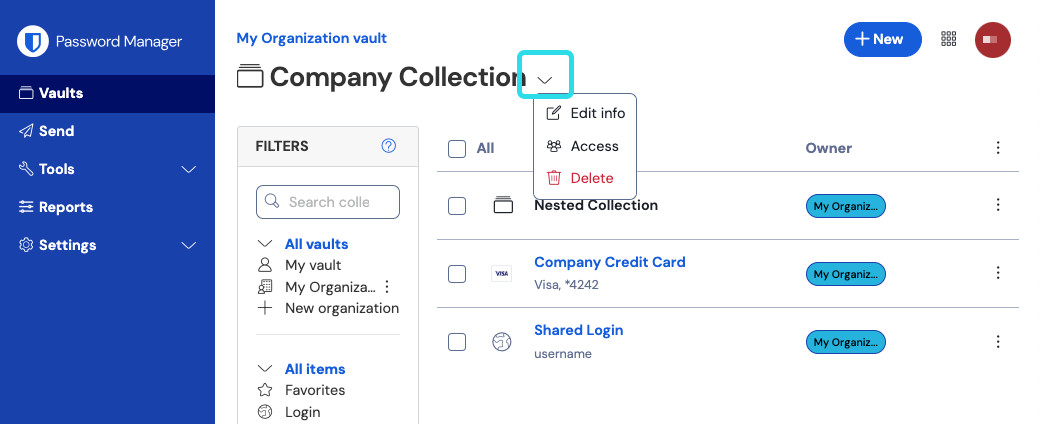
Verwalten Sie eine Sammlung Select Access.
In the collection Access view, you can:
Grant additional groups or members access, including what level of permission they have.
Change the level of permission associated with a group or member that can already access the collection.
Select Save.

tip
Bulk-management: Users with access to the Admin Console can bulk-manage access to collections from the Collections view using the options menu:

Assign access to un-managed collections
Collections should always have at least one assigned member with the Manage collection permission. Under certain circumstances, for example when a managing member leaves your organization, collections can end up without a member with that level of permission.
note
The following only applies if the Owners and admins can manage all collections and items collection management setting is off. If this setting is on in your organization:
Owners and admins can always, rather than temporarily, modify access to a collection from the Collections view.
The Add Access badge and tab described below will not appear.
When this occurs, owners and admins will temporarily gain management capabilities for these collections through the Add Access tab of the Collections view:

Using the steps described previously in this article, owners and admins should assign a new member with the Manage collection permission. Once done, owners and admins lose management capabilities for that collection and the Add Access label is removed.
Next steps
Learn about collections at a conceptual level.
Create a collection that you can add shared items to.
Share items with organization members through your new collection.
Configure the permissions your groups and members have to the collection.
Configure collection management settings for your organization.