Delete an Account or Organization
Deleting an account or organization is permanent, cannot be undone or restored, and will delete all associated vault data. You may want to export data before proceeding with account or organization delete:
Deleting a Bitwarden account or organization permanently deletes the account or organization and all data that is associated with it. Bitwarden does not "soft delete" any data.
Deleting an account or organization does not automatically cancel a subscription. Learn how to cancel a subscription before deleting an account.
If you are locked out of your vault and deleting your account so that you can create a new one, contact us and we can help transfer your subscription to the new account.
To delete your individual account:
To delete your account without needing to log in (for example, if you have lost your master password):
Open https://vault.bitwarden.com/#/recover-delete (or https://vault.bitwarden.eu/#/recover-delete, or
https://your-server.com/#/recover-deleteif you're self-hosting) in a web browser.Enter the Email Address associated with the account to issue a deletion confirmation email.
In your inbox, open the email and verify you want to delete this Bitwarden account.
If you are deleting your account to start a new one, here are a few next steps:
If you delete a Bitwarden account that has a premium subscription associated with it, contact us and we will reapply your existing subscription to the new account.
If you were able to successfully export your vault data prior to deletion, you can easily import it into the new account.
If you are the sole owner of an organization, you can't delete your account until you add a second owner to the organization or delete the organization itself. If you've forgotten your master password, contact us from the email address that owns the organization.
The email address associated with your deleted account should be available to re-register with Bitwarden, should you wish to do so, immediately.

Organization owners, admins, and some custom role members may be able to delete member accounts.
Only organization owners can delete an organization. (If you are an organization member, you can instead leave the organization.) To delete an organization:
Open the Admin Console:
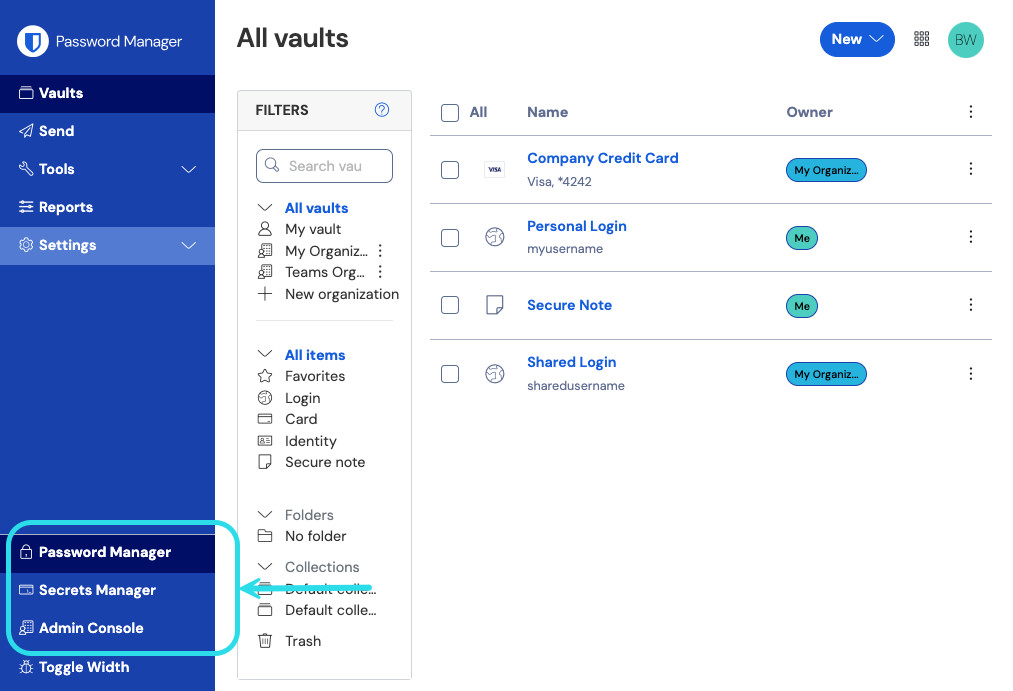
Product switcher Select the Organization you want to delete. Then, go to Settings → Organization info.
Scroll down to the Danger Zone and select Delete Organization.
When prompted, enter your master password to confirm you have the authority to take this action.