About Send
Bitwarden Send is an encrypted file and text sharing tool that transmits sensitive information directly to anyone through secure, temporary links. Send can be used to transmit text up to 1000 encrypted characters or files up to 500 MB (or 100 MB on mobile) and can be shared with anyone via text, email, or any preferred communication channel.
Accessing Send
Sends are created, edited, managed, and deleted from the Send view in any Bitwarden app. Access the send view from the primary navigation:

Using Send
Using Bitwarden Send is a two-step process: Create your Send and share with intended recipients. To create a Send:
Select New Send:
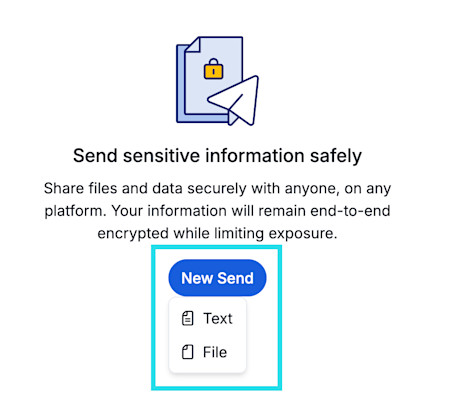
New Send Select the required lifespan options and privacy options to fit your sharing needs.
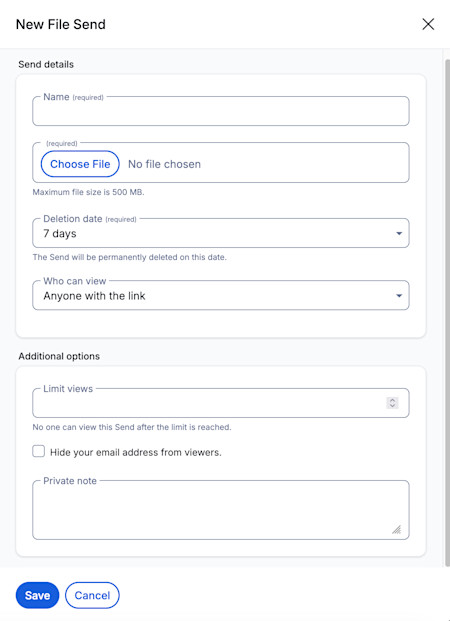
Send options Share the Send link using any communication channel you prefer.


Each Send has a configured lifespan that allows you to track the Send. Sends will display a set of status icons whenever a lifespan event (for example, expiration) has occurred. The icons are as follows:
Icon | Meaning |
|---|---|
This Send is protected by a password. | |
This Send has been manually disabled. | |
This Send has reached its specified expiration date. | |
This Send has reached its specified maximum access count. | |
This Send has reached its specified deletion date and is pending deletion. |
note
Attachments on individual vault items and all Sends use the individual storage space granted by premium subscriptions or organizations. Attachments on organization owned items use shared organizational storage space. Learn how to add storage space.
Next steps
Now that you have learned the basics of Bitwarden Send, we recommend:
For a more in-depth overview of send, see Bitwarden Send - How it works.