Organizations Overview
Organizations relate Bitwarden users and vault items together for secure sharing of logins, notes, cards, and identities. Organizations have a unique view, the Admin Console, where administrators can manage the organization's items and members, run reporting, and configure organization settings:

Members of an organization will find shared items in their Vaults view alongside personal items, as well as several methods for filtering the item list to only organization items or items in particular collections:

Bitwarden offers a variety of organizations to meet your business's or family's needs. For feature-by-feature breakdowns of each organization type, see About Bitwarden Plans.
Type | Description |
|---|---|
Free organizations | Free organizations allow two users to securely share in up to two collections. |
Families organizations | Families organizations allow six users to securely share in unlimited collections. |
Teams organizations | Teams organizations allow unlimited users (billed per user per month) to securely share in unlimited collections and offer a suite of operational tools such as event logs. |
Enterprise organizations | Enterprise organizations allow unlimited users (billed per user per month) to securely share in unlimited collections and add enterprise-only features such as login with SSO and policies to Bitwarden's suite of operational tools. |
The key thing to know is that organizations enable secure sharing from organizations to users. Premium individual plans unlock premium password security and management features, including advanced 2FA options, the Bitwarden authenticator (TOTP), encrypted file attachments, and more, but premium individual does not include secure data sharing.
Paid organizations (Families, Teams, or Enterprise) automatically include those premium features (advanced 2FA options, Bitwarden authenticator (TOTP), and more) for every user enrolled in the organization.
Providers are vault-administration entities that allow businesses such as managed service providers (MSPs) to quickly create and administer multiple Bitwarden organizations on behalf of business customers.
Organizations are created and managed from the web app. If you are new to Bitwarden, create an account before you start your organization, then proceed with these instructions:
Select the New organization button in the Bitwarden web app:
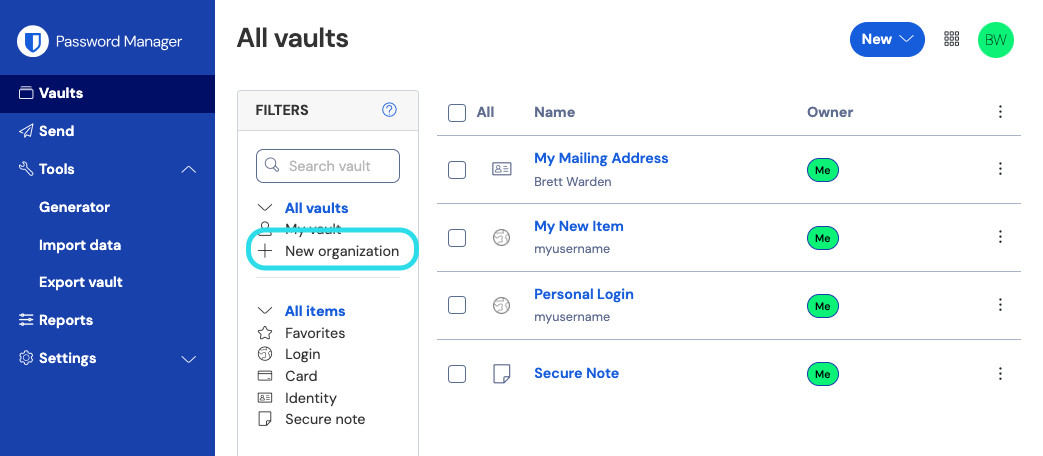
New organization Enter an Organization name and a Billing email we can reach you at. Learn what the holder of your billing email is allowed to do.
Choose your plan. Bitwarden offers organizations suited to any need. Check out the feature-by-feature breakdown to figure out which is best for you.
tipAll paid organization (Families, Teams Starter, Teams, or Enterprise) include premium features for all enrolled users!
If you chose a free organization, you are all set! If you chose one of our paid organizations,
Families/Teams/Enterprise: Your plan comes with 5 GB of encrypted storage for attachments. Add Additional storage (GB) for $0.33 per GB per month.
Teams/Enterprise: Specify the number of user seats you need for your organization. Seats will be added if you exceed this number, unless you specify a limit.
Teams/Enterprise: Choose whether you would like to be billed annually or monthly. Families organizations can only be billed annually.
Once you are happy with your organization, enter your Payment information (not required if you're creating a Free organization) and select Submit.
tipNew Families, Teams, and Enterprise organization have a 14 day free trial built in! We won't charge you until your trial is over, and you can cancel your subscription at any time from the organization Settings tab.

Once you have created your organization, create a collection, invite users, and start sharing.
Bitwarden collections and groups are organizational tools that allow you to share data securely and manage access at scale.
Collections
Collections are a way to associate and share items, similar to a shared folder. Items may belong to one or more collections. Collection management is performed by users with appropriate permissions. Collections may often be organized by:
Departments (engineering, HR)
Areas of responsibility (social media, software development)
Functions (compliance reporting, customer outreach)
To get started with collections, see here.
Groups
Organization groups are a way to associate members of your organization, similar to user groups in an identity provider. Groups enable administrators to grant or revoke collection permissions in bulk, or act as a template when a new member joins your organization. Groups may often be used to organize:
Departments ( engineering, HR)
Vendor or systems (AWS, production servers)
Locality (US employees, EU employees)
To get started with groups, see here.
If you want to upgrade your organization to another plan in order to unlock the additional features:
In the Admin Console, navigate to your organization's Billing → Subscription view.
Select the Upgrade plan button.
You can only upgrade your organization to a higher plan, for example from Teams to Enterprise. Upgrading an organization in this way will not initiate a 14-day free trial like creating a new organization would.