Event Logs
Track your organization's activity and investigate incidents with event logs, timestamped records that capture changes and usage across your Teams or Enterprise organization. You can access these logs through the web app and /events endpoint of the Bitwarden Public API. While event log data is retained indefinitely, you can only view up to 367 days worth of data at a time.
Access event logs
To review event logs in the Bitwarden web app:
Open the Admin Console from the product switcher:
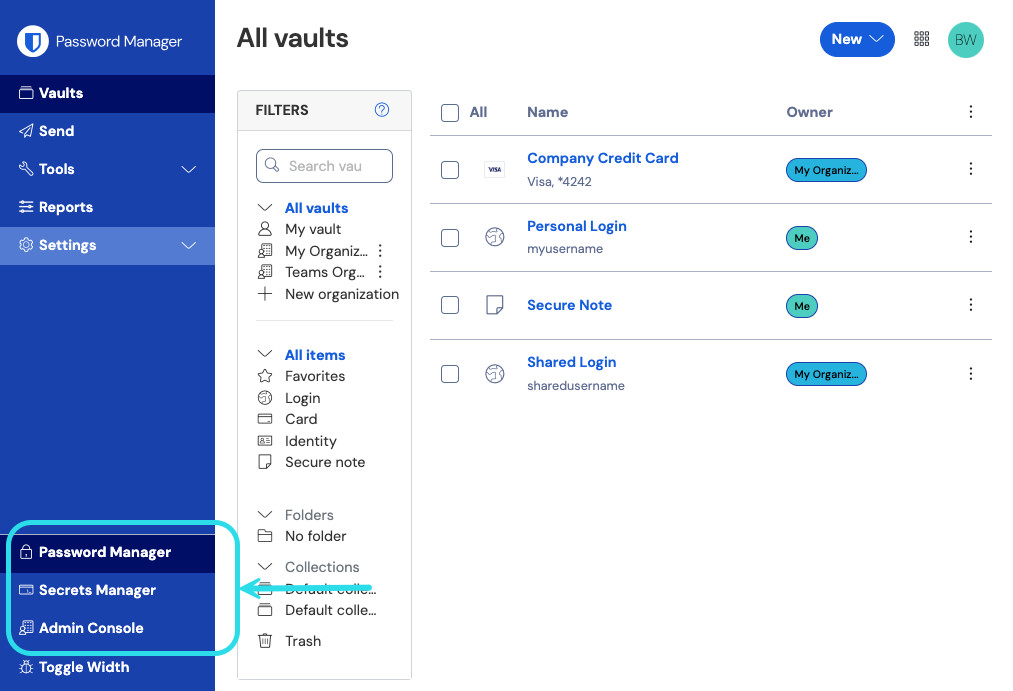
Product switcher Select Reporting → Event logs.
(Optional) Adjust the date range and select Update.
Some events include a pink resource identifier in the Event column:

Select the event identifier to:
View a list of all associated events, like when an item was edited or an Enterprise policy was turned on.
Go to the page where you can access and, if available, modify the resource. For example, selecting a member's identifier from Event logs will take you to the Members view and automatically filter the list down to that member.
You can also export logs as .csv from the web app or as JSON via the Bitwarden Public API.
When events are saved
Bitwarden captures events at both the client and server level. While server events are recorded instantly, client events, the majority, are transmitted to the server every 60 seconds. As such, recent activity may show a brief delay. Clients automatically retry failed transmissions, but events cannot be recorded if the client loses API connectivity or is somehow modified to not send events.
note
Event logs rely on user-reported and client-level data, which technically could be modified or suppressed. Because of this potential situation, Bitwarden event logs may not suffice for security, legal forensics, or auditing purposes for all users and organizations.
Event types
Bitwarden records over 60 event types, and each is listed below with their type codes. For each event, the event logs page displays the:
Timestamp of the event
Client application and IP address (hover over the Client column's value or the client icon for details)
Member connected to the event
Event description
Events are associated with a type code (1000, 1001, etc...) that identifies the action captured by the event. Type codes are used by the Bitwarden Public API to identify the action documented by an event.
User events
Logged In. (
1000)Changed account password. (
1001)Enabled/updated two-step login. (
1002)Disabled two-step login. (
1003)Recovered account from two-step login. (
1004)Login attempted failed with incorrect password. (
1005)Login attempt failed with incorrect two-step login. (
1006)User exported their individual vault items. (
1007)User updated a password issued through account recovery. (
1008)User migrated their decryption key with Key Connector. (
1009)User requested device approval. (
1010)
Item events
Created item
item-identifier. (1100)Edited item
item-identifier. (1101)Permanently Deleted item
item-identifier. (1102)Created attachment for item
item-identifier. (1103)Deleted attachment for item
item-identifier. (1104)Moved item
item-identifierto an organization. (1105)Edited collections for item
item-identifier(1106)Viewed item
item-identifier. (1107)Viewed password for item
item-identifier. (1108)Viewed hidden field for item
item-identifier. (1109)Viewed security code for item
item-identifier. (1110)Copied password for item
item-identifier. (1111)Copied hidden field for item
item-identifier. (1112)Copied security code for item
item-identifier. (1113)Autofilled item
item-identifier. (1114)Sent item
item-identifierto trash. (1115)Restored item
item-identifier. (1116)Viewed Card Number for item
item-identifier. (1117)
Collection events
Created collection
collection-identifier. (1300)Edited collection
collection-identifier. (1301)Deleted collection
collection-identifier. (1302)
Group events
Created group
group-identifier. (1400)Edited group
group-identifier. (1401)Deleted group
group-identifier. (1402)
Organization events
Invited user
user-identifier. (1500)Confirmed user
user-identifier. (1501)Edited user
user-identifier. (1502)Removed user
user-identifier. (1503)Edited groups for user
user-identifier. (1504)Unlinked SSO for user
user-identifier. (1505)user-identifierenrolled in account recovery. (1506)user-identifierwithdrew from account recovery. (1507)Master Password reset for
user-identifier. (1508)Reset SSO link for user
user-identifier. (1509)user-identifierlogged in using SSO for the first time. (1510)Revoked organization access for
user-identifier. (1511)Restored organization access for
user-identifier. (1512)Approved device for
user-identifier. (1513)Denied device for
user-identifier. (1514)Deleted user
user-identifier. (1515)User
user-identifierleft organization. (1516)Edited organization settings. (
1600)Purged organization vault. (
1601)Exported organization vault. (
1602)Organization Vault access by a managing Provider. (
1603)Organization enabled SSO. (
1604)Organization disabled SSO. (
1605)Organization enabled Key Connector. (
1606)Organization disabled Key Connector. (
1607)Families Sponsorships synced. (
1608)Modified collection management setting. (
1609)Turned on Restrict collection creation setting (
1610)Turned off Restrict collection creation setting (
1611)Turned on Restrict collection deletion setting (
1612)Turned off Restrict collection deletion setting (
1613)Turned on Restrict item deletion setting (
1614)Turned off Restrict item deletion setting (
1615)Turned on Allow owners and admins to manage all collections and items setting (
1616)Turned off Allow owners and admins to manage all collections and items setting (
1617)Modified policy
policy-identifier. (1700)Added domain
domain-name. (2000)Removed domain
domain-name. (2001)domain-nameverified. (2002)domain-namenot verified. (2003)
Secrets Manager events
Secrets Manager events are available both from the Reporting tab of your organization vault and from the machine account Event logs page. The following Secrets Manager events are captured:
Accessed a secret with identifier:
secret-identifier(2100)Created a new secret with identifier:
secret-identifier(2101)Edited a secret with with identifier:
secret-identifier(2102)Deleted a secret with identifier:
secret-identifier(2103)Accessed a project with identifier:
project-identifier(2200)Created a new project with identifier:
project-identifier(2201)Edited a project with identifier:
project-identifier(2202)Deleted a project with identifier:
project-identifier(2203)Added user:
user-identifierto machine account with identifier:machine-account-identifier(2300)Removed user:
user-identifierfrom machine account with identifier:machine-account-identifier(2301)Added group:
group-identifierto machine account with identifier:machine-account-identifier(2302)Removed group:
group-identifierfrom machine account with identifier:machine-account-identifier(2303)Created machine account with identifier:
machine-account-identifier(2304)Deleted machine account with identifier:
machine-account-identifier(2305)
Provider events
When any of the above events is executed by a member of an administering provider, the User column will record the name of the provider. Additionally, a provider-specific event will record whenever a member of an administering provider accesses your organization vault:

Export events
To export a .csv of all events within the specified date range, select Export:

For example:
Bashmessage,appIcon,appName,userId,userName,userEmail,date,ip,type Logged in.,fa-globe,Web Vault - Chrome,1234abcd-56de-78ef-91gh-abcdef123456,Alice,alice@bitwarden.com,2021-06-14T14:22:23.331751Z,111.11.111.111,User_LoggedIn Invited user zyxw9876.,fa-globe,Unknown,1234abcd-56de-78ef-91gh-abcdef123456,Alice,alice@bitwarden.com,2021-06-14T14:14:44.7566667Z,111.11.111.111,OrganizationUser_Invited Edited organization settings.,fa-globe,Web Vault - Chrome,9876dcba-65ed-87fe-19hg-654321fedcba,Bob,bob@bitwarden.com,2021-06-07T17:57:08.1866667Z,222.22.222.222,Organization_Updated
tip
You can also download a ..csv list of members that includes account-specific details, like whether Secrets Manager is activated and their status in the organization.
API responses
Access event logs from the /events endpoint of the Bitwarden Public API to return a JSON response, such as:
Bash{
"object": "list",
"data": [
{
"object": "event",
"type": 1000,
"itemId": "string",
"collectionId": "string",
"groupId": "string",
"policyId": "string",
"memberId": "string",
"actingUserId": "string",
"date": "2020-11-04T15:01:21.698Z",
"device": 0,
"ipAddress": "xxx.xx.xxx.x"
}
],
"continuationToken": "string"
}SIEM and external systems integrations
Bitwarden provides a comprehensive set of integrations with Security Information and Event Management (SIEM) platforms that leverage event logs:
Bitwarden also provides multiple methods for accessing data that may be relevant to SIEM platforms for which there is not currently a specific integration. For help configuring a SIEM that isn't listed above, refer to Non-native SIEM.