Temporarily Revoke Access
Organization admins and some custom role members can manage members' access to the organization on a temporary basis through revoking and restoring. Revoking access is:
Often useful when a member shouldn't have access for a period of time, but will need to have access restored in the future.
Automatically done when users are in violation of some enterprise policies.
Automatically done for organizations using SCIM when a member is suspended or de-activated in the IdP.
Restoring access to a revoked member does not require that they take any steps to rejoin the organization, meaning they won't need to be re-invited, accept an invite, or be confirmed.
Revoke access
note
Alleen eigenaars kunnen toegang intrekken en herstellen voor andere eigenaars.
To revoke organization access to a member:
In the Admin Console, navigate to the Members view.
Select the members you want to revoke access for and use the Options menu to Revoke access:
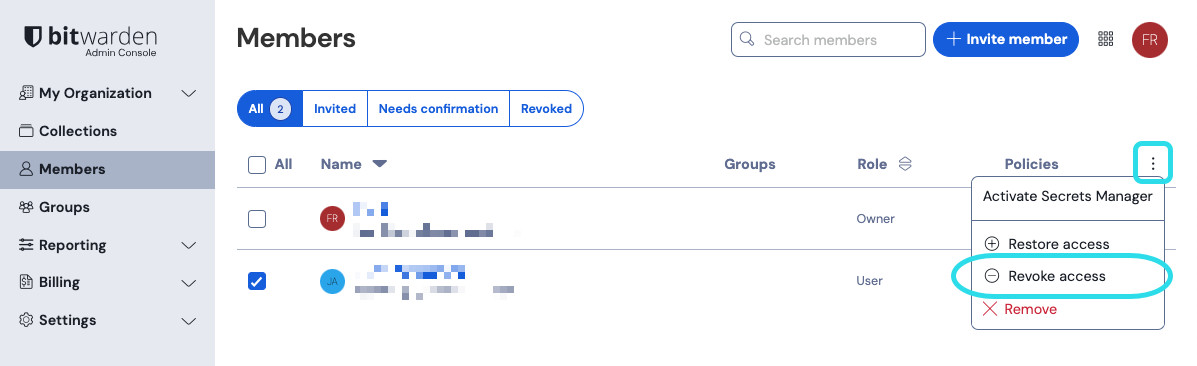
Toegang intrekken

Restrictions on revoked members
Members with revoked access are listed in the Revoked tab and will:
Not have access to any organization vault items or collections.
Not be able to log in to the account using your organization's SSO.
Not be subject to your organization's policies.
Not occupy a license seat.
Restore access
note
Members who are not compliant with some policies will not be able to have their access restored until they take steps to become compliant.
To restore access to a member:
In the Admin Console, navigate to the Members view.
Open the Revoked tab.
Select the members you want to restore access for and use the Options menu to Restore access:
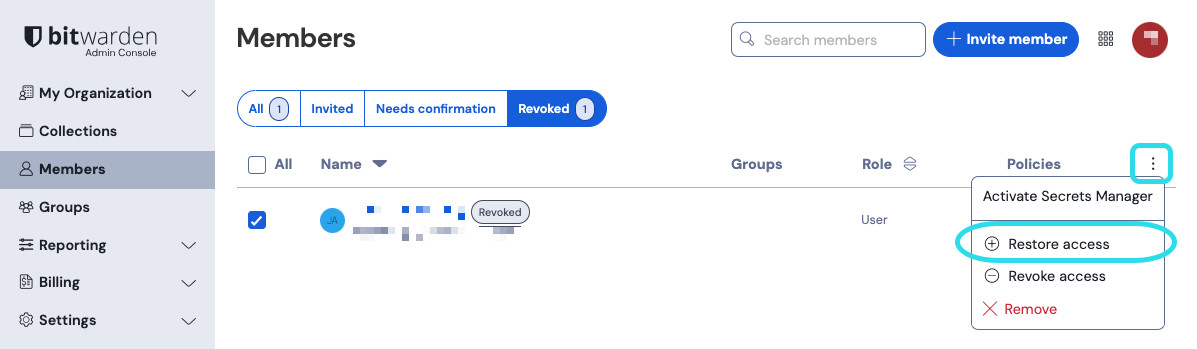
Toegang herstellen
