Change Members’ Account Email & Name
On the Enterprise plan, organizations can update an eligible member's account email address and name directly from the Admin Console. This lets administrators keep member records accurate after changes like a legal name update, saving time and preserving the member's existing vault access.
This option is available only for claimed accounts using Key Connector with SSO or trusted devices with SSO instead of a master password. While accounts with a master password are not eligible for this option, those members can update their own master password.
An owner, admin, or custom user with Manage users permission can update a member’s account email address and name.
To be eligible for administrator updates, the member's account must meet two requirements:
It must be a claimed account, part of a claimed domain.
The account cannot have a master password. This means your organization must use Key Connector or trusted devices, and the specific member did not set up or keep a master password. For example, members who joined before trusted devices were configured may still have a master password. In these cases, their account is not eligible for email changes by an administrator.
noteIf the member has a master password, you can still update the name. You will not, however, be able to update the account email.
To change an eligible member’s account email address or name:
Log in to the Bitwarden web app and open the Admin Console using the product switcher:
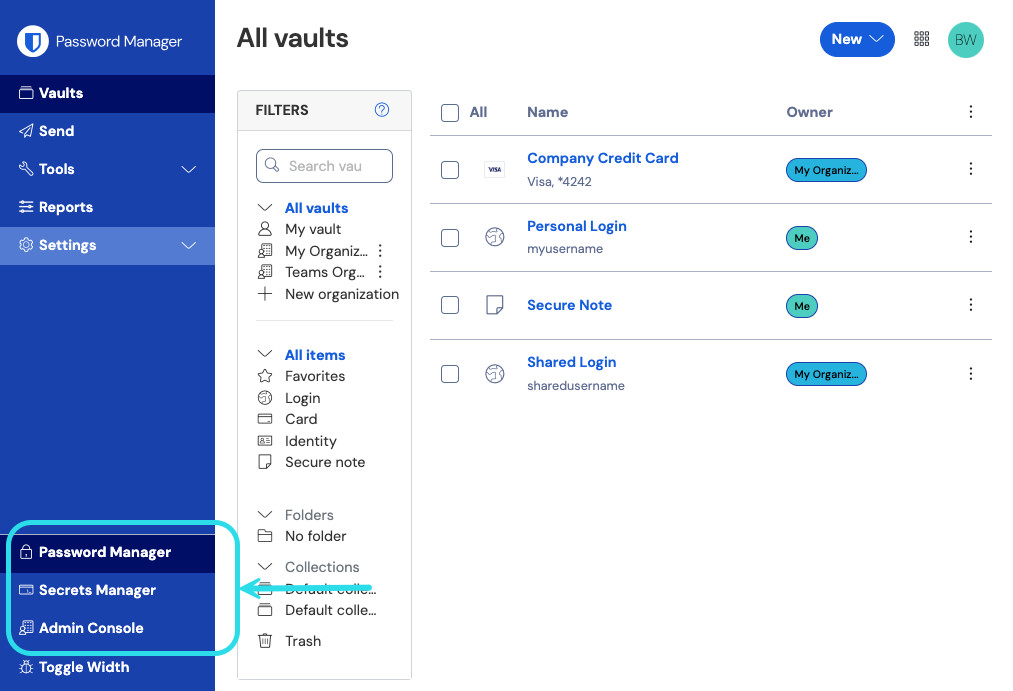
Productkiezer In the Admin Console, select Members.
Select the member that you want to update. A pop-up window will appear.
Depending on what needs updating:
Enter the new Name.
Enter the new Email. The email must use a domain claimed by your organization.
Select Save.
After your changes are saved:
The member's active sessions remain logged in.
An event log records who edited the member. If the email was changed, a second event log records who made that update.
If you updated the email, Bitwarden sends a message to the member's original email address. The message states that an administrator changed their account email and includes the new address. This message does not mention name changes, and Bitwarden sends no message if you update only the name.