Encryption Key Derivation
Bitwarden first uses Key Derivation Functions (KDFs) on account creation to derive a master key for the account from the input master password, which acts as input for a master password hash for the account (learn more). Whenever a user is authenticated, for example when unlocking a vault or satisfying master password re-prompt, the process is repeated so that the newly-derived hash can be compared to the originally-derived hash. If they match, the user is authenticated.
KDFs are used in this capacity to frustrate brute-force or dictionary attacks against a master password. KDFs force an attacker's machines to compute a non-trivial number of hashes for each password guess, at increasing cost to the attacker.
Two KDF algorithms are currently available for use in Bitwarden for password derivation; PBKDF2 and Argon2. Each algorithm has a selection of options available which can be used to increase the time and expense, or "work factor", imposed on the attacker.
PBKDF2
Password-Based Key Derivation Function 2 (PBKDF2) is recommended by NIST and, as implemented by Bitwarden, satisfies FIPS-140 requirements so long as default values are not changed.
PBKDF2, as implemented by Bitwarden, works by salting your master password with your username and running the resultant value through a one-way hash algorithm (HMAC-SHA-256) to create a fixed-length hash. This value is again salted with your username and hashed a configurable number of times (KDF iterations). The resultant value after all iterations is your master key, which acts as input for the master password hash used to authenticate that user whenever they log in (learn more).
note
Bitwarden performs additional iterations beyond what is configured between the client and the server. The master password hash has a total default of 700,000 iterations. See the Bitwarden Security Whitepaper for more details.
By default, Bitwarden is set to iterate 600,000 times, as recommended by OWASP for HMAC-SHA-256 implementations. As long as the user does not set this value lower, the implementation is FIPS-140 compliant.
Argon2id
Argon2 is the winner of the 2015 Password Hashing Competition, is available as an alternative to PBKDF2. There are three versions of the algorithm, and Bitwarden has implemented Argon2id as recommended by OWASP. Argon2id is a hybrid of other versions, using a combination of data-depending and data-independent memory accesses, which gives it some of Argon2i's resistance to side-channel cache timing attacks and much of Argon2d's resistance to GPU cracking attacks (source).
Argon2, as implemented by Bitwarden, works by salting your master password with your username and running the resultant value through a one-way hash algorithm (BLAKE2b) to create a fixed-length hash.
Argon2 then allocates a portion of memory (KDF memory) and fills it with the computed hash until full. This is repeated, starting in the subsequent portion of memory where it left off in the first, a number of times iteratively (KDF iterations) across a number of threads (KDF parallelism). The resultant value after all iterations, is your master key, which acts as input for the master password hash used to authenticate that user whenever they log in (learn more).
By default, Bitwarden is set to allocate 64 MiB of memory, iterate over it 3 times, and do so across 4 threads. These defaults are above current OWASP recommendations, but here are some tips should you choose to change your settings:
Increasing KDF iterations will increase running time linearly.
The amount of KDF parallelism you can use depends on your machine's CPU. Generally, Max. Parallelism = Num. of Cores x 2.
note
Argon2id users with a KDF memory value higher than 64 MiB will receive a warning dialogue every time iOS autofill is initiated or a new Send is created through the Share sheet. To avoid this message, adjust Argon2id settings or enable unlock with biometrics.
Changing KDF algorithms
Changing the iteration count can help protect your master password from being brute forced by an attacker, however should not be viewed as a substitute to using a strong master password in the first place. A strong master password is always the first and best line of defense for your Bitwarden account.
Changing the KDF algorithm re-encrypts the protected symmetric key and updates the authentication hash, much like a normal master password change. The symmetric encryption key is not rotated, however, so vault data is not re-encrypted. Learn more about re-encrypting your data.
note
Backing up your vault data is not required before changing your encryption settings, however taking regular backups is highly recommended.
To update your KDF algorithm:
In the web app, go to Settings → Security.
Select Keys:
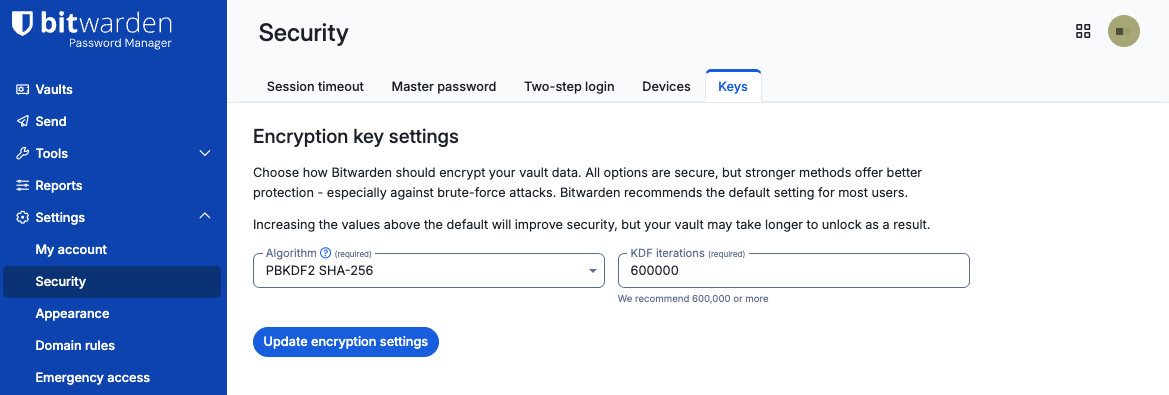
Encryption key settings From the Algorithm dropdown menu, select PBKDF2 SHA-256 or Argon2id.
(Optional) Update the additional settings that appear.
Select Update encryption settings.

More KDF iterations will increase both the time it will take an attacker to crack a password and the time it will take a legitimate user to log in. Setting your KDF iterations too high could result in slower performance when logging into and unlocking Bitwarden on devices with slower CPUs. We recommend increasing the value in increments of 100,000 and then testing on all of your devices.
For PBKDF2 SHA-256, the default KDF iteration setting is 600,000.
For Argon2id, the default settings are:
KDF memory: 32
KDF iterations: 6
KDF parallelism: 4
Low PBKDF2 KDF iterations
In the 2026.2.1 release, Bitwarden increased the minimum number of PBKDF2 KDF iterations to the default level, 600,000, in accordance with OWASP guidelines. This strengthens vault encryption against hackers armed with increasingly powerful devices.
If you use the PBKDF2 algorithm and the KDF iterations are set below 600,000, you may see a message to Update your encryption settings. If you see this message, enter your master password and select Update settings to increase your KDF iterations to 600,000. You will not need to re-log into any clients for the change to occur. If you instead click Later, this message will appear again after 24 hours to encourage you to protect your account. Alternatively for your convenience, you will not see the prompt and the increase will happen automatically if you unlock or log in with your master password.
HKDF
HKDF is a HMAC-based KDF specified in RFC 5869 that is widely used in the industry and recommended by NIST in SP 800-56. Bitwarden uses HKDF in order to derive encryption keys from non-password material, such as other keys or cryptographically randomly generated material.