Set Up Account Recovery
Account recovery helps organization members regain access to their account. After the Enterprise policy is activated, members need to enroll in the program. Enrollment triggers the key exchange that makes account recovery secure. There are two ways for members to be enrolled:
Automatic enrollment is the quickest option, but only applies to members who join after the policy is turned on.
Self-enrollment allows members to manually enroll through the web app.
First, turn on the Account recovery administration policy. After it's activated, members must enroll in account recovery.
When you turn on the Account recovery administration policy, you have the option to check Automatically enroll new members in account recovery. Turning on this setting will:
Enroll new members in account recovery automatically when they enter an accepted status.
Prevent them from withdrawing from account recovery.
Bitwarden recommends turning on automatic enrollment. However, automatic enrollment only applies to members who join after the policy was activated. If your organization already had members before the policy was turned on, those members must self-enroll to be eligible.
If you automatically enroll members in account recovery, we recommend notifying them. Some organization members can choose to store personal credentials under their own ownership and should be made aware that account recovery could allow an administrator to access their personal items.
Members must opt in proactively if automatic enrollment is off or if they joined before it was turned on. To enroll in account recovery:
From the web app, select the Options icon next to the organization in the Vaults view.
Select Enroll in account recovery:
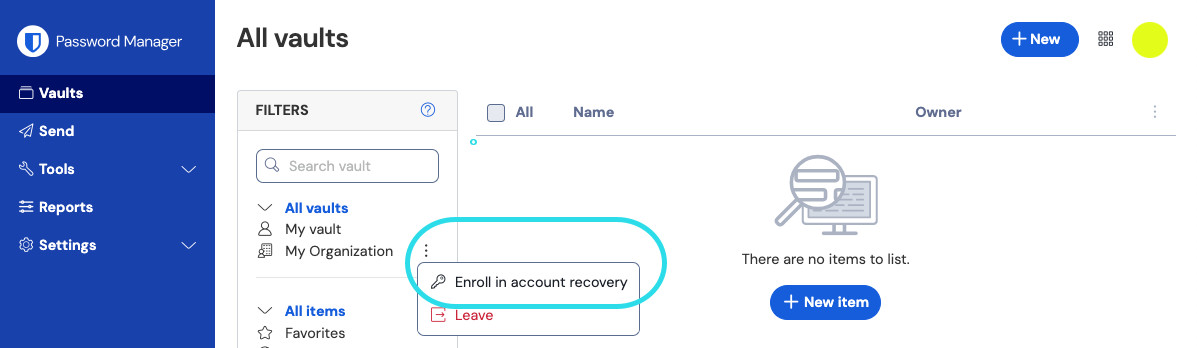
Enroll in account recovery Enter your Master password.
Select Submit.
Select Trust.

Members of organizations that turned on the automatic enrollment policy are not allowed to withdraw from account recovery. Members of organizations that have not turned it on, however, can select Withdraw from the same menu used to enroll:

Manually changing your master password or rotating an encryption key will not withdraw a member from account recovery.