Change At-Risk Passwords
Bitwarden prompts you to update weak, reused, or exposed passwords with a Review and change at-risk passwords banner in your vault or an At-risk password or Change now label below the password field in the opened login item. Replacing at-risk passwords strengthens your overall security and reduces the risk of your accounts being compromised.
This notification appears for one of two reasons:
As an organization member, the administrative team identified a weak, reused, or exposed password and requires you to update it. You may also receive an email notification. The banner appears in the Vaults view of your browser extension and you may also receive an email about the at-risk password:
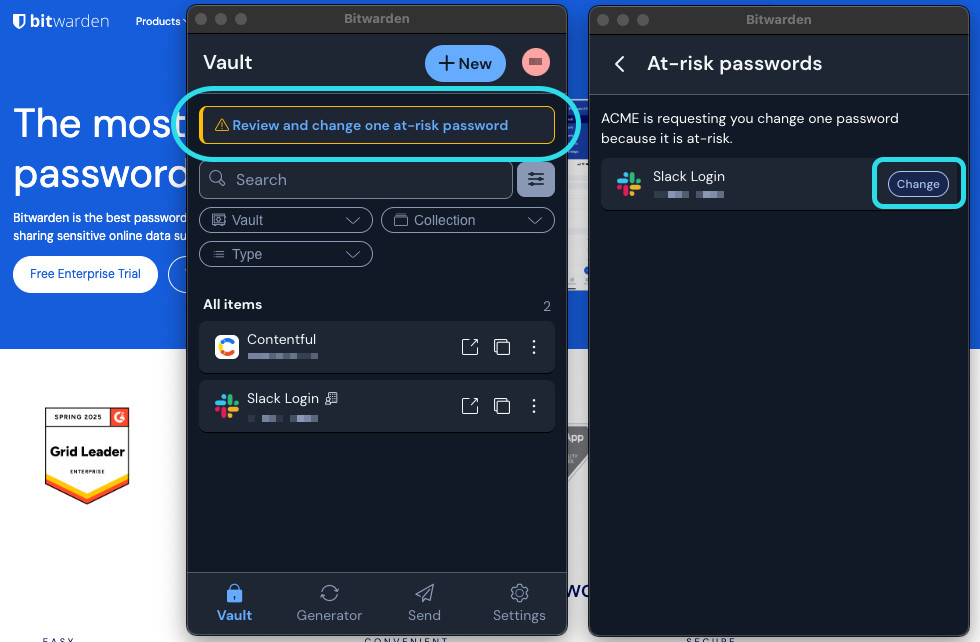
Change an at-risk password As a Premium user, Bitwarden automatically identified a weak, reused, or exposed password in your vault with vault health reporting. The notification appears when on the opened View Login page in your browser extension, desktop app, or the web app.

In your browser extension, select the banner and use the Change button to update each at-risk password with a new, stronger one. Alternatively, select the Change now button within each flagged login item. In most cases, the browser extension will take you directly to that service's change password page. Remember that:
You must update the password within the website's "Change password" form and within your Bitwarden vault.
You should use the password generator to create a strong and unique new password.