Permanently Remove Access
Organization admins, owners, and some custom role members can remove members from an organization. Removing a member:
Eliminates their access to the organization and its data. Removed members need to re-join the organization to re-gain access.
Does not delete their Bitwarden account in most cases. Removed members are still able to access their personally-owned vault items unless you delete their account.
Is automatically done for organizations using directory sync if the Remove disabled users during sync option is turned on.
Remove members from an organization
To remove members from your organization:
In the Admin Console, go to Members.
Select the users you want to remove and select the Options icon.
Select Remove:
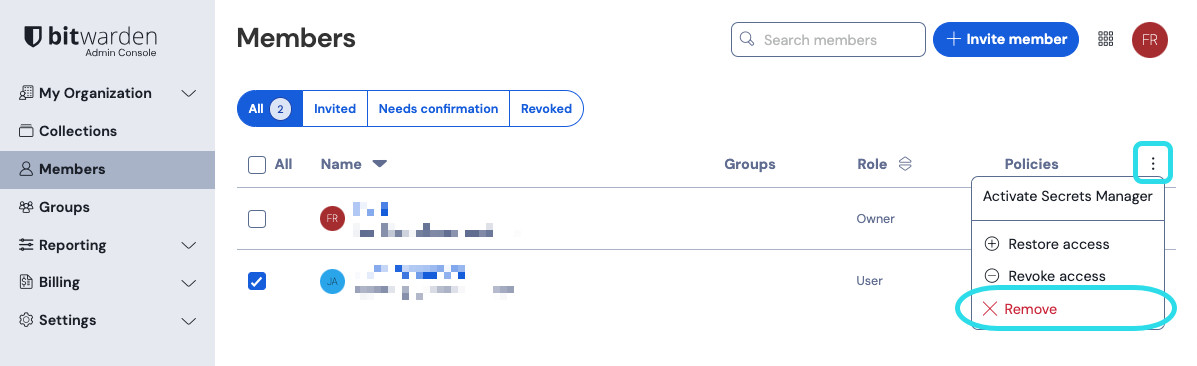
メンバーを削除する Select Remove members to confirm.

tip
If your organization has a claimed domain and the user's account email address matches your claimed domain, Remove is not listed. Instead, you can select Delete to delete the account permanently, effectively removing the user’s access to the organization:

Offline devices cache a read-only copy of data, including organization items. Some clients may retain access to this read-only data for a short time after a member is removed. If you anticipate malicious exploitation of this, update credentials the member had access to when you remove them from the organization.
warning
マスターパスワードがない結果としての信頼できるデバイスとのSSOを持つアカウントについては、組織からの削除またはアクセス権の取り消しにより、以下の場合を除き、そのBitwardenアカウントへのすべてのアクセスが遮断されます:
あらかじめアカウント回復を使用して、マスターパスワードを割り当てます。
ユーザーは、アカウント回復ワークフローを完全に完了するために、アカウント回復後に少なくとも一度ログインします。
What happens to removed members' data
Organizations own all collections. When you remove the only member with full Manage collection permission to a collection, owners and admins can grant a current member access to the collection.
Items saved in My vault are owned by the individual user. When a member is removed from an organization, the user keeps all items in their My vault.
In contrast, organizations using the Centralize organization ownership policy retain access to data when members are removed. This policy replaces the individually-owned My vault with the organization-owned My Items. When a member with data in My Items is removed, their My Items automatically converts into a collection named with the user's email address. Owners and admins can then assign access to the collection. After a current member is granted Manage collection permission, they can access, edit, and reassign items the same way as a standard Bitwarden collection.