CLI Authentication Challenges
The August 2021 release of Bitwarden (2021-09-21) introduced Captcha requirements to increase security against bot traffic. On the CLI, Captcha challenges are substituted with authentication challenges that can validated using your account's personal API key client_secret.
Get your personal API key
To get your personal API key:
In the Bitwarden web app, navigate to Settings → Security → Keys:
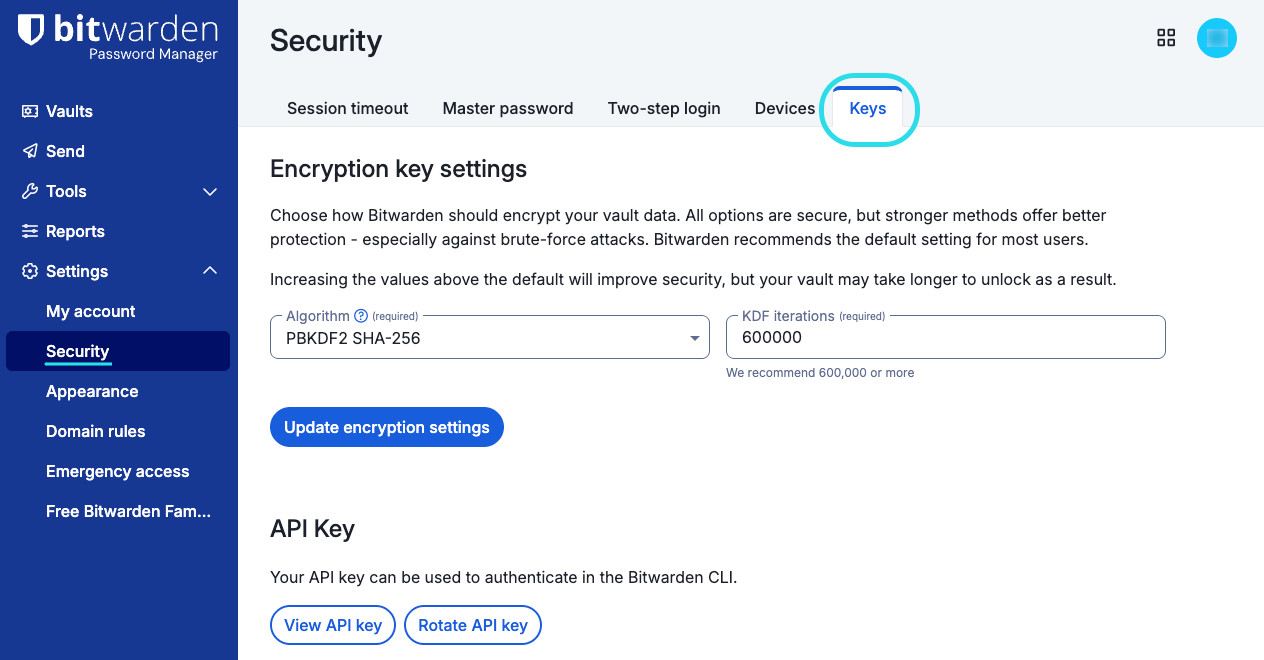
Keys settings Select the View API key button and enter your master password to validate access.
From the API key dialog box, copy the client_secret: value, which is a random string like
efrbgT9C6BogEfXi5pZc48XyJjfpR.

Answering challenges
Depending on your preferences, you can save an environment variable to automatically pass authentication challenges or manually enter your client_secret whenever a challenge is made:
Answer challenges with an environment variable
Authentication challenges will look for a non-empty environment variable BW_CLIENTSECRET before prompting you to enter one manually. Saving this variable with the retrieved client_secret value will allow you to automatically pass authentication challenges. To save this environment variable:
Bash
Bashexport BW_CLIENTSECRET="client_secret"PowerShell
Bashenv:BW_CLIENTSECRET="client_secret"warning
If your client_secret is incorrect, you will receive an error. In most cases, this is because you have rotated your API key since saving the variable. Use the above steps to retrieve the correct value.
Answer challenges manually
When an authentication challenge is made and no BW_CLIENTSECRET value is found, you will be prompted to manually enter your client_secret value:

warning
If your client_secret is incorrect, you will receive an error. In most cases, this is because you have rotated your API key since saving the variable. Use the above steps to retrieve the correct value.