FAQs
Domande frequenti
Bitwarden Access Intelligence è una soluzione completa progettata per proteggere l'intera organizzazione dai rischi legati alle credenziali. Con Bitwarden Access Intelligence, puoi identificare in modo proattivo i rischi relativi alle credenziali, dare priorità alle applicazioni critiche, guidare i dipendenti nell'aggiornamento delle password e misurare i miglioramenti della sicurezza.
Gli amministratori e i proprietari con un abbonamento a un'organizzazione Enterprise possono trovare Access Intelligence nella Console di amministrazione, nel menu di navigazione a sinistra.
Bitwarden Access Intelligence è disponibile con tutti gli abbonamenti enterprise di Bitwarden.
Access Intelligence segnala le password deboli, riutilizzate ed esposte condivise nell'organizzazione Bitwarden. Le stesse informazioni sono disponibili anche nei report sull'integrità delle casseforti Bitwarden. Le password esposte vengono identificate tramite Have I Been Pwned (HiBP), che condivide informazioni pubbliche sulle violazioni.
Bitwarden Access Intelligence ti indica inoltre a quali applicazioni sono associate queste password a rischio e chi dispone dell'autorizzazione Può gestire per quella password.
L'autenticazione TOTP integrata è una funzionalità premium di Bitwarden Password Manager. Bitwarden Authenticator è un'app mobile autonoma gratuita che genera codici TOTP per qualsiasi servizio online che li supporti. Bitwarden Authenticator può essere usato senza un account Bitwarden.
Sì, sono applicazioni separate.
L'autenticazione a due fattori (2FA) utilizza specificamente due metodi di verifica, mentre l'autenticazione a più fattori (MFA) può usare due o più fattori. L'app Bitwarden Authenticator supporta implementazioni sia 2FA che MFA, generando codici sicuri basati sul tempo per qualsiasi servizio che supporti l'autenticazione TOTP.
Sì, le app di autenticazione offrono una sicurezza superiore rispetto alla 2FA basata su SMS. I codici generati dall'app non possono essere intercettati tramite attacchi di SIM swapping, funzionano offline e non dipendono dalle reti cellulari. Gli esperti di sicurezza raccomandano le app di autenticazione come standard di riferimento per l'autenticazione a due fattori.
Bitwarden Authenticator è un'app autonoma disponibile per tutti, anche per chi non usa Bitwarden Password Manager.
Bitwarden Authenticator genera password monouso basate sul tempo (TOTP) per l’autenticazione a più fattori. L’app crea codici sicuri a 6 cifre che cambiano ogni 30 secondi, fornendo un secondo livello di sicurezza essenziale per i tuoi account online, oltre alla semplice password.
In questa versione iniziale, i tuoi dati verranno sottoposti a backup tramite i servizi di backup del sistema operativo mobile. Assicurati che il dispositivo sia acceso e configurato per i backup. I dati di Bitwarden Authenticator sono inclusi nei backup del sistema operativo e verranno ripristinati insieme a essi.
Sì! Molti utenti Bitwarden hanno richiesto un autenticatore autonomo in cui salvare i codici di verifica usati per accedere al proprio account Bitwarden. È importante annotare e conservare i codici di recupero del Password Manager in un luogo sicuro.
New features on the roadmap include import, syncing to Bitwarden accounts, push-based 2FA, and account recovery.
Bitwarden Authenticator encrypts all of your data locally on your device.
Local encryption: All authenticator entries, including the secret keys that generate your codes, are encrypted with AES-256 before being stored. None of this data ever leaves your device.
Unique key generation: When you set up the app, it creates a random 256-bit encryption key specifically for your device.
Secure storage of the key: This key is stored in your device’s secure keychain (iOS) or keystore (Android), the most secure storage area available on mobile devices.
Your encrypted data further benefits from your device's built-in security features:
Biometrics: Face ID, Touch ID, or fingerprint unlock protect access to the key.
Device passcode: Your device’s lock screen passcode adds another layer of security.
Hardware security: On modern devices, keys are stored in secure hardware isolated from the main operating system.
In short, all your Bitwarden Authenticator data is encrypted at rest on your device, with strong protections built into both the app and your device’s hardware.
Quando cerchi altri gestori di password, valuta soluzioni con un'estensione per browser, un'app desktop e una suite di funzionalità simile a quella offerta da Bitwarden. Gli utenti apprezzano Bitwarden per le sue funzionalità complete, molte delle quali disponibili già dal piano gratuito.
Ecco cosa dovrebbero cercare gli utenti esperti di tecnologia nella scelta dei migliori gestori di password:
Una struttura sicura e open source che metta al primo posto trasparenza e sicurezza.
Conformità a tutti i principali framework, inclusi il Data Privacy Framework, il GDPR e altri.
Opzioni self-hosted per la massima sicurezza e il massimo controllo.
Supporto per oltre 50 lingue.
Prezzi chiari, semplici e basati sul valore.
Sì. Le integrazioni di Bitwarden includono Okta, Microsoft Entra ID (in precedenza Azure AD) e Google Workspace sia per l’autenticazione SSO sia per la sincronizzazione delle directory. Puoi configurare l’accesso con SSO per l’autenticazione senza password e usare SCIM o Directory Connector per automatizzare il provisioning degli utenti e la gestione dei gruppi da questi provider di identità.
Sì. Bitwarden supporta il SCIM (System for Cross-domain Identity Management) per il provisioning dei clienti aziendali. SCIM automatizza il provisioning di utenti e gruppi dal tuo provider di identità a Bitwarden, mantenendo la tua organizzazione sincronizzata con il servizio directory. Questo semplifica l'onboarding, l'onboarding e gli avvicendamenti, oltre alla gestione continuativa degli utenti nell'intera distribuzione aziendale.
Bitwarden utilizza Raccolte e Gruppi per consentire la condivisione sicura delle password su scala enterprise. Gli amministratori creano Raccolte contenenti credenziali condivise, assegnano Gruppi di utenti a tali Raccolte con autorizzazioni granulari (sola lettura, password nascosta, accesso in modifica) e gestiscono la condivisione tra reparti senza esporre inutilmente le credenziali. Tutte le attività di condivisione vengono registrate per garantire visibilità a fini di audit.
Gli amministratori di Bitwarden possono applicare criteri aziendali, tra cui requisiti di complessità della password principale, obbligo di autenticazione a due fattori, restrizioni sull'uso del vault personale, impostazioni del generatore di password, limitazioni a una singola organizzazione, controlli sull'esportazione del vault, requisiti di autenticazione SSO, opzioni di recupero dell'account e applicazione dell'accesso senza password. I criteri vengono configurati prima dell'onboarding degli utenti e si applicano a tutta l'organizzazione per mantenere gli standard di sicurezza.
Bitwarden fornisce log degli eventi completi che tracciano tutti gli accessi alle credenziali, gli eventi di condivisione, le modifiche alle policy e le azioni amministrative in tutta l'organizzazione. I log degli eventi possono essere esportati in formato CSV o JSON per l'integrazione con SIEM piattaforme, documentazione di conformità e analisi della sicurezza. I clienti Enterprise ottengono audit trail completi per verifiche normative e indagini sugli incidenti.
Bitwarden mantiene una struttura open source, con il più alto standard di cybersicurezza a oggi. Questa architettura viene inoltre valutata periodicamente in termini di efficacia, evolvendosi con il supporto dei nostri esperti interni e della community globale attiva. Bitwarden rafforza il proprio impegno per la sicurezza e la trasparenza, offrendo anche un programma bug bounty per incentivare la segnalazione di bug. Questo approccio proattivo si traduce nella migliore esperienza di cybersicurezza possibile per tutti.
1Password: Solo alcuni componenti dell’ecosistema 1Password sono open source, come SDK e librerie di autenticazione passkey.
Bitwarden mantiene una struttura open source ed è costantemente perfezionato da utenti, sviluppatori e specialisti della sicurezza in tutto il mondo. Questo approccio collaborativo garantisce elevata integrità, individuando proattivamente nuove opportunità per risultati sempre migliori a ogni aggiornamento.
Oltre all’hashing con salt e alla crittografia avanzata AES a 256 bit, Bitwarden coinvolge esperti che effettuano revisioni continue dalla community dedicata di utenti Bitwarden. Questo notevole elenco di auditor di sicurezza di terze parti include
HackerOne (hacking etico in crowdsourcing).
Insight Risk Consulting (penetration test).
Cure53 (audit del codice sorgente).*
1Password non dispone di questa rete globale di supporto e, al momento, non ha una struttura completamente open source; un aspetto che desta preoccupazione per alcuni durante la transizione, nonostante la sua architettura zero-knowledge.
*Vedi bitwarden.com/compliance per un elenco completo dei materiali Bitwarden su sicurezza e conformità.
Bitwarden consente una condivisione di file crittografata e senza interruzioni tramite la sua funzione Send, offrendo un modo intuitivo per condividere dati sensibili in modo sicuro.
Sebbene Keeper supporti anch'esso la condivisione di file, il suo approccio è più complesso e legato ai piani a pagamento, rendendo Bitwarden l'opzione più semplice ed economica.
Bitwarden ha la più grande community globale rispetto ad altri gestori di password, che verifica ogni fase del processo di gestione delle password e della sicurezza dei dati.
Keeper ha una community globale limitata, soprattutto rispetto a Bitwarden.
Bitwarden offre report di sicurezza completi, inclusi controlli per password deboli, riutilizzate o compromesse, il tutto incluso nel piano gratuito.
Keeper offre funzionalità simili, ma riserva il monitoraggio avanzato "BreachWatch" ai piani a pagamento, rendendo Bitwarden più accessibile per chi cerca informazioni di sicurezza solide senza costi aggiuntivi.
Bitwarden offre servizi in oltre 50 lingue e continua ad ampliare i propri sforzi di traduzione per supportare un numero maggiore di aziende globali.
Keeper supporta solo 11 lingue, risultando meno accessibile al pubblico globale.
Bitwarden è al 1° posto per soddisfazione degli utenti su G2 da nove trimestri consecutivi! Quando scegli Bitwarden invece di Keeper, ottieni prezzi semplici, maggiore flessibilità, un supporto reattivo e molto altro:
Trasparenza e sicurezza dell'open source.
Opzioni di distribuzione in cloud e self-hosted.
Condivisione diretta e crittografata di file o testo con chiunque.
Opzioni complete di importazione ed esportazione.
Supporto per oltre 50 lingue.
Prezzi chiari, semplici e basati sul valore.
Bitwarden è uno dei gestori di password più conformi disponibili oggi ed è approvato da diversi framework per la privacy dei dati: AICPA SOC 2 Type 2, GDPR, CCPA e Data Privacy Framework UE-USA.
1Password è conforme a GDPR e SOC 2, ma offre poche informazioni pubbliche sulle altre certificazioni di conformità di cui dispone, limitandone la funzionalità per alcune categorie di utenti.
Bitwarden ha la community globale più ampia rispetto ad altri gestori di password, che verifica ogni fase del processo di gestione delle password e di sicurezza dei dati.
1Password ha una community globale limitata, soprattutto rispetto a Bitwarden.
Bitwarden offre più funzionalità premium, supportando le autorizzazioni degli utenti nei pannelli di visualizzazione di inviti, membri e gruppi. La sicurezza è ulteriormente rafforzata dall'hosting autonomo, se l'utente lo sceglie.
1Password offre opzioni limitate per le autorizzazioni degli utenti che, a volte, sono riservate a determinati livelli di abbonamento.
Bitwarden offre servizi in oltre 50 lingue e si impegna ad ampliare le proprie iniziative di traduzione per supportare aziende globali (ancora più numerose).
1Password attualmente supporta solo 11 lingue, risultando meno accessibile a un pubblico globale.
I piani Business di 1Password lasciano molto a desiderare, soprattutto se confrontati con una soluzione completa come Bitwarden.
L’impegno di Bitwarden per la trasparenza emerge chiaramente nei relativi livelli di prodotto e nelle offerte. Ad esempio, Bitwarden offre un piano gratuito completo, oltre a un piano famiglia che supporta fino a sei utenti, rendendolo un’opzione conveniente per piccoli gruppi senza compromettere la qualità del prodotto.
1Password mette la maggior parte delle sue funzionalità chiave dietro un paywall, offrendo solo integrazioni di base, controlli di amministrazione di nicchia e la prevista crittografia end-to-end. 1Password suddivide i piani e elenca separatamente funzionalità accessorie, come il vantaggio del punteggio complessivo di integrità delle password. Nel complesso, molti utenti ritengono che Bitwarden offra un miglior rapporto qualità-prezzo con una struttura semplificata.
A differenza di Bitwarden, 1Password offre molta meno visibilità sulla sua architettura principale, indicando come open source solo alcuni elementi della struttura. Questo, insieme ai costi più elevati, all’assenza di un piano gratuito e a opzioni di integrazione macchinose, rende Bitwarden il password manager preferito da molte persone e aziende.
Bitwarden maintains an open source approach, constantly refined by users, developers, and security specialists globally. This collaborative approach holds integrity high, proactively identifying new opportunities for an even better outcome, update after update. Dashlane lacks this global network of support, as its code has a murky classification (only the mobile app is open source)—and some critical Dashlane-specific elements have been removed, per TechCrunch.
In addition to salted hashing and advanced AES-256 bit encryption, Bitwarden engages experts who conduct ongoing reviews from the dedicated Bitwarden user community. This impressive list of third-party security auditors include
HackerOne (crowdsourced ethical hacking)
Insight Risk Consulting (penetration testing)
Cure53 (source code audits).
See bitwarden.com/compliance for a full list of Bitwarden security and compliance materials.
Unlike Dashlane’s two types of two-factor authentication, Bitwarden offers several advanced multifactor authentication (MFA) methods:
Company-wide Duo Security with Duo Push, SMS, phone call, and security keys
Individual use of Duo Security and TOTP codes
YubiKey OTP (any 4/5 series device or YubiKey NEO/NFC)
Hardware security key (FIDO2 Passkey)
Dashlane offers four business plans:
Standard.
Business.
Business Plus.
Enterprise.
With this itemized division of plans and auxiliary features—such as their overall password health score perk—many users feel that Bitwarden offers better value with a simplified structure.
Unlike Bitwarden, Dashlane offers no transparent, advanced saving opportunities for companies with 50+ employees, relegating users to choose the unexplained Enterprise tier—which may not fit their needs or budget.
Additionally, the service does not offer as wide a range of support (compared to 24/7 Bitwarden support), nor is it truly open source. The only framework currently available for Dashlane that is “open source" is for their Google Play Store app—not the core source code itself. This stands in stark contrast to the Bitwarden open source nature and transparency.
As you search for password managers, consider the suite of features Bitwarden offers. Users love Bitwarden because of its comprehensive features—many of them from the free plan onward.
Features to look for include:
A secure, open source structure that prioritizes transparency and security.
Compliance with all major frameworks, including the Data Privacy Framework, GDPR, and others.
Self-hosted options for maximum security and control.
Support for over 50 languages.
Clear, straightforward, value-based pricing.
Bitwarden is one of the most compliant password managers available to date and is approved by several data privacy frameworks. These include AICPA SOC2 Type 2, GDPR, CCPA, and EU-U.S. Data Privacy Framework(s), respectively.
Dashlane is not Data Privacy Framework compliant, limiting its application and functionality for certain user classes.
Bitwarden’s self-hosted option is available from its free password manager tier, and remains compatible across Linux, MacOS, and Windows devices. Many appreciate this, as self-hosted solutions are typically at less risk for a data breach or security crisis.
Dashlane does not currently have a self-hosted option.
Bitwarden offers more premium features, supporting user permissions across the invitation, membership, and group view panels. Security can be further enhanced by self-hosting, if the user chooses.
Dashlane is incredibly limited when it comes to user permission options, especially compared to Bitwarden.
Bitwarden offers services across 50+ languages and continues to expand its translation efforts to support more global businesses.
Dashlane only supports 11 languages, making it less accessible to the global audience.
Bitwarden is completely open source, and is reviewed by experts to ensure continuous improvement as cyberthreats become more sophisticated. Bitwarden also offers a bug bounty program, encouraging users and security experts to report and remediate bugs—which results in a better overall experience for everyone.
Dashlane is only open source for mobile app (Google Play Store), not the core source code.
Bitwarden has the biggest global community compared to other password managers, fostering collaboration at every step of the password management and data security process.
Dashlane has an extremely limited global community compared to Bitwarden.
Bitwarden è completamente open source ed è sottoposto a revisioni da parte di esperti per garantire un miglioramento continuo man mano che le minacce informatiche diventano più sofisticate. Bitwarden offre anche un programma di bug bounty, incoraggiando utenti ed esperti di sicurezza a segnalare e correggere bug, con il risultato di un'esperienza complessiva migliore per tutti.
Keeper è open source solo per l'app mobile (Google Play Store), non per il codice sorgente principale.
L’opzione self-hosted di Bitwarden è disponibile a partire dal piano gratuito del suo password manager ed è compatibile con dispositivi Linux, macOS e Windows. In molti apprezzano questa possibilità, poiché le soluzioni self-hosted sono in genere meno esposte al rischio di violazioni dei dati o crisi di sicurezza.
Grazie al suo approccio open source, Bitwarden è sottoposto a ispezioni e miglioramenti continui da parte di sviluppatori, utenti e ricercatori di sicurezza in tutto il mondo. Con la crescita di Bitwarden, più occhi, competenze e controlli vengono applicati a ogni riga di codice, consolidando ulteriormente l’integrità dell’applicazione mentre sviluppatori e ricercatori individuano proattivamente potenziali errori da risolvere.
Oltre alle revisioni continue da parte della community dedicata di utenti Bitwarden, Bitwarden si avvale di diversi auditor di sicurezza di terze parti, tra cui HackerOne (hacking etico crowdsourced), Insight Risk Consulting (penetration test) e Cure53 (audit del codice sorgente).
Questo ciclo di revisione continuo e rigoroso rafforza il codice sorgente e il servizio, garantendo una sicurezza ottimale agli utenti Bitwarden. (Consulta bitwarden.com/compliance per un elenco completo dei materiali di sicurezza e conformità di Bitwarden.)
Entrambi sono gestori di password solidi, ma la combinazione di trasparenza, convenienza, flessibilità e funzionalità incentrate sull'utente rende Bitwarden la scelta migliore per la maggior parte degli utenti che cercano un'alternativa a Keeper Security. Bitwarden si distingue come alternativa superiore a Keeper Security in diverse categorie:
1. Trasparenza open source
Bitwarden: completamente open source, con audit e contributi della community.
Keeper: software proprietario con trasparenza limitata.
2. Convenienza economica
Bitwarden: offre un piano gratuito solido e piani premium più convenienti.
Keeper: generalmente più costoso, con una versione gratuita limitata.
3. Opzioni di self-hosting
Bitwarden: consente agli utenti di ospitare autonomamente il proprio vault password per il massimo controllo.
Keeper: nessuna opzione di self-hosting disponibile.
4. Compatibilità multipiattaforma
Bitwarden: sincronizzazione fluida su tutti i dispositivi e le piattaforme.
Keeper: alcune limitazioni nelle funzionalità multipiattaforma.
5. Funzionalità per sviluppatori
Bitwarden: offre strumenti CLI e accesso API per utenti avanzati e integrazioni.
Keeper: non dispone di queste funzionalità orientate agli sviluppatori.
6. Interfaccia ed esperienza utente
Bitwarden: interfaccia pulita e intuitiva, con potenti estensioni per browser.
Keeper: funzionale, ma spesso considerato meno facile da usare.
7. Supporto della community e sviluppo
Bitwarden: community attiva che contribuisce a miglioramenti rapidi e all'aggiunta di funzionalità.
Keeper: sviluppo limitato alle iniziative dell'azienda.
8. Approccio orientato alla privacy
Bitwarden: crittografia zero-knowledge e raccolta minima di dati.
Keeper: sicurezza elevata, ma minore trasparenza sulle pratiche relative ai dati.
Se la tua azienda ha almeno cinque utenti e non più di dieci, puoi scegliere il piano Keeper Business Starter, che offre meno funzionalità rispetto al piano Bitwarden Teams.
Allo stesso modo, il piano Keeper Business offre meno funzionalità essenziali rispetto al piano Bitwarden Teams, come l’autenticazione a due fattori avanzata, Directory Connector e l’accesso API.
Keeper non rende pubblico il prezzo del piano Enterprise e propone costosi componenti aggiuntivi per alcune funzionalità. Il piano Bitwarden Enterprise offre tutte le funzionalità Bitwarden a un prezzo trasparente di 6 $ per utente al mese, per una sicurezza completa delle password.
LastPass currently offers two plans for businesses: Teams and Business. Teams is optimized for single-team small businesses, and Business is best for any organization that has multiple teams. Unlike Bitwarden, LastPass offers no advanced savings opportunities for companies with hundreds or thousands of employees, relegating them to choose the Business tier—which may or may not fit their needs or budget.
Additionally, key tools like Directory integration and advanced security reports/log monitoring are locked behind the Business plan paywall. This gap leaves individuals and businesses on the Teams tier two choices: pay more for the next membership tier, or go without key areas of functionality.
Bitwarden offers these core functions at their lowest business tier, Teams, ensuring that no businesses, regardless of scale, go without.
As you search for other password managers, consider looking for a suite of features similar to what Bitwarden offers (there’s a reason Bitwarden ranks #1 in user satisfaction on G2 for nine straight quarters!).
Users love Bitwarden because of all the features included from the free plan onward. Some of the most popular include:
Bitwarden’s open source structure that prioritizes transparency and security.
Convenient cloud and self-host deployment options.
Direct encrypted file or text sharing to anyone.
Comprehensive import and export options.
Support for over 50 languages.
Clear, straightforward, value-based pricing.
Bitwarden maintains an open source approach that is constantly refined by users, developers, and security specialists around the world. This collaborative approach to betterment solidifies the application’s integrity, proactively identifying new opportunities for an even better outcome.
LastPass lacks this global support network, as its code is completely closed-source and “proprietary.”
In addition to salted hashing and advanced AES-256 bit encryption, Bitwarden engages experts who conduct ongoing reviews from the dedicated Bitwarden user community to better secure itself. This impressive list of third-party security auditors include:
HackerOne (crowdsourced ethical hacking).
Insight Risk Consulting (penetration testing).
Cure53 (source code audits).
See bitwarden.com/compliance for a full list of Bitwarden’s security and compliance materials.
Open-Source Transparency
Bitwarden: Fully open-source with community audits and contributions.
LastPass: Proprietary software with limited transparency.
Cost-Effectiveness
Bitwarden: Offers a robust free tier and more affordable premium plans.
LastPass: Generally more expensive with a limited free version.
Self-Hosting Options
Bitwarden: Allows users to self-host their password vault for ultimate control.
LastPass: Does not have a self-host option.
Cross-Platform Compatibility
Bitwarden: Seamless sync across all devices and platforms.
LastPass: While users can securely share passwords, many experience delays and failures during the transfer process.
Developer-Friendly Features
Bitwarden: Offers CLI tools and API access for advanced users and integrations.
LastPass: Offers CLI and API tools, but lacks the support and depth of the Bitwarden global community and resource pool to implement with.
User Interface and Experience
Bitwarden: Clean, intuitive interface with a powerful browser extension that works on all modern supported browsers.
LastPass: Clunky, slow, and less user-friendly design limits free tier users and paid users alike.
Community Support and Development
Bitwarden: Active global community contributing to password manager improvements and feature additions.
LastPass: Limited to company-driven development as their structure is not open source.
Privacy-Focused Approach
Bitwarden: Zero-knowledge encryption and minimal data collection.
LastPass: Strong security, but it is far less transparent about data practices around customer data, password management, and transfer.
Unlike LastPass, Bitwarden offers several advanced multifactor authentication methods:
Company-wide Duo Security with Duo Push, SMS, phone call, and security keys.
Individual use of Duo Security and TOTP codes.
YubiKey OTP (any 4/5 series device or YubiKey NEO/NFC).
Hardware security key (FIDO2 Passkey).
Bitwarden’s SSO is compatible with all SAML 2.0 and OpenID Connect apps across environments; making it more integration-friendly and competitive than LastPass.
LastPass offers SSO support but it’s gatekept behind the Business account or their Advanced SSO add-on, and it may be less compatible than Bitwarden’s SSO experience.
Bitwarden’s self-hosted option is available from its free password manager tier, and remains compatible across Linux, MacOS, and Windows devices. Many appreciate this, as self-hosted solutions are typically at less risk for a data breach or security crisis.
LastPass does not currently have a self-hosted option.
Bitwarden offers services across 50+ languages, and is continuing to expand its translation efforts to support more global businesses.
LastPass only supports seven languages on its platform, making it less accessible to the global audience.
Bitwarden is completely open source, and is reviewed by experts to ensure continuous improvement as cyberthreats become more sophisticated. Bitwarden also offers a bug bounty program, encouraging users and security experts to report and remediate bugs—which results in a better overall experience for everyone.
LastPass maintains a proprietary closed source back-end. Lack of structure transparency means LastPass doesn’t have the same global-community caliber that drives ongoing improvements.
Bitwarden retains the privilege of having the biggest global community compared to other password managers, and maintains it by fostering collaboration at every step of the password management and data security process.
LastPass: Extremely limited global community.
Bitwarden maintains an open source codebase, with server, clients, browser extensions, and mobile apps, supported by a substantially larger GitHub community than Passbolt. The codebase is reviewed annually by Cure53 and Insight Risk Consulting, and a HackerOne bug bounty program keeps independent researchers financially motivated to find issues before bad actors do. This collaborative model means every update is scrutinized by a global network of developers and security professionals, resulting in continuous improvements to security posture.
Passbolt is also genuinely open source, and all audit reports are published publicly. Its community is smaller, and it does not operate a public bug bounty program. Passbolt also engages Cure53 for ongoing audits.
Bitwarden supports self-hosting on Linux, macOS, and Windows via Docker, with Kubernetes support for larger deployments. A simplified Lite deployment option is also available for smaller teams.
Passbolt supports both self-hosting and cloud, but moving between deployment modes requires a complex manual migration. Organizations must choose their model up front.
Bitwarden Send lets users share encrypted text or files with anyone, including external partners, contractors, and non-technical staff, without requiring a Bitwarden account. Shared items support expiration dates, view limits, and password protection. For internal teams, shared collections allow granular role-based permission control across the organization.
Passbolt sharing requires all recipients to have a Passbolt account with a GPG key configured. This is practical for internal IT teams sharing server credentials, but creates significant friction for organizations that need to share with people outside their Passbolt deployment.
Bitwarden is ISO 27001 certified and compliant with AICPA SOC 2 Type II, GDPR, CCPA, and HIPAA. This certification set makes Bitwarden the appropriate choice for regulated industries such as healthcare, financial services, and government, without requiring additional compliance controls.
Passbolt holds SOC 2 Type II and GDPR compliance and has been audited repeatedly by Cure53, with all reports published publicly. However, HIPAA certification is not listed anywhere on their compliance or security documentation. For organizations in healthcare or other regulated industries, this is a genuine gap.
Bitwarden offers services across 50+ languages and continues to expand its translation program to support more global businesses of any size.
Passbolt supports a limited number of languages, making it less accessible for global organizations with diverse, multilingual workforces.
Bitwarden offers native apps for iOS and Android, applications for Windows, macOS, Linux, and extensions for every major browser. A password manager only improves security when employees actually use it. The Bitwarden G2 ease-of-use scores and eleven straight quarters at #1 for enterprise satisfaction reflect this. Bitwarden was built to serve the entire organization, from engineers to executives.
Passbolt offers mobile apps for iOS and Android, and a Windows desktop app (currently in beta). Its primary interface remains the browser extension, with no native desktop client for macOS or Linux. For organizations with mixed operating system environments or those needing a polished cross-platform experience outside the browser, the broader client coverage with Bitwarden is a meaningful advantage.
Open Passbolt and select the password(s) or the folder(s) you’d like to export.
If you want to export all the passwords you have access to, you can click on the menu next to “Folders”.
Click on the “Export” or “Export all” button.
Choose the right format for the export.
You will be prompted to enter your passphrase.
The download will start, and you will be able to open the file.
Then log in to your Bitwarden web vault, navigate to Tools → Import data, select the .kdbx file format, and upload your export. Enterprise customers receive dedicated onboarding support throughout migration.
Both are open source password managers, but Bitwarden is built for the entire organization, not just the IT team. Bitwarden offers desktop apps for Mac and Linux (Passbolt's desktop client is Windows-only and in beta), higher cross-platform app store ratings, automated vault health reports, credential sharing without recipient accounts, and broader compliance coverage, including HIPAA. The Bitwarden Teams plan is also priced lower ($4 vs. $4.90/user/month), with no minimum user requirement and all-inclusive, transparent pricing at every tier.
Yes, and with more flexibility. Bitwarden supports Docker-based self-hosting on Linux, macOS, and Windows, as well as Kubernetes for larger deployments.
See full self-hosting documentation.
The Bitwarden open source codebase is continuously reviewed by a substantially larger global community than Passbolt's. Annual third-party audits by Cure53 and Insight Risk Consulting cover source code, web vault, browser extensions, desktop, and mobile clients. A HackerOne bug bounty program rewards independent researchers for discovering and reporting security issues before they can be exploited. See bitwarden.com/compliance for a full list of Bitwarden security and compliance materials.
Both hold SOC 2 Type II and GDPR compliance. Beyond that, Bitwarden holds several certifications Passbolt does not: HIPAA certification (Passbolt describes privacy-by-design principles suitable for healthcare but does not claim HIPAA certification), SOC 3, ISO 27001 (Passbolt states alignment with ISO 27001 but does not hold the formal certification), and CCPA/CPRA. For healthcare organizations, HIPAA is the critical gap. For organizations undergoing enterprise procurement or security audits, the distinction between ISO 27001 certification and alignment is also worth noting.
Beyond the open source label, evaluate: community size and audit cadence, cross-platform app coverage, compliance certifications for your industry, credential sharing flexibility, and total pricing, including any feature add-ons. Most importantly, a password manager only improves security when employees actually use it. Bitwarden ranks #1 in enterprise satisfaction on G2 for 11 straight quarters because adoption follows deployment.
Bitwarden prioritizes building and maintaining the integrations most requested by the community and customers to ensure they meet high standards of functionality and security. Many companies take advantage of the API functionality within Bitwarden to enable integrations. Bitwarden strives to fit easily within existing environments, whether an identity provider, directory services, log export to SIEM systems, and more.
Additionally, the integrations page features a variety of solutions developed by third-party software vendors, offering even more ways to extend Bitwarden's capabilities.
Building a custom integration with Bitwarden is a straightforward process designed to give developers flexibility and control. Here’s how to get started:
Explore the public API documentation: Review the comprehensive Bitwarden API documentation to understand available endpoints and capabilities.
Set up API access: Generate and configure API credentials to securely connect your application with Bitwarden.
Choose your development framework and preferred programming language, such as Python, Go, or another tool of your choice, to start building your integration. Once developed, thoroughly test it to ensure seamless operation and compatibility.
Submit for review: Share your completed integration with Bitwarden for feedback or inclusion to the ecosystem.
While no company is entirely immune to security breaches, proactive measures can significantly minimize their impact and protect sensitive data. How a company safeguards its users and responds to incidents plays a crucial role in maintaining trust. By understanding a company’s security practices and how it handles incidents, you can make a more informed decision when choosing the right password manager for your business.
Yes, when exporting data from Bitwarden into other systems, a combination of data from the event log exports, API and CLI may be used to gather data.
Millions of businesses, enterprises, and individuals choose Bitwarden to secure their passwords, secrets, passkeys, and other sensitive credentials. Bitwarden offers robust enterprise solutions featuring flexible SSO integrations, audit logs, directory sync, SCIM provisioning, self-hosting, and more. Bitwarden takes security and privacy seriously with annual third-party security audits, zero knowledge encryption, and an open source code base.
When your free trial ends, you will be charged and your Bitwarden subscription will begin.
Enterprises may choose to manage passwords through a number of methods. They might try to memorize them, write them down on a piece of paper, save them in documents stored on a computer, verbally share them, or share them through a messaging app. All of these common methods for managing passwords are insecure, which is why enterprises should manage passwords through an enterprise password manager. An enterprise password manager is a centralized system used to create, manage, and store passwords.
Yes, Bitwarden has a Public API (Restful API) that provides organizations a suite of tools for managing members, collections, groups, event logs, and policies. Bitwarden also has a Vault Management REST API for programmatic access to Vault secrets.
Marketing agencies handle critical accounts and sensitive client data, often with small teams serving enterprise-level clients. Bitwarden makes password management effortless with simple setup, easy-to-use features, and enterprise-grade security. Secure your agency and clients while boosting team productivity—get started today!
With robust security, simple setup, and encrypted sharing via Bitwarden Send, Bitwarden is a top choice for agencies worldwide. Thanks to these benefits and more, G2 ranked Bitwarden the #4 Best Security Product in the 2025 Software Awards—the highest among all password managers.
Anyone can set up and use Bitwarden. It is an extremely lightweight, easy-to-use platform that makes password management accessible for all.
Bitwarden is a top choice for law firms worldwide. G2 ranked Bitwarden the #4 Best Security Product in the 2025 Software Awards—the highest among all password managers.
Bitwarden is especially good for firms with security-conscious clients or those needing to demonstrate transparency and control.
Law firms manage sensitive client data and high-stakes case information, making them prime targets for cyberattacks. With 81% of hacking-related breaches linked to weak or stolen passwords, strong password security is essential.
Bitwarden delivers enterprise-grade password management that’s easy to set up and use. Protect your firm and clients while improving team productivity. Get started with Bitwarden today.
Open source security solutions offer a level of transparency and trust that their closed source counterparts simply cannot, but transparency goes deeper than source code. Some password managers muddle their pricing with confusing add-ons or fees; others offer introductory pricing that skyrockets at renewal. There are also solutions that are not truly end-to-end encrypted, leaving sensitive information like URLs visible in the event of a breach.
Some password management solutions withhold critical features like Advanced SSO, security reports, and MFA from their plans and package them as costly add-ons.
Other popular password management solutions are tailor made for the individual consumer and later adapted for business use, making for a sometimes clunky and confusing business experience.
The Bitwarden Password Manager is and always has been an enterprise-first solution. This comes through in a number of ways:
Bitwarden is a light and flexible password manager offering admins the ability to customize how they deploy and use Bitwarden. Bitwarden flexibility extends to its industry-leading SSO integration which allows enterprise organizations to leverage their existing Identity Provider to authenticate users with Bitwarden using SAML 2.0 or Open ID Connect (OIDC) protocols.
Bitwarden is all-inclusive. There are no hidden add-ons or fees. You won’t get locked out of critical features because you don’t have the right add-ons. You get robust, enterprise-grade security for the price you signed up for.
Users say Bitwarden is the best! Bitwarden has been ranked first in Enterprise User Satisfaction for eight straight quarters in the G2 Enterprise Grid Report for Password Managers. Bitwarden was ranked first overall in the same report in four of the last five quarters, including the most recent report.
Bitwarden has 16 enterprise policies that allow Enterprise organizations to enforce security rules for all users, for example mandating use of two-step login. Enterprise policies can be set by organization admins or owners.
Windows Credential Manager is built for personal use and is only accessible per user profile. There are no enterprise features available with the default windows credential manager.
Bitwarden uses end-to-end encryption for all vault data. Only you can decrypt your vault. Since your data is fully encrypted before ever leaving your local device, you can only see, read, or access your data, and the Bitwarden servers only store encrypted and hashed data. This is an important step that Bitwarden takes to protect you. End-to-end encryption provides an additional layer of security to protect sensitive information.
Windows Credential Manager is not end-to-end encrypted. It encrypts stored credentials using Windows Data Protection API, but this encryption is tied to the user’s Windows account and its associated password. This means, if someone gains access to your user account by finding out your password, they can decrypt and access your stored credentials.
Bitwarden is completely open source, and is reviewed by experts to ensure continuous improvement as cyberthreats become more sophisticated. Bitwarden also offers a bug bounty program, encouraging users and security experts to report and remediate bugs—which results in a better overall experience for everyone.
Windows Credential Manager is not open source, which means security researchers or the broader community cannot independently audit its code. As a proprietary Microsoft solution, it relies on the company's internal security processes and updates through Windows patches. While Microsoft does conduct security testing, the closed-source nature limits external verification and community-driven improvements that could help identify and address vulnerabilities more quickly.
Bitwarden self-hosted option is available from its free password manager tier, and remains compatible across Linux, MacOS, and Windows devices. Many appreciate this, as self-hosted solutions are typically at less risk for a data breach or security crisis.
Windows Credential Manager does not have a self-hosted option, as it operates exclusively as a built-in Windows component that stores credentials locally on your device. While this means your passwords remain on your machine rather than in the cloud, it also ties you completely to the Windows ecosystem without the flexibility to deploy your own server infrastructure, control your data storage location, or customize security configurations to meet specific organizational or compliance requirements.
Bitwarden è molto apprezzato nel settore della gestione delle password aziendali e spesso supera i concorrenti. Secondo il Business Password Manager Comparison Report 2024 di Info-Tech Research Group, Bitwarden è indicata come soluzione leader, davanti a concorrenti come Dashlane, 1Password e Keeper. Ha ottenuto un punteggio composito di 9,1 e un punteggio per l’esperienza cliente di 9,4, con il 99% degli utenti intenzionato a rinnovare l’abbonamento.
Bitwarden è apprezzata per la facilità d’uso, le solide funzionalità di sicurezza e l’integrazione fluida con gli ambienti tecnologici esistenti. Offre funzionalità avanzate come l’autenticazione a più fattori (MFA), il single sign-on (SSO) e un monitoraggio completo dei dati con audit trail. Inoltre, Bitwarden è riconosciuta per la rapidità di implementazione: il 70% dei clienti enterprise è operativo in meno di un mese e offre il ritorno sull’investimento (ROI) più rapido del settore.
La piattaforma è nota anche per la sua natura open source, che rafforza sicurezza e innovazione consentendo l’accesso pubblico al codice. Questa trasparenza rappresenta un vantaggio significativo rispetto ai concorrenti closed source. L’impegno di Bitwarden per il miglioramento continuo e l’innovazione garantisce che rimanga una soluzione a prova di futuro per le aziende.
Nel complesso, Bitwarden si distingue per l’elevata soddisfazione degli utenti, la facilità di implementazione e le solide misure di sicurezza, risultando una scelta eccellente per le aziende che cercano una soluzione di gestione delle password affidabile ed efficiente.
I registri eventi sono record con data e ora degli eventi che si verificano all'interno della tua organizzazione Teams o Enterprise. I registri eventi sono esportabili, accessibili dall'endpoint /events dell'API pubblica di Bitwarden, e vengono conservati a tempo indeterminato. I registri eventi registrano oltre 50 tipi diversi di eventi e acquisiscono un Timestamp per l'evento, informazioni sull'app client, tra cui tipo di applicazione e IP (visualizzabili passando il mouse sull'icona del globo), l'Utente associato all'evento e una descrizione dell'Evento.
Directory Connector (applicazione scaricabile disponibile per tutti i piani aziendali) interroga la directory di origine ed esegue il provisioning e il deprovisioning di utenti, gruppi e associazioni. SCIM (disponibile nel web vault per i piani aziendali) invia automaticamente gli aggiornamenti a Bitwarden per effettuare il provisioning o revocare l'accesso degli utenti.
Nel mondo enterprise, il single sign-on (SSO) è un metodo diffuso per proteggere le credenziali. L'accesso con un solo clic, che riduce il numero di ID di accesso e password dei dipendenti, migliora l'esperienza utente e accelera la produttività riducendo il tempo che i dipendenti dedicano all'accesso. Riconoscendo i vantaggi dell'SSO, Bitwarden consente alle aziende di integrare la tecnologia SSO con Bitwarden Password Manager.
Che Bitwarden venga distribuito in cloud o on-premise, gli utenti aziendali possono usare l'SSO con dispositivi attendibili: gli utenti registrano e confermano i dispositivi attendibili, che vengono poi autenticati tramite SSO. Da quel momento, possono accedere ai dati cifrati del vault senza bisogno di una password Bitwarden.
Un'altra opzione è l'Accesso con SSO, che si affida al provider SSO solo per l'autenticazione. L'utente inserisce quindi la propria password principale di Bitwarden per decifrare i dati. È l'opzione più semplice per le aziende che desiderano usare l'SSO.
L'Accesso con SSO funziona con la gestione delle password aziendali on-premise e in cloud, purché il server di identità aziendale sia raggiungibile dall'istanza.
Un password manager aziendale è un'applicazione che genera, gestisce e archivia password e altre informazioni protette in un archivio digitale con funzionalità amministrative per le aziende. Per le imprese, scopri il Password Manager Enterprise. Ti interessa vederlo in azione? Prenota un posto a una demo live settimanale!
Un vault aziendale per password è l'archivio di conservazione delle password (puoi considerarlo la spina dorsale di un gestore di password) gestito da un'azienda e condiviso con i suoi dipendenti.
Una cassaforte per password funziona archiviando e centralizzando le credenziali. Queste credenziali possono includere nomi utente, password, dati di accesso, carte di credito aziendali, elementi di testo sicuri o altri dati sensibili. Queste informazioni critiche vengono crittografate nella cassaforte per password e possono essere decrittografate solo quando un utente accede utilizzando la password principale.
La configurazione di un password manager open source sul tuo server in genere prevede questi passaggi
Prepara il server: assicurati di avere un server o una macchina virtuale pronta. Può trattarsi di hardware on-premise o di un server basato sul cloud.
Scegli il metodo di distribuzione: molti password manager self-hosted offrono diverse opzioni di installazione. Le più comuni includono:
Container Docker
Distribuzioni Kubernetes
Installazione: consulta la documentazione dettagliata di Bitwarden sull'hosting autonomo per i vari tipi di distribuzione.
Configurazione: imposta le variabili d'ambiente e regola le impostazioni in base ai tuoi requisiti di sicurezza e alle esigenze dell'organizzazione.
Gestione degli utenti: configura gli account amministratore e i diritti di accesso degli utenti.
Configurazione dei client: installa estensioni del browser, app desktop e app mobili per i tuoi utenti, assicurandoti che siano configurate per connettersi al tuo server self-hosted.
Test: testa accuratamente l'installazione, incluse funzionalità come il generatore di password, la condivisione sicura e l'autenticazione a più fattori.
Piano di manutenzione: definisci procedure per backup regolari, aggiornamenti e audit di sicurezza per mantenere sicuro e aggiornato il tuo password manager self-hosted.
Ricorda: sebbene il self-hosting offra molti vantaggi, richiede anche manutenzione continua e attenzione costante alla sicurezza. Assicurati di avere le risorse e le competenze necessarie per gestire efficacemente una soluzione self-hosted.
Bitwarden offre guide approfondite per distribuire installazioni Docker nella documentazione di supporto. Sono disponibili anche istruzioni per l'installazione su AWS EKS, OpenShift e Azure AKS tramite Helm. Di seguito trovi le risorse consigliate per iniziare:
I gestori di password aiutano i dipendenti a creare, gestire e archiviare le password in modo sicuro. Questo riduce il rischio della minaccia informatica più comune: password deboli, riutilizzate o compromesse. Bitwarden apporta valore alla tua azienda riducendo il rischio e aumentando la produttività!
Sì, puoi ospitare Bitwarden autonomamente per avere il pieno controllo sui tuoi dati. Il self-hosting ti consente di gestire le credenziali aziendali e criteri di sicurezza personalizzati sul tuo server. Questa configurazione offre una vera sovranità dei dati, permettendoti di applicare il tuo modello di sicurezza, controllare i backup e garantire la disponibilità in base alle tue esigenze specifiche. Puoi posizionare la tua installazione di Bitwarden dietro un proxy, un firewall e altre misure di protezione per una maggiore sicurezza dei dati.
Ospitare Bitwarden autonomamente è particolarmente vantaggioso per le organizzazioni con requisiti rigorosi di conformità dei dati, poiché consente di soddisfare specifiche politiche di conformità e di residenza interna dei dati. Offre inoltre la flessibilità di integrarsi con l'infrastruttura IT esistente, inclusi servizi di directory e provider di identità. Tuttavia, richiede risorse tecniche e competenze per gestire la manutenzione del server, la sicurezza e gli aggiornamenti.
Per gli utenti idonei dei piani Business sono disponibili proroghe. Contatta il team vendite per ricevere assistenza.
Sì, oppure puoi configurare una prova Enterprise gratuita per effettuare il test. Contatta il team commerciale di Bitwarden per maggiori informazioni.
Vera sovranità dei dati: l'hosting autonomo di un gestore di password ti offre il pieno controllo sui tuoi dati. Gestisci il tuo server, assicurando che password e credenziali sensibili siano archiviate sull'infrastruttura sotto il tuo controllo.
Sicurezza avanzata: con una soluzione in hosting autonomo, puoi applicare il tuo modello di sicurezza. Proteggi ulteriormente l'installazione del gestore di password collocandola dietro proxy e firewall.
Personalizzazione: i gestori di password in hosting autonomo offrono spesso variabili di ambiente flessibili, che ti consentono di personalizzare la configurazione in base alle tue esigenze specifiche e ai requisiti di conformità.
Vantaggi dell'open source: fiducia e trasparenza sono essenziali quando si sceglie quale gestore di password ospitare autonomamente. Poiché Bitwarden è un gestore di password open source, le misure di sicurezza sono verificabili autonomamente e ogni riga di codice viene ispezionata regolarmente da migliaia di esperti e appassionati di sicurezza in tutto il mondo.
Conformità normativa: l'hosting autonomo può aiutare a soddisfare requisiti rigorosi di conformità dei dati in vari settori, poiché hai il pieno controllo sulla residenza e sull'accesso ai dati.
Integrazione con i sistemi esistenti: le soluzioni in hosting autonomo supportano spesso un'integrazione fluida con l'infrastruttura IT attuale, inclusi servizi di directory e provider di identità.
Preparazione agli audit: ottieni accesso a log eventi dettagliati per il monitoraggio delle attività degli utenti, un aspetto che può essere cruciale per gli audit interni e il mantenimento della conformità.
Bitwarden supporta un ampio set di integrazioni per migliorare la sicurezza e semplificare le operazioni, tra cui:
Integrazioni per il Single Sign-On: collega Bitwarden ai principali provider di identità per un'autenticazione senza interruzioni.
Integrazioni con directory: sincronizza facilmente utenti e gruppi dai tuoi servizi di directory.
Integrazioni per il monitoraggio degli eventi: collega Bitwarden ai tuoi strumenti SIEM preferiti per monitoraggio e analisi avanzati.
Integrazioni per l'autenticazione a più fattori (MFA): aggiungi un ulteriore livello di sicurezza con varie opzioni MFA.
Integrazioni con alias email: semplifica la privacy con provider di alias email integrati.
Integrazioni con Bitwarden Secrets Manager: integra in modo sicuro le tue pipeline CI/CD e la tua infrastruttura con Bitwarden Secrets Manager.
Sì, Bitwarden offre anche un Portale Provider per aiutare gli MSP a gestire più facilmente i propri clienti. Scopri di più nella pagina MSP e contatta il reparto vendite per iniziare.
I client Bitwarden sono multipiattaforma e il server può essere distribuito in container Docker su Windows, Linux o in Kubernetes utilizzando un chart Helm.
Docker Desktop su Windows potrebbe richiedere una licenza a seconda che la tua azienda soddisfi i requisiti di licenza di Docker, tuttavia Docker su Linux è gratuito.
Puoi leggere ulteriori informazioni su Docker e sulle tecnologie dei container sul sito web di Docker.
Il rapporto di Cumulus Global afferma che il 43% delle piccole e medie imprese è stato bersaglio di un attacco informatico. Gli hacker considerano i dati delle PMI un bersaglio facile perché presumono che le aziende più piccole non dispongano della sicurezza o della protezione solida che le grandi aziende possono permettersi.
Bitwarden is trusted by security-conscious companies around the world and backed by the most rigorous compliance standards including GDPR, Data Privacy Framework (DPF), HIPAA, CCPA, and SOC 2.
As an open source product, Bitwarden code can be reviewed by anyone at any time. To maintain the integrity of the codebase, Bitwarden relies on the following protocols for code contributions:
Bitwarden maintains extensive compliance certifications with international standards.
Regular security training sessions conducted for all Bitwarden employees—including simulated attacks.
Code branches include protections to prevent unapproved changes being deployed without being reviewed.
Code and proposed changes are subject to automated scans and require in-depth review by other team members.
Dependency analysis monitors for potential vulnerabilities.
Partnership with security researchers at HackerOne to monitor for exploits.
Regular third party audits conducted.
Bitwarden uses Cryptography libraries maintained by industry experts.
Additional resources:
Real time system updates and historical uptime are available on the Bitwarden Status page.
Bitwarden processes and stores all data securely in the Microsoft Azure cloud using services that are managed by the team at Microsoft in the US. Since Bitwarden only uses service offerings provided by Azure, there is no server infrastructure to manage and maintain. All uptime, scalability, and security updates, patching, and guarantees are backed by Microsoft and their cloud infrastructure. For more information, see Microsoft Azure Compliance Offerings, https://azure.microsoft.com/en-us/explore/trusted-cloud/compliance/
Bitwarden is an open source password management service that provides scalable storage, management and sharing of website credentials and other secure data.
Bitwarden currently serves tens of thousands of businesses and millions of end users globally.
For information on the structure of the Bitwarden team, compliance with international standards, and historical uptime, visit the compliance page, SOC 3 report and Bitwarden Status page.
Artificial intelligence (AI) enhances cybersecurity threat detection but also poses new risks when not properly managed, empowering bad actors to create advanced malware and more convincing social engineering attacks. For example;
AI-powered malware can adapt its behavior against traditional security detection, analyzing target systems and changing its code
It can create highly convincing phishing emails, mimicking legitimate senders
It can produce authentic-looking video or audio for deepfake social engineering
Privacy and Reliance Risks: AI-driven security tools can compromise privacy by processing data without consent, while over reliance on them can create new risks if bypassed or compromised.
Oversharing Sensitive Info: If an AI platform is breached, any sensitive information individuals or employees input into the platform can be exploited.
These risks can be mitigated with a strong password manager, AI use policies. and vigilance about good security habits and evolving threats.
To ensure security while leveraging the potential of AI, its important to:
Evaluate how your data will be used before investing in AI software and data security solutions
Leverage a trusted cybersecurity solution, like Bitwarden, to safeguard business accounts and securely store sensitive information
Regularly inspect new and existing AI software for vulnerabilities, focusing on compliance, risk, access, and privacy, which is often easier with open source technology that allows you to inspect the source code
Don’t willingly input highly sensitive personal or organizational data into AI-driven software tools
Bitwarden offre ad aziende e privati gli strumenti per gestire e condividere in modo sicuro le informazioni online con soluzioni di sicurezza open source affidabili. Con Password Manager per tutti, gli utenti possono gestire facilmente la propria identità online ovunque si trovino. Bitwarden Secrets Manager e Passwordless.dev rafforzano la sicurezza dei segreti degli sviluppatori e semplificano lo sviluppo delle passkey per gli utenti finali e l'autenticazione dei dipendenti. Fondata nel 2016, Bitwarden serve oltre 50.000 aziende e più di 10 milioni di utenti in oltre 180 Paesi e più di 50 lingue. L'azienda ha sede a Santa Barbara, in California. Scopri di più su bitwarden.com.
Bitwarden consente a chiunque di gestire in modo sicuro le identità online e condividere informazioni sensibili online grazie a soluzioni di sicurezza affidabili per la gestione di password, segreti e passkey.
Bitwarden è un leader affidabile nel campo della sicurezza per milioni di utenti in tutto il mondo e consente ad aziende, sviluppatori e singoli individui di gestire e condividere in modo sicuro le informazioni sensibili ovunque. Bitwarden permette a tutti gli utenti di estendere facilmente una sicurezza solida a tutti i loro dispositivi con gestione delle password, gestione dei segreti e innovazioni passwordless e passkey.
Sì. Bitwarden è una società con sede a Santa Barbara, in California, e dipendenti negli Stati Uniti e in tutto il mondo.
I tuoi dati vengono completamente crittografati e/o sottoposti a hashing prima ancora di lasciare il tuo dispositivo locale, quindi nessuno del team Bitwarden potrà mai vedere, leggere o risalire ai tuoi dati reali tramite reverse engineering. I server Bitwarden memorizzano solo dati crittografati e sottoposti a hashing. Per maggiori informazioni sulla sicurezza, visita https://bitwarden.com/help/security-faqs/
Consulta la nostra pagina Media Spotlight per le ultime recensioni degli esperti del settore: https://bitwarden.com/media-spotlight/
Per le opinioni dei clienti, consulta: https://bitwarden.com/bitwarden-reviews/
Per le recensioni degli utenti che sono passati da un altro gestore di password, consulta: https://bitwarden.com/user-reviews/
La gestione delle password è una protezione importante contro i crimini informatici. Molti gestori di password sono protetti da solide misure di sicurezza come AES, una tecnologia usata per proteggere le informazioni sensibili dei governi. Sebbene i gestori di password siano una difesa efficace contro le violazioni dei dati, è comunque molto importante che gli utenti adottino corrette abitudini di gestione delle password, proteggano le password principali, usino la 2FA come ulteriore livello di difesa lato utente e prestino attenzione alle truffe di phishing che tentano di aggirare le funzionalità di sicurezza dei migliori gestori di password. Anche se nessun sistema è completamente immune agli attacchi hacker, i gestori di password affidabili usano crittografia avanzata e buone pratiche di sicurezza per ridurre al minimo il rischio. Usare una password principale robusta e attivare l’autenticazione a due fattori può ridurre ulteriormente le probabilità di accesso non autorizzato ai dati delle password.
La missione di Bitwarden è aiutare le persone a restare al sicuro online, indipendentemente dalla tecnologia di autenticazione che utilizzano. Bitwarden integra diverse funzionalità passwordless, tra cui biometria, chiavi di sicurezza e 2FA, e continuerà a innovare e ad aggiungere il supporto per queste importanti tecnologie in futuro. L'autenticazione passwordless è importante e continuerà a crescere. Allo stesso tempo, è improbabile che l'autenticazione basata su password scompaia a breve, per via della sua praticità e diffusione.
Per maggiori informazioni, consulta i nostri post su Vivere una vita senza password, Bitwarden e la rivoluzione passwordless e Come passare al passwordless con Bitwarden
Sì, il generatore di password di Bitwarden è completamente gratuito, per sempre. Non serve un account, non ci sono funzionalità premium nascoste: solo generazione illimitata di password. A differenza di altri strumenti “gratuiti” che limitano le funzionalità o richiedono upgrade, il generatore di password gratuito di Bitwarden ti offre accesso completo alla generazione di password e passphrase, senza restrizioni. Genera tutte le password che ti servono, quando ti servono.
Una password è una combinazione casuale di caratteri (come K9$mPq2#vL7n), mentre una passphrase mette insieme parole casuali (come correct-horse-battery-staple). Entrambe sono sicure, ma le passphrase sono più facili da ricordare e digitare. Il generatore di passphrase di Bitwarden crea password lunghe e facili da ricordare, perfette per gli account a cui accedi manualmente, come il servizio di streaming sulla TV. Per tutto il resto, consigliamo il generatore di password tradizionale: poi ti basta salvarle nel tuo gestore di password sicuro di Bitwarden.
Bitwarden è costantemente valutato come il miglior gestore di password gratuito da recensori indipendenti come PCMag, The Verge e CNET. Il piano gratuito di Bitwarden include password illimitate, dispositivi illimitati, gestione delle passkey e crittografia zero-knowledge. Con sicurezza open source e nessun limite di dispositivi, Bitwarden Free offre gratuitamente la sicurezza affidabile di cui tutti hanno bisogno.
Bitwarden è costantemente valutato tra i migliori gestori di password per famiglie da PCMag, CNET e ricercatori di sicurezza indipendenti. Il piano Bitwarden Families offre a ogni membro un account Premium completo, non solo un accesso di base. Con raccolte condivise illimitate, 10 GB di spazio di archiviazione e crittografia a conoscenza zero, ottieni sicurezza di livello aziendale a un prezzo adatto alle famiglie. Inoltre, il codice open source di Bitwarden consente agli esperti di sicurezza di tutto il mondo di verificarne la protezione.
Sì. Bitwarden offre controlli delle password e report sulle violazioni. Il report sulle violazioni dei dati è disponibile nel piano gratuito. Report aggiuntivi fanno parte dell'offerta premium a soli 1,65 USD/mese, meno di qualsiasi altra offerta a pagamento di altre aziende.
Bitwarden consente agli utenti di condividere gratuitamente le password con altre persone. Ogni account gratuito Bitwarden include un'organizzazione gratuita per due persone con condivisione di accessi illimitati.
Inoltre, ogni account gratuito Bitwarden include Bitwarden Send, che consente di trasmettere qualsiasi informazione, password o altro, a qualsiasi altro utente in un formato crittografato end-to-end.
L'account gratuito Bitwarden Basic offre password illimitate su un numero illimitato di dispositivi. Nessun'altra offerta di alcun altro importante fornitore si avvicina a questa proposta.
Bitwarden offre un generatore di password per tutti i piani, inclusa una versione web che non richiede un account Bitwarden: https://bitwarden.com/password-generator/
Bitwarden offre uno strumento per verificare la robustezza delle password per tutti i piani, inclusa una versione web che non richiede un account Bitwarden: https://bitwarden.com/password-strength
PBKDF2 SHA-256 viene usato per derivare la chiave di crittografia dalla tua password principale; tuttavia puoi scegliere Argon2 come alternativa. Bitwarden applica salt e hashing alla tua password principale con il tuo indirizzo email localmente, prima della trasmissione ai nostri server. Quando un server Bitwarden riceve la password con hash, questa viene nuovamente salata con un valore casuale crittograficamente sicuro, sottoposta di nuovo a hashing e archiviata nel nostro database.
Molte aziende utilizzano metodi obsoleti e non sicuri per gestire le password, come fogli di calcolo condivisi o persino appunti scritti. Per proteggere la tua azienda dagli attacchi informatici, usa gestori di password con crittografia end-to-end per condividere e archiviare le password in modo sicuro.
La condivisione delle password in Bitwarden Families usa raccolte condivise. Puoi creare raccolte per diverse categorie (streaming, home banking, casa), aggiungere le password a queste raccolte e assegnare i familiari che devono avere accesso. Quando aggiorni una password, viene sincronizzata immediatamente con tutti gli utenti autorizzati. Ognuno vede le password condivise nella propria cassaforte insieme alle password personali, mentre tu controlli esattamente chi vede cosa.
Il generatore di password di Bitwarden utilizza algoritmi crittografici per creare password casuali. Imposti i parametri (lunghezza, tipi di caratteri) e il generatore produce una combinazione univoca praticamente impossibile da indovinare. A differenza delle password create dalle persone, il generatore di password robuste di Bitwarden non segue schemi prevedibili, rendendole esponenzialmente più difficili da violare per gli hacker.
Le passkey utilizzano chiavi crittografiche archiviate sul tuo dispositivo al posto delle password tradizionali, rendendole resistenti al phishing e difficili da rubare in caso di violazioni dei dati. Quando accedi, il tuo dispositivo verifica la tua identità tramite dati biometrici o un PIN, senza trasmettere segreti su internet. Bitwarden archivia e sincronizza le passkey su tutti i tuoi dispositivi, offrendoti una sicurezza senza password con la stessa comodità delle password salvate.
Bitwarden adotta misure rigorose per garantire la sicurezza dei propri siti web, applicazioni e server cloud. Bitwarden utilizza i servizi gestiti di Microsoft Azure per gestire l'infrastruttura e la sicurezza dei server, anziché occuparsene direttamente.
Inizia dal team IT per definire le policy e testare i flussi di lavoro. Usa la sincronizzazione con la directory per automatizzare l'onboarding. Procedi reparto per reparto, fornendo materiali di formazione. Monitora l'adozione tramite report e offri supporto continuativo per eventuali domande.
Una password sicura ha tre qualità essenziali: lunghezza (almeno 14 caratteri), complessità (combinazione di maiuscole, minuscole, numeri e simboli) e unicità (mai riutilizzata su più account). Il generatore di password sicure di Bitwarden crea automaticamente password che soddisfano tutti e tre i criteri. Il risultato? Password che richiederebbero miliardi di anni per essere decifrate, contro pochi secondi per password comuni come “Password123”.
Con l’architettura di crittografia a conoscenza zero di Bitwarden, i dati della tua cassaforte restano crittografati e illeggibili. I tuoi dati vengono crittografati localmente sul tuo dispositivo prima ancora di raggiungere i server Bitwarden, e solo tu possiedi le chiavi di crittografia per decifrarli. Nemmeno Bitwarden può accedere alle tue password o alle informazioni sensibili. Inoltre, Bitwarden utilizza i servizi gestiti di Microsoft Azure per contribuire alla gestione dell’infrastruttura server e della sicurezza, e si sottopone ad audit di sicurezza di terze parti per convalidare le proprie pratiche di sicurezza. Ciò significa che, nell’improbabile eventualità di una violazione, gli aggressori avrebbero accesso solo a dati crittografati, la cui decifrazione è computazionalmente impraticabile. La tua password principale non lascia mai il tuo dispositivo, garantendo che la tua cassaforte resti al sicuro indipendentemente dalle minacce esterne.
Sì. La tua password non viene mai trasmessa ai nostri server e viene elaborata localmente nel browser web del tuo dispositivo.
Sì, il generatore di password di Bitwarden è completamente sicuro. Le password vengono generate localmente sul tuo dispositivo usando casualità crittografica; non viaggiano mai su Internet né vengono archiviate sui server di Bitwarden. Genera password illimitate in totale tranquillità.
No.
I tuoi dati vengono completamente crittografati e/o sottoposti a hashing prima ancora di lasciare il tuo dispositivo locale, quindi nessuno del team di Bitwarden può mai vederli, leggerli o risalire tramite reverse engineering ai tuoi dati reali. I server Bitwarden archiviano solo dati crittografati e sottoposti a hashing. Per maggiori informazioni su come vengono crittografati i tuoi dati, consulta Crittografia.
Bitwarden sempre crittografa e/o sottopone ad hashing i tuoi dati sul dispositivo locale prima che qualsiasi dato venga inviato ai server cloud per l'archiviazione. I server Bitwarden vengono utilizzati solo per archiviare dati crittografati. Per maggiori informazioni, consulta Archiviazione.
Il self-hosting ti offre il pieno controllo su dove risiedono fisicamente i dati delle password, semplificando la conformità a requisiti rigorosi di residenza e sovranità dei dati, come GDPR, leggi sulla localizzazione dei dati o normative specifiche di settore. Sei tu a gestire l'infrastruttura e puoi distribuire Bitwarden sui tuoi server o in un cloud privato all'interno della tua giurisdizione geografica. Ciò elimina le preoccupazioni legate all'archiviazione dei dati presso terze parti, mantenendo gli stessi standard di sicurezza, certificazioni e funzionalità di Bitwarden Cloud. Il self-hosting è particolarmente utile per le organizzazioni in settori regolamentati, come sanità, finanza o pubblica amministrazione, che richiedono che i dati restino entro specifici confini geografici o sotto il controllo diretto dell'organizzazione.
Invece di affidarti esclusivamente ai gestori proprietari offerti da Apple o Google, usare un gestore di password di terze parti significa poter accedere alle tue credenziali ovunque, senza essere vincolato a Google, a un dispositivo Apple o a un ecosistema specifico.
Puoi fidarti di noi per diversi motivi:
Bitwarden è un software open source. Tutto il nostro codice sorgente è ospitato su GitHub ed è liberamente consultabile da chiunque. Migliaia di sviluppatori software seguono i progetti del codice sorgente di Bitwarden (e dovresti farlo anche tu!).
Bitwarden è sottoposto ad audit da rinomate società di sicurezza di terze parti oltre che da ricercatori di sicurezza indipendenti.
Bitwarden non memorizza le tue password. Bitwarden memorizza versioni cifrate delle tue password che solo tu puoi sbloccare. Le tue informazioni sensibili vengono cifrate localmente sul tuo dispositivo personale prima ancora di essere inviate ai nostri server cloud.
Bitwarden gode di una solida reputazione. Bitwarden è utilizzato da milioni di persone e aziende. Se facessimo qualcosa di discutibile o rischioso, saremmo fuori dal mercato!
Ancora non ti fidi di noi? Non sei obbligato. L'open source è fantastico. Puoi ospitare facilmente l'intero stack Bitwarden in autonomia. I tuoi dati li controlli tu.
Certo. Condividere password e dati sensibili in famiglia rende più semplice ed efficiente accedere alle piattaforme musicali, pagare le bollette e guardare gli album fotografici online. I piani Bitwarden per famiglie partono da appena 3,99 USD al mese per un massimo di 6 utenti. Inizia con una prova gratuita di 14 giorni.
Sì. Bitwarden Families include una prova gratuita di 14 giorni con accesso completo a tutte le funzionalità. Puoi invitare i familiari, creare raccolte condivise e provare la condivisione delle password senza rischi.
Assolutamente sì. Anche se puoi usare il generatore di password di Bitwarden senza un account, creando un account Bitwarden gratuito puoi salvare, organizzare e compilare automaticamente le password generate su tutti i tuoi dispositivi. Genera una password, salvala nella tua cassaforte crittografata con un clic e accedi ovunque: computer, telefono, tablet. Non dimenticare né reimpostare mai più una password.
In un’era digitale in cui l’IA sta cambiando lo scenario, un ottimo gestore di password è quello che protegge la tua esperienza online dal desktop (tramite estensione del browser) al dispositivo mobile (app iOS e Android). I gestori di password più diffusi proteggono le password, le generano e individuano quelle deboli. Altre funzioni utili da considerare includono l’archiviazione sicura dei file, la compilazione automatica degli accessi e il monitoraggio del dark web per individuare violazioni dei dati. I buoni gestori di password consentono inoltre di archiviare elementi come numeri di carta di credito, numeri di conto bancario, codici PIN e note sicure, oltre a conservare le credenziali di accesso online.
Ma non molti offrono una versione gratuita. E ce n’è solo uno progettato come gestore di password open source: Bitwarden.
Bitwarden è un gestore di password consigliato da CNET, selezionato in base a test approfonditi e alla valutazione di funzionalità, sicurezza, compatibilità, prezzi ed esigenze degli utenti.
Il modo più sicuro per gestire le tue password è usare un gestore di password sicuro, come Bitwarden. Scopri di più.
Qual è la differenza tra un gestore di password per piccole imprese e un gestore di password aziendale?
Un gestore di password per piccole imprese come Bitwarden Teams punta su facilità d'uso e convenienza. Un gestore di password aziendale come Bitwarden Enterprise aggiunge funzionalità avanzate come SSO, sincronizzazione delle directory e self-hosting. Entrambi offrono una gestione completa delle password aziendali, con controlli di amministrazione e condivisione in team.
Tutti i dati del vault vengono crittografati da Bitwarden prima di essere archiviati ovunque. Per scoprire come, consulta Crittografia.
I report sull'integrità del vault (disponibili con tutti i piani a pagamento) possono essere usati per valutare la sicurezza del tuo vault Bitwarden individuale o di organizzazione e includono report su password esposte, riutilizzate e deboli, siti web non sicuri, accesso in due passaggi inattivo e violazioni dei dati.
Bitwarden offre piani e prezzi sia Business sia Personali, oltre alla popolare offerta gratuita per privati. L'offerta Premium per uso personale costa solo 1,65 USD/mese e il piano Famiglia costa 3,99 USD/mese
Per piani e prezzi, visita: https://bitwarden.com/pricing/
Consigliamo che le tue password siano lunghe almeno 14 caratteri per garantire una sicurezza elevata. Il generatore di password di Bitwarden ti consente di creare password da 5 a 128 caratteri. Più lunga è la password, più è difficile violarla. Per indovinare una password di 14 caratteri servono miliardi di anni, mentre per una di 8 caratteri bastano poche ore. Usa il cursore per personalizzare la lunghezza in base alle tue esigenze di sicurezza.
Sì! I gestori di password dedicati sincronizzano la tua cassaforte tra desktop e mobile. Così puoi compilare automaticamente i nomi utente su siti e app, sia desktop sia mobile, quando necessario. Scopri di più qui su Bitwarden per iOS e Android.

Repository
URL:https://mobileapp.bitwarden.com/fdroid/repo
Impronta digitale:BC54EA6FD1CD5175BCCCC47C561C5726E1C3ED7E686B6DB4B18BAC843A3EFE6C
Istruzioni
Installa l’app client F-Droid.
Scansiona il codice QR qui sopra oppure copia/incolla manualmente le informazioni del repository Bitwarden nell'app client F-Droid in Impostazioni.
Aggiungi il repository Bitwarden all'app client F-Droid.
Aggiorna l'app client F-Droid dalla scheda Categorie.
Installa Bitwarden dall'elenco dell'app client F-Droid.
Limitazioni
Poiché la build F-Droid di Bitwarden non include Firebase Messaging, le notifiche push per gli aggiornamenti di sincronizzazione in tempo reale della tua cassaforte non funzioneranno. È necessario sincronizzare manualmente la cassaforte.
Prova il Generatore di password di Bitwarden.
Usiamo uno strumento chiamato zxcvbn. Scopri di più
Start by opening your browser's Settings and going to "Profiles," then "Passwords." Navigate to the three-dot menu next to "Passwords," then click "Export Passwords." Please note that you'll need to choose where to save your password list on your computer. Once you're done, select your preferred location and click "Save."
Open Edge's Settings and go to "Profiles" then "Passwords." Click the three dots (…) menu next to "Passwords" and select "Export passwords," then choose a location to temporarily save your password list.
Next, log into vault.bitwarden.com and select "Tools," then "Import Data." Here, you'll need to choose where you want your passwords to go, such as a personal or organizational vault. Once you've selected your location, pick your file format. You'll then be able to upload your exported Edge file or paste its contents, clicking "Import Data" to complete the transfer.
To move your Firefox passwords to Bitwarden, start by typing 'about:logins' in your Firefox address bar. Open the menu panel on the top right, and select "Export Logins." Follow the on-screen prompts to save your passwords as a .csv file.
Once you have the .csv file, log into your Bitwarden web vault, click the menu button and go to “Tools.” Then, click “Import Data” and select your import destination and file format. There, you’ll be able to upload your Firefox .csv file or paste its contents, click "Import Data," and you're done!*
*Note that you'll need to manually transfer any additional items like file attachments.
Log in to your Dashlane account.
Click on the My Account dropdown and choose Settings from the menu.
Click Export Data from Settings.
Click Export to CSV and save your file.
Save your .zip file to your preferred location, and unpack it to view your multiple .csv files exported from the account. You can then import them into Bitwarden.
Start by exporting your current passwords from your browser's settings. "Password Manager" section, where you can download everything as a CSV file. Be sure to click "Save" before exiting. Once done, head to vault.bitwarden.com (or your custom Bitwarden domain if you're self-hosting) and look for the "Import Data" option under Tools. From there, just tell Bitwarden where you want your passwords to live—whether in your personal vault or an organization's vault—and pick which folder to put them in.
Once you've determined where your files will go, choose your file format, upload the file using the on-screen prompts, and click "Import."
First, you’ll need to export your passwords from Brave by navigating to the browser’s menu and clicking "Autofill and Passwords" then "Password Manager." The download options will be hidden under the "Settings" tab.
Once you've downloaded the export file, log into your Bitwarden vault and locate the "Import Data" option under "Tools." You can then select where you'd like to store your passwords and upload the file. Just note that if any of these passwords already exist in your Bitwarden vault, you may end up with duplicates. Click the confirmation dialog box and begin using your migrated Brave browser passwords instantly.
Log in to your LastPass account.
Select the Advanced Options tab, located in the left sidebar.
Select Export from the Manage Your Vault option. This will prompt LastPass to send you an email to confirm this change.
Log in to your email account associated with LastPass.
Open the email from LastPass and confirm the export by following the on-screen prompts.
Log back into your LastPass web vault, and click on the Export option again to complete the export.
Check your downloads. Your data automatically saves as a .csv or displays on the screen in .csv format depending on your browser settings.
If your data went to the screen: Highlight the content and copy/paste it into a new export.csv file for ease of use.
To export your passwords from Opera, open the "Settings" menu. Navigate to "Privacy & Security," then select "Autofill" followed by "Passwords." Click on the three-dot menu next to "Saved Passwords" and choose "Export Passwords." You will be prompted to enter your computer’s password to confirm the export. Save the .csv file to your desired location.
To export your passwords from Brave, start by opening "Settings." Then, navigate to "Autofill and Passwords" and select "Password Manager." Once you're there, click on "Settings," then choose "Download File." Note that you'll need to enter your computer's password to authorize the export. Finally, save the exported .csv file to your preferred location on your device.
DuckDuckGo offers Bitwarden as a built-in part of its interface, so you won’t typically need to import passwords from DuckDuckGo. Just make sure that the in-built DuckDuckGo browser integration is permitted through your DuckDuckGo settings, then save credentials as you go with a single click.
Begin by exporting your passwords from Opera using the browser's "Privacy & Security" menu. Navigate to "Autofill" and "Passwords," then select the export option under the three-dot menu in "Saved Passwords." Save the file to your device.
Next, log into your Bitwarden vault, go to the "Tools" section, and click "Import Data." Select the exported .csv file and upload it. Be aware that any duplicate passwords in Bitwarden will be added alongside existing entries. Confirm the import, and your Opera passwords will be ready to use in Bitwarden.
Yes, you can export your existing data and import it into your Bitwarden Organization. For a full list of supported import formats, refer to this FAQ item.
To cancel your 1Password subscription complete the following steps:
Sign in to your account on 1Password.com.
Click Billing in the sidebar, then click Billing Settings.
Click Unsubscribe.
To export your Bitwarden vault data, click the menu button to open the “Tools” menu panel in the web app. Then, select "Export Vault." Choose where to export from and pick your preferred file format: .json, .csv, or encrypted .json. If you opt for encrypted export, you can make it account-restricted or password-protected for extra security.
Once you've confirmed your format choice, click "Export Vault" again in the menu panel and verify the action with your master password or an email code. The exported file will include all vault items you have permission to access.
First, export your Chrome passwords by going to your settings, clicking Export Passwords, and saving the file as a .csv format to your computer. Then, log into Bitwarden and go to "Tools," then "Import Data." From there, you'll select your import destination, either a personal or organizational vault. You'll then choose any specific folder you want to store the passwords in, as well as the file format you'd like the data in. After uploading your exported file or pasting its contents, click Import Data to complete the transfer.
This demo is tailored for enterprise users ready to learn more about Bitwarden Password Manager, how the product works, and the steps to get started as an individual user.
Attendees will learn the basics of how to securely store, share, and auto-fill sensitive information like passwords, TOTP codes, credit cards, secure notes, and more — anytime, anywhere.
Get actionable steps for identifying compromised or insecure logins, generating strong and unique credentials, and storing those credentials in Bitwarden Password Manager.
Join the deep dive to:
Evaluate if Bitwarden Password Manager is right for your business, organization, or team
Explore features and functionality available with your business plan
Get questions about Bitwarden Password Manager answered live by Bitwarden experts
Join Bitwarden product experts live every Wednesday at 11 AM ET / 8 AM PT / 5 PM CEST.
Register for the Bitwarden Password Manager Deep Dive at bitwarden.com/bitwarden-demo-users/.
Register for your preferred session at bitwarden.com/bitwarden-demo-users/ and follow the instructions in the email confirmation.
This demo is tailored for IT professionals and security administrators ready to learn more about Bitwarden Password Manager, how the product works, and the steps to get started.
Administrators will discover how to implement the solution in their organization, manage user access, enforce key security policies, and conduct security audits.
Join the deep dive to:
Evaluate if Bitwarden Password Manager is right for your business, organization, or team
Explore features and functionality available with your business plan
Get questions about Bitwarden Password Manager answered live by Bitwarden experts
Join Bitwarden product experts live every Wednesday at 12 PM ET / 9 AM PT / 6 PM CEST.
Register for the Bitwarden Password Manager Deep Dive at bitwarden.com/bitwarden-demo/.
Register for your preferred session at bitwarden.com/bitwarden-demo/ and follow the instructions in the email confirmation.
Apri l’applicazione 1Password sul tuo dispositivo.*
Fai clic sull’icona con i tre puntini nella parte superiore della barra laterale.
Scegli “Esporta”.
Seleziona l’account che desideri esportare.
Accedi al tuo account.
Scegli il formato di esportazione desiderato. Potrai scegliere tra un file .1pux o .csv.
Esporta i tuoi dati.
Scegli la posizione in cui vuoi esportare i dati.
Fai clic su “Apri”.
*Tieni presente che abbiamo fatto riferimento direttamente alle istruzioni di esportazione per Windows di 1Password. L’esperienza può variare in base al sistema operativo (OS).
Sì, l'accesso tramite SSO consente alle organizzazioni Enterprise di sfruttare il proprio provider di identità esistente per autenticare gli utenti con Bitwarden tramite i protocolli SAML 2.0 o OpenID Connect (OIDC).
I criteri (disponibili nei piani Enterprise) consentono alle organizzazioni di definire una base sicura a livello di sistema per tutti gli utenti, ad esempio richiedere l’autenticazione Single Sign-On, impostare un valore massimo per il timeout della cassaforte o configurare requisiti minimi di complessità per il generatore di password. I criteri Enterprise possono essere impostati dagli amministratori o dai proprietari dell’organizzazione. Consulta l’elenco dei criteri Enterprise per saperne di più.
Il piano Enterprise include l'accesso con SSO, criteri aziendali e la possibilità di self-hosting. Nel piano Enterprise è disponibile anche il recupero dell'account. Questa funzionalità consente agli amministratori di recuperare gli account utente e ripristinare l'accesso se un dipendente dimentica la propria password di Bitwarden.
Entrambi i piani includono funzionalità premium per tutti gli utenti iscritti e una gestione avanzata delle password, tra cui ruoli dei membri, gruppi, raccolte condivise, supporto SCIM e opzioni di integrazione con i servizi di directory. Per confrontare le funzionalità supportate nei piani Business di Bitwarden, consulta il nostro articolo della guida sui Piani Bitwarden.
Bitwarden protegge le credenziali aziendali tramite diverse funzionalità chiave:
Crittografia end-to-end: Bitwarden offre un vault sicuro con crittografia end-to-end per archiviare e condividere credenziali come nomi utente, password e altri dati sensibili. In questo modo, solo gli utenti autorizzati possono decrittografare e accedere alle informazioni usando la propria password principale.
Gestione delle password: Bitwarden aiuta le aziende a gestire le password consentendo ai dipendenti di generare, archiviare e condividere password forti e univoche. È fondamentale per proteggersi dalle violazioni dei dati, soprattutto se combinato con l'autenticazione a due fattori (2FA).
Funzionalità di sicurezza: Bitwarden offre report sullo stato del vault per rilevare credenziali a rischio, come password esposte, riutilizzate o deboli. Questo consente agli amministratori IT di avvisare i dipendenti e sostituire le credenziali deboli con credenziali forti e univoche usando il generatore di password integrato.
Single Sign-On (SSO) e autenticazione a più fattori (MFA): Bitwarden si integra con provider SSO come Duo, aumentando la sicurezza riducendo il numero di password che i dipendenti devono gestire e offrendo livelli di autenticazione aggiuntivi.
Controlli amministrativi: Bitwarden consente controlli amministrativi completi, permettendo alle organizzazioni di gestire le credenziali a livello centralizzato pur mantenendo un utilizzo orientato all'utente. Include funzionalità di monitoraggio e reportistica per tracciare l'uso e la sicurezza delle credenziali.
Gestione del ciclo di vita delle credenziali: Bitwarden offre strumenti per gestire l'intero ciclo di vita delle credenziali, dalla creazione all'eliminazione, garantendo che siano gestite in modo sicuro e che l'accesso venga revocato quando non è più necessario.
Le aziende dovrebbero usare un gestore di password perché consente ai dipendenti di creare, gestire e conservare facilmente password e passkey complesse e uniche. Credenziali solide offrono alle aziende un ulteriore livello di protezione contro le violazioni dei dati perché, se abbinate all’autenticazione a due fattori (2FA), sono molto più difficili da rubare.
Bitwarden offre solidi piani di gestione delle password aziendali progettati per soddisfare le esigenze di archiviazione e condivisione sicura di piccoli team, aziende in crescita e grandi imprese, tra cui:
Teams consente ai dipendenti di generare, archiviare e condividere in modo sicuro password e altri dati sensibili con colleghi, reparti o l'intera azienda. Le organizzazioni Teams includono tutte le funzionalità premium per gli utenti iscritti, la condivisione sicura illimitata dei dati e una suite di strumenti operativi come il registro eventi e un'API per la gestione dell'organizzazione. Teams può avere un numero illimitato di utenti, con la possibilità di scegliere la fatturazione mensile o annuale.
Enterprise include tutte le funzionalità Premium e Teams per gli utenti iscritti e strumenti riservati alle aziende, come autenticazione SSO flessibile, applicazione dei criteri aziendali e opzione di self-hosting. Gli amministratori del piano Enterprise possono anche offrire agli utenti un piano Family gratuito.
Sì, puoi integrare Bitwarden con la tua soluzione Single Sign-On (SSO) esistente. Bitwarden supporta l’integrazione con qualsiasi provider di identità che utilizzi i protocolli SAML 2.0 o OpenID Connect. In questo modo puoi sfruttare la tua infrastruttura di gestione delle identità esistente per autenticare gli utenti con Bitwarden.
L’integrazione con SSO offre diversi vantaggi, come semplificare l’accesso alla piattaforma per i dipendenti, standardizzare le procedure di accesso con le credenziali di lavoro e consentire un onboarding e un avvicendamento degli utenti sicuri. Supporta anche le configurazioni di autenticazione a più fattori (MFA) esistenti.
L’integrazione SSO di Bitwarden mantiene la crittografia a conoscenza zero: ciò significa che, mentre l’autenticazione è gestita dal tuo provider di identità, la decrittografia dei dati della cassaforte resta separata e sicura, garantendo che né Bitwarden né il provider di identità abbiano accesso alle chiavi di decrittografia della tua cassaforte.
G2 e TechRadar hanno classificato Bitwarden come il miglior gestore di password per piccole imprese perché è open source e offre funzionalità avanzate per proteggere gli utenti.
Bitwarden offers several advanced two-step login methods:
Company-wide Duo Security with Duo Push, SMS, phone call, and security keys.
Individual use of Duo Security and TOTP codes.
YubiKey OTP (any 4/5 series device or YubiKey NEO/NFC).
Hardware security key (FIDO2 Passkey).
Backups can be created, managed and retrieved at any time by exporting individual or organization vault data. This process can be automated with CLI scripting.
You can use encrypted exports to make secure long-term backups of your vault data that are encrypted with your account encryption key.
Alternatively, you can use a program such as PeaZip to create an encrypted archive of the file after exporting a plaintext file from Bitwarden.
You can learn more about PeaZip here:
http://www.peazip.org/
https://github.com/giorgiotani/PeaZip
Warning
Disclaimer: PeaZip is a third-party program and is not supported by Bitwarden. These links were shared with you as an alternative for use at your own risk.
Bitwarden can securely auto-fill your login information into websites using the browser extension and mobile apps (Android and iOS) using associated URIs. To auto-fill on desktop, use the keyboard shortcut, right-click context menu, or enable 'Autofill on page load' in the browser extension settings menu. For items without a corresponding URI, navigate to the vault item and tap the auto-fill button.
If you use Bitwarden Authenticator, Bitwarden will automatically copy a login's TOTP code to the clipboard when the login is auto-filled by any of the methods outlined in the Auto-fill Logins in Browser Extensions Help Center article.
The Bitwarden Password Manager is the best password security tool for Microsoft Edge. Since it's open source, security experts continuously review the code to keep your information safe. Additionally, setup is quick and simple — grab the Edge extension, create your account, and you're ready to go. From there, Bitwarden works behind the scenes to manage your passwords and automatically fill your login information, keeping everything in sync across all your devices in real-time.
First, create and verify your Bitwarden account with your email address. Then, visit the Microsoft Edge add-on marketplace to install the Bitwarden extension. Once installed, you'll see the Bitwarden icon in your browser's extension area – click it and sign in with your account details. After that, you're set! Browse while Bitwarden automatically saves your passwords and synchronizes them across all your devices.
Humble brag, but we think Bitwarden is one of the best free password managers for Firefox. It's rare to find a transparent open-source architecture with a powerful free tier that’s easy to use. Bitwarden has all the features you want when surfing online, unlike other password managers that only offer a limited free version. It's easy to start. All you have to do is install the Bitwarden Firefox extension, create an account, and surf—the extension does the work for you, securely saving and auto-filling passwords as you search. With premium features like secure password generation, storage for unlimited passwords, and seamless sync across all your devices, Bitwarden gives you everything you need to keep your passwords safe without any hassle.
Getting started with Bitwarden is simple and quick. After creating and verifying your account at bitwarden.com, simply install the Bitwarden extension through Firefox's add-on marketplace. Once installed, you'll notice the Bitwarden icon in your browser's toolbar. Click it, log in with your credentials, and you're ready to go. From there, Bitwarden works in the background, saving logins and passwords as you browse, automatically syncing them across all your devices for easy access.
Bitwarden Password Manager is the best free option. It’s open source, user-friendly, and packed with features to protect your data, including unlimited password storage, end-to-end encryption, and multi-device syncing.
Bitwarden is an ideal choice for individual and family password management due to its strong security, cross-platform support, and ease of use. It simplifies sharing passwords and data securely among trusted family members, and offers robust encryption and two-factor authentication for enhanced protection.
Bitwarden offers affordable plans for any budget. The user friendly interface and comprehensive import options make it easy to transition from other password managers. Try Bitwarden for free and discover how easy it is to keep your most precious data secure whether your home, at work, or on the go.
Yes, Bitwarden is considered the best password manager by millions of happy users worldwide. Bitwarden syncs across devices and works across platforms. It’s secure, open-source, and undergoes constant expert review to keep it hack-resistant. You can even self-host it if you'd appreciate another layer of privacy, which isn't an option with many other password managers.
Saving logins and passwords shouldn’t be hard. Bitwarden makes it easy by offering standout features like secure password generation and support for multiple vaults without the steep price tag of competitors like 1Password or LastPass.
The Bitwarden Password Manager is the best free Vivaldi password manager available. It's transparently open source, simple to onboard, and has all the essentials you need to launch well—including unlimited passwords, end-to-end vault encryption, and multi-device syncing.
It's incredibly simple to set up and launch Bitwarden. Simply create your account, confirm your email, and visit the Chrome Web Store to install the extension—just make sure you've enabled it in your Vivaldi settings. After you complete the download, the Bitwarden icon appears in your browser's toolbar. Click to log in. Once you've logged in, you're good to go—Bitwarden will handle the rest, safely storing and syncing your passwords across all your devices as you browse.
Start by creating a Bitwarden account and verifying your email address. Next, visit the Chrome Web Store or Opera Add-ons store to download the Bitwarden Password Manager extension. Follow the prompts to add it to Opera. Once installed, you'll find the Bitwarden icon in your toolbar. Log in with your account details, and you're ready to manage your credentials securely across your favorite websites.
Begin by creating a Bitwarden account and verifying your email address. Next, head to the Chrome Web Store to download the Bitwarden Password Manager extension, following the on-screen prompts to add it to Brave. Once installed, you'll see the Bitwarden icon in your toolbar—just log in with your account details, and you'll be ready to surf and sync your credentials from all of your favorite sites.
The Bitwarden Password Manager is built into DuckDuckGo, so it’s easy to get started. Here’s how you can enable it in your browser:
First, access your DDG browser settings and select "Autofill." Then, choose "Bitwarden" as your password manager and follow the integration wizard's prompts. You'll need to have Bitwarden installed and be logged in. Then, go to “Bitwarden” and “Preferences” through the menu bar, scroll to "App Settings," and enable "Allow DuckDuckGo browser integration." Once the connection is established, you'll see a confirmation message in your DuckDuckGo settings.
Bitwarden offers a variety of different installation options for the desktop application. You can download and view instructions for installation on the Bitwarden Download Page as well as listed below.
Note that some options are not capable of automatic updates and are labeled as such. You should always keep Bitwarden applications up to date.
Windows(10 and 11 - x86 and x64)
Standard Installer
Bitwarden-Installer.exe
Portable App for Flash Drives
Bitwarden-Portable.exe NO AUTO-UPDATES
Windows Store https://www.microsoft.com/store/apps/9PJSDV0VPK04
Chocolatey Package Manager
Bashchoco install bitwarden
macOS(Mojave 10.14 and later)
Standard Installer
Bitwarden.dmg
Mac App Store
https://itunes.apple.com/app/bitwarden/id1352778147
Homebrew Package Manager
Bashbrew install bitwarden
Linux(x64 only)
Standard Installer
Bitwarden-x86_64.AppImage
Ubuntu, Debian, Linux Mint, etc.
Bitwarden-amd64.deb
NO AUTO-UPDATES
Fedora, CentOS, RHEL, openSUSE, etc.
Bitwarden-x86_64.rpm
NO AUTO-UPDATES
Snap Package Manager
Bashsudo snap install bitwarden
When creating a password protected vault export, the encryption key is generated through PBKDF2 and stretched using HKDF. KDF iterations are currently hard-coded to 100,000, which is the same default for a Bitwarden account and Bitwarden Sends.
Bitwarden always encrypts and/or hashes your data on your local device before it is sent to the cloud servers for syncing. The Bitwarden servers are only used for storing and synchronizing encrypted Vault data. It is not possible to get your unencrypted data from the Bitwarden cloud servers. Specifically, Bitwarden uses AES 256-bit encryption as well as PBKDF-SHA256 to secure your data. For more information, see the Bitwarden Security Whitepaper
Your data is never sent to the Bitwarden Cloud without first being encrypted on your local device. Bitwarden uses TLS/SSL to secure communications between Bitwarden clients and user devices to the Bitwarden Cloud. Bitwarden’s TLS implementation uses 4096-bit X.509 certificates for server authentication and key exchange and a strong cipher suite for bulk encryption. Our servers are configured to reject weak ciphers and protocols. Bitwarden also implements HTTP Security headers such as HTTP Strict Transport Security (HSTS), which will force all connections to use TLS. For more information, see the Bitwarden Security Whitepaper.
Bitwarden uses AES-CBC 256-bit encryption for your Vault data, and PBKDF2 SHA-256 to derive your encryption key. For more information, see the Bitwarden Security Whitepaper.
To stay safe from data breaches, you need to create strong and unique passwords for every account, and the best way to manage them is to use a secure password generator and storage solution, like Bitwarden.
A trusted password manager makes it easy to protect yourself and your online data. It allows you to generate and store long, complex passwords for each site while only having to remember one master password (the one that unlocks your password manager account).
Bitwarden is the ideal choice as it offers affordable plans for individuals and businesses with cross-platform access for mobile, browser, and desktop applications. Bitwarden generates, stores, and secures your most important digital assets in an end-to-end encrypted vault.
Bitwarden is available on all modern devices and platforms, including desktops (Windows, MacOS, and Linux), browser extensions (Google Chrome, Mozilla Firefox, Safari, Microsoft Edge, Brave, Safari, Vivaldi, Tor Browser, and Opera), mobile (iOS and Android), Command Line Interface (CLI), and by using the web vault.
To explore all Bitwarden download options, go to https://bitwarden.com/download/.
You can set the Bitwarden desktop app to automatically open on startup.
Select the Start (Windows Logo) button, select All apps, and scroll to find the Bitwarden shortcut.
Right-click the Bitwarden desktop app, select More, and then select Open file location.
With the file location open, press the Windows logo key + R, type shell:startup, then select OK. This opens the startup folder.
Copy and paste the shortcut to the Bitwarden desktop app from the file location to the startup folder.
Bitwarden protects against online attacks through the master password, 2FA, API rate limiting, and vault timeout options.
Offline attacks are protected by a user's master password, multiple layers of encryption on vaults at rest—including column level encryption on sensitive fields through keys held on an HSM, and transparent data encryption for the entire database at rest.
Bitwarden is the most trusted password management solution by security and industry experts as well as millions of users around the world for many reasons, including;
Bitwarden is open source software. All of our source code is hosted on GitHub and is free for anyone to review. Thousands of software developers follow Bitwarden's source code projects (and you should too!).
Bitwarden is audited by reputable third-party security firms as well as independent security researchers.
Bitwarden does not store your passwords. Bitwarden stores encrypted versions of your passwords that only you can unlock. Your sensitive information is encrypted locally on your personal device before ever being sent to our cloud servers.
Bitwarden has a reputation. Bitwarden is used by millions of individuals and businesses. If we did anything questionable or risky, we would be out of business!
Still don't trust us? You don't have to. Open source is beautiful. You can easily host the entire Bitwarden stack yourself. You control your data. Learn more here.
If you are a Bitwarden Password Manager for Business (Teams or Enterprise) customer, please contact the sales team to ask about training opportunities.
Teams & Enterprise plans include 24/7 priority support. All employees, regardless of member role, may contact the support team directly at bitwarden.com/contact. For more information on available resources for account owners and administrators, see the Proof-of-Concept Project Checklist.
Users in Bitwarden organizations can be granted a variety of member roles and access controls in order to manage their permissions and access. You can set member roles and access controls when you invite users to your organization, or at any time from the Manage → Members screen in your organization. For more information see the Help Center article.
Typically, this is because am app's vault data has fallen behind a web vault or other app's. Performing a vault sync should bring everything up to date. For more information, see https://bitwarden.com/help/vault-sync/
Getting started with Bitwarden is quick and easy! Follow these steps:
Import passwords from any prior password manager
Follow this guide to get the most out of your trial
Start onboarding your employees
First, sign up for a Bitwarden account and confirm your email address.
Open Chrome.
Next, head to the Chrome Web Store to install the Bitwarden password manager extension.
Once installed, you'll notice the Bitwarden icon in your browser's toolbar.
Click it, and sign in with your account credentials.
From there, you're all set to browse the web using Chrome, while Bitwarden automatically saves your passwords and syncs them across your devices, like Android
The free Bitwarden app extension for Google Chrome is the best password manager for everyday use. It's open-source, easy to use, and is constantly undergoing rigorous security checks from top cybersecurity experts around the world. Users can also self-host using Bitwarden for an extra layer of security.
Multiple vaults, seamless syncing, and extensive free features also help Bitwarden stand out from expensive, lower-value alternatives like 1Password and LastPass.
Bitwarden is best for Chrome users looking for a no-cost password management solution. It's secure, simple, and has a completely transparent open source architecture allowing constant security validation and review. It's easy to start—simply add the Bitwarden extension to Chrome, set up your account, and you're ready to go. The extension works quietly in the background, handling password storage and doing select autofill tasks as you browse—effortlessly syncing your saved credentials across your devices in less than a second.
Un password manager dedicato archivia in modo sicuro le password in un vault crittografato a cui si accede con una password principale (chiave di sicurezza). I password manager spesso si integrano con i browser tramite estensioni per compilare automaticamente i moduli di accesso, generare password robuste, avvisare in caso di password deboli (o coinvolte in una violazione) e sincronizzare i dati su più dispositivi. I password manager semplificano l'accesso alle password salvate per le app desktop e mobili. Inoltre generano password sicure (basta password deboli e riutilizzate!) e offrono molti altri vantaggi, tra cui:
Condivisione sicura delle password tra app desktop e mobili.
Archiviazione illimitata delle password.
Bitwarden è un password manager gratuito che protegge le password degli account su diverse piattaforme, come Windows, macOS e Linux, per impedire accessi non autorizzati. Bitwarden protegge anche le app mobili con una versione mobile scaricabile per telefoni Android e iOS.
Le estensioni browser di Bitwarden sono compatibili con i principali browser web come Chrome, Firefox, Safari e Edge. Inoltre Bitwarden offre anche un'app di autenticazione autonoma per dispositivi mobili. Poiché Bitwarden si sincronizza su tutti i dispositivi, password e credenziali si compilano automaticamente da qualsiasi browser senza problemi.
Per le aziende, scopri il Password Manager Business e il Password Manager Enterprise di Bitwarden.
Accedi alla cassaforte web su https://vault.bitwarden.com, https://vault.bitwarden.eu o https://your.bitwarden.domain.com se utilizzi un'istanza self-hosted.
Seleziona Strumenti → Importa dati dalla barra di navigazione:
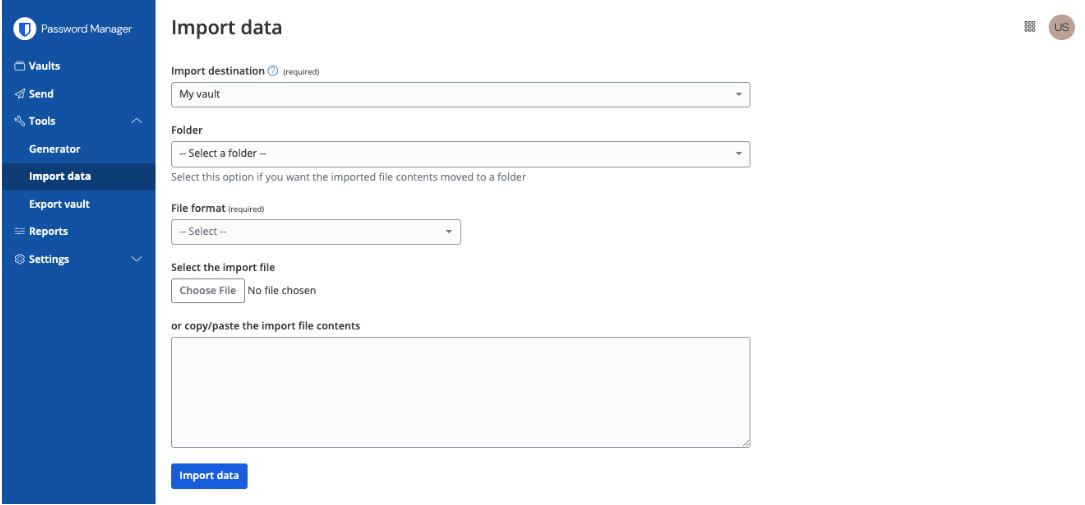
Importa dati Import data
Importa dati
Completa i seguenti campi dai menu a discesa:
Destinazione dell'importazione: seleziona la destinazione dell'importazione, ad esempio la tua cassaforte individuale o una cassaforte dell'organizzazione a cui hai accesso.
Cartella o raccolta: seleziona se vuoi spostare il contenuto importato in una cartella specifica o in una raccolta dell'organizzazione a cui hai accesso.
Formato file: seleziona il formato del file di importazione di Keeper.
Seleziona Scegli file e aggiungi il file da importare oppure copia/incolla il contenuto del file nella casella di input.
Seleziona Importa dati per avviare l'importazione. Se stai importando un file .json protetto da password, inserisci la password nella finestra Conferma importazione cassaforte che apparirà.
Dopo l'importazione riuscita, elimina il file sorgente dell'importazione dal computer. In questo modo sarai protetto nel caso in cui il computer venga compromesso.

La tua password principale non può essere reimpostata né recuperata. La crittografia a conoscenza zero di Bitwarden significa che nemmeno noi possiamo accedervi. Tuttavia, puoi configurare opzioni di recupero dell'account o l'Accesso di emergenza per consentire a contatti fidati di ripristinare la tua cassaforte. Si consiglia vivamente di conservare la password principale in modo sicuro e abilitare l'autenticazione a due fattori per una protezione aggiuntiva.
La visualizzazione dei dati di fatturazione varia a seconda che riguardi un abbonamento Individuale o Organizzazione. Per istruzioni dettagliate, consulta l’articolo di assistenza Aggiornare i dati di fatturazione per una guida a entrambe le procedure.
I tuoi dati non vengono mai eliminati. Se annulli, l'account di ogni membro torna a un piano individuale gratuito e mantiene l'accesso alla propria cassaforte personale. Le raccolte condivise diventano inattive, ma possono essere recuperate se ti abboni di nuovo.
Nessun problema. Quando lo inviti, collegherà il suo account esistente al tuo piano Families e passerà subito a Premium. Il suo vault personale e le password salvate verranno trasferiti completamente, quindi non andrà perso nulla.
No. Ogni membro ha la propria cassaforte privata, a cui solo lui può accedere. Le password condivise si trovano in una raccolta condivisa separata. I membri vedono solo ciò che condividi esplicitamente con loro. Le tue password personali restano sempre solo tue.
Sì. Bitwarden Families supporta fino a 6 membri e non è necessario che vivano con te. Puoi invitare un genitore, un fratello o una sorella, o chiunque di cui ti fidi. Ognuno riceve il proprio account Premium incluso nel tuo piano.
Bitwarden Families supporta fino a 6 utenti. In genere copre genitori, figli e altri familiari che vivono nello stesso nucleo domestico. Ogni persona ottiene il proprio account Premium con tutte le funzionalità. Se hai bisogno di più di 6 utenti o vuoi aggiungere amici o coinquilini al di fuori della tua famiglia più stretta, considera il piano Bitwarden Teams per piccoli gruppi.
Changing your account email address will not change the address that received 2FA codes if you are using two-step login via email.
Open the web vault, select the profile icon and choose Account Settings from the dropdown.
On the My Account page, find the Change Email section.
Enter your current Master Password to prove you have the authority to take this action, and specify the New Email you'd like to change to.
Select the Continue button.
Bitwarden will email a verification code to the specified email address. Check your inbox for the code and enter it into the Code text input displayed in your web vault to finalize the change.
If you have a paid subscription, also contact us to let us know about the change so that we change your billing information.
Be sure to logout of all Bitwarden apps you use, and log back in with the new credentials. Sessions using a "stale" email address will eventually be logged out.
There is! Users with a premium subscription can proactively setup trusted emergency contacts who can access your vault in case of emergency. For more information, see Emergency Access.
As a zero-knowledge encryption solution, Bitwarden and its systems have no knowledge of, way to retrieve, or way to reset your master password. If you have already lost your master password, there is unfortunately no way for the team to recover the account. For help understanding what to do next, or what to do proactively to protect yourself from such a scenario, refer to the article on your master password.
To change your master password hint:
Open the web vault, select the profile icon and choose Account Settings from the dropdown.
From the account settings menu, select the Security page and the Master Password tab.
Enter a hint in the Master Password Hint box and select the Save button.
The Bitwarden Families plan supports up to up to a maximum of 6 users. You can launch a second Families Organization and you can be part of both.
For Organization sizes beyond 6 people you might want to consider a Teams Organization.
Every member can also launch a free 2-person organization and share permanently with a second user.
Bitwarden Teams and Enterprise organizations will automatically scale up user seats as you invite new users. You can set a seat limit on scaling to prevent your seat count from exceeding a specified number, or manually add seats as desired. Regardless of how you choose to add seats, you will need to manually remove seats you're no longer using. For more information, see the User Management Help Center article.
Bitwarden has committed to achieving FedRAMP Class D (High) Certification, and more details are available in the announcement.
Agencies subject to FedRAMP or GovRAMP requirements are able to deploy a self-hosted version of Bitwarden on their own compliant servers. This deployment works in offline and air-gapped environments as well.
Bitwarden Secrets Manager consente ai team di fornire in modo sicuro agli agenti di IA l'accesso a segreti di sviluppo predefiniti da usare negli script e nelle pipeline CI/CD. Sostituendo le chiavi API in chiaro e altri segreti con stringhe di ID segreto generate da Bitwarden, puoi contribuire a impedire agli agenti di IA di ottenere accessi non autorizzati a credenziali ed ecosistemi.
Scopri di più su come usare Bitwarden Secrets Manager per proteggere le variabili d'ambiente dall'accesso degli agenti.
Un’organizzazione avrà lo stesso piano per tutti i prodotti a cui è abbonata. Ad esempio, se un cliente è abbonato a un piano Enterprise di Bitwarden Password Manager e decide di acquistare Bitwarden Secrets Manager, sarà abbonato anche al piano Enterprise.
Per abbonarti a un piano Secrets Manager diverso da quello a cui sei attualmente abbonato con Password Manager, crea semplicemente una nuova organizzazione o un nuovo account e iscriviti a Secrets Manager seguendo questi passaggi.
Sì! Secrets Manager e Password Manager possono essere usati insieme per offrire alla tua azienda una sicurezza ancora maggiore.
Bitwarden Secrets Manager è progettato per consentire ai team di sviluppatori di archiviare, gestire e distribuire centralmente i segreti con privilegi. Secrets Manager è pensato per i segreti dell’infrastruttura ed è supportato solo dall’app web e dai client CLI. Se vuoi aiutare i tuoi dipendenti a gestire le proprie credenziali personali, consulta Bitwarden Password Manager.
Bitwarden Secrets Manager supports out-of-the-box integrations for GitHub Actions, Ansible, Kubernetes, and GitLab CI/CD with more being added all the time. The Bitwarden Secrets Manager Software Development Kit (SDK) is also available for building your own applications and integrations.
Absolutely! Check out this help article for more details on how to get started.
Bitwarden aims for the highest levels of availability. You can learn more about Bitwarden availability in the Security White Paper.
In addition, there are multiple secret backup options.
Integrations - Some integrations, like Bitwarden Secrets Manager Kubernetes Operator, act as a caching layer when secrets are fetched.
SDKs - Secrets can be cached locally when using an SDK. Caching any information or credentials in a local environment should be done with care and security awareness.
Self-hosting - Self-hosting Secrets Manager ensures that secrets are available in the event you cannot connect to the Bitwarden cloud.
A project is a collection of secrets that can be grouped together based on how you want to structure access by your engineering, DevOps, and cybersecurity teams.
Machine accounts represent non-human machine users, like applications or deployment pipelines, that require programmatic access to a discrete set of secrets.
Secrets refer to digital authentication credentials for sensitive parts of the IT and developer ecosystem. Secrets are sensitive key-value pairs that need to be securely stored and should never be exposed in plain-text code or transmitted over unencrypted channels.
Examples of secrets are:
SSH keys
Database passwords
SSL or TLS certificates
Private encryption keys
API keys
One-time password devices
Yes, see the SOC 3 Report for more information.
Yes, see the SOC 3 Report for more information.
Bitwarden uses zero knowledge encryption to ensure neither Bitwarden nor subprocessors have access to customer vault data. See Bitwarden Subprocessors and administrative data for more information.
Bitwarden stores encrypted Administrative Data and Vault Data. Vault data is encrypted locally on your device before being sent to Bitwarden servers and only you have the keys required to decrypt your vault. Neither Bitwarden, nor subprocessors have access to your vault data. For detailed information, view the full Privacy Policy.
Deleting a Bitwarden account or Organization permanently deletes the account or Organization and all data that is associated with it. Bitwarden does not "soft delete" any data. For administrative data, see bitwarden.com/help/administrative-data.
The Bitwarden Security and Compliance Program is based on the ISO 27001 Information Security Management System (ISMS). Bitwarden is ISO 27001 certified in compliance with ISO 27001 control sets surrounding data security. More information in the Bitwarden Security White paper.
Carica il tuo file in Bitwarden Send, imposta una password o una data di scadenza facoltativa, quindi condividi il link sicuro generato. Il destinatario può accedere al file senza bisogno di un account Bitwarden e puoi monitorare quando il file è stato aperto.
Per condividere in modo sicuro le password con i familiari, Bitwarden Send offre la soluzione più semplice. Crea un Send di testo con la tua password, imposta una data di scadenza e, facoltativamente, una password di accesso, quindi condividi il link. Per la condivisione continuativa delle password, valuta un piano Bitwarden Families, che consente di condividere in modo sicuro gli elementi del vault.
No, inviare password via email non è consigliato, perché in genere le email non sono crittografate end-to-end. Le email possono essere intercettate, archiviate su più server e rimanere nelle caselle di posta a tempo indeterminato. Bitwarden Send offre un'alternativa più sicura, con funzionalità di crittografia ed eliminazione automatica.
Usare Bitwarden Send, che offre crittografia end-to-end e link ad autodistruzione, è uno dei metodi più sicuri per condividere password. A differenza delle email o degli SMS, Bitwarden Send crittografa i tuoi dati e ti consente di impostare date di scadenza e limiti di accesso.
Sì. Bitwarden conduce regolarmente audit di sicurezza da parte di terzi ed è conforme alle principali normative in materia di privacy e sicurezza, come GDPR, CCPA, HIPAA e SOC 2. Visita la pagina Sicurezza e conformità di Bitwarden per maggiori informazioni.
Bitwarden archivia le password nel cloud o nella tua istanza self-hosted. Dopo l'accesso su un dispositivo, Bitwarden memorizza i tuoi dati localmente in un formato crittografato che solo tu puoi decrittare. Questo consente l'accesso in lettura offline al tuo vault. Per aggiungere o modificare password è necessario l'accesso online.
I dati archiviati sul tuo computer/dispositivo sono crittografati e vengono decrittografati solo quando sblocchi la tua cassaforte. I dati decrittografati vengono archiviati in memoria soltanto e non vengono mai scritti su memoria persistente.
Sì, Bitwarden è conforme a diversi standard normativi. Aderisce agli standard di sicurezza del settore e possiede certificazioni come ISO 27001, SOC 2 Type II e SOC 3. Bitwarden è inoltre conforme alle normative sulla privacy, come il Regolamento generale sulla protezione dei dati (GDPR), il California Consumer Privacy Act (CCPA) e l'Health Insurance Portability and Accountability Act (HIPAA). Inoltre, Bitwarden è conforme al Data Privacy Framework (DPF), precedentemente noto come Privacy Shield, garantendo il trasferimento sicuro dei dati personali.
Bitwarden conduce regolarmente audit di sicurezza completi da parte di terzi con importanti società di sicurezza. Questi audit annuali includono valutazioni del codice sorgente e penetration test su IP, server e applicazioni web di Bitwarden.
Bitwarden utilizza i Dati amministrativi per fornire il Servizio Bitwarden ai propri utenti. Elenchiamo i dati raccolti nella sezione sulla sicurezza del nostro sito di assistenza qui: https://bitwarden.com/help/article/administrative-data/
Il modello di business di Bitwarden si basa su piani a pagamento per aziende e privati. Puoi leggere di più in questo blog: Definire e mantenere il valore per gli utenti Bitwarden https://bitwarden.com/blog/defining-and-sustaining-value-for-bitwarden-users/
Come posso saperne di più sul vostro impegno per la sicurezza, la privacy e la conformità agli standard internazionali?
Visita: https://bitwarden.com/compliance/ per scoprire come Bitwarden protegge i dati dei clienti.
La scansione delle violazioni dei dati di Bitwarden (inclusa in tutti i piani) ti avvisa quando la tua email o le tue credenziali compaiono in violazioni note. Gli utenti Premium ricevono anche report sullo stato del vault che individuano password deboli, riutilizzate e compromesse, insieme a consigli pratici. Esegui regolarmente questi report per individuare le vulnerabilità prima degli aggressori e aggiorna subito le credenziali esposte per proteggere i tuoi account online.
Se per qualche motivo Bitwarden venisse violato e i tuoi dati fossero esposti, le tue informazioni rimarrebbero comunque protette grazie alle solide misure di crittografia e hashing salato unidirezionale adottate sui dati della tua cassaforte e sulla password principale.
Per informazioni sull'approccio di Bitwarden alla sicurezza e sull'architettura sottostante (inclusi i diagrammi di flusso dei dati), consulta:
Bitwarden elabora e archivia in modo sicuro tutti i dati del vault nel cloud Microsoft Azure negli Stati Uniti o nell'UE utilizzando servizi gestiti dal team Microsoft. Poiché Bitwarden utilizza solo le offerte di servizi fornite da Azure, non c'è alcuna infrastruttura server da gestire e mantenere. Tutte le garanzie di disponibilità, scalabilità, aggiornamenti di sicurezza e affidabilità sono supportate da Microsoft e dalla sua infrastruttura cloud. Consulta la documentazione sulle offerte di conformità di Microsoft Azure per maggiori dettagli.