FAQs
Perguntas frequentes
O Access Intelligence gera relatórios sobre senhas fracas, reutilizadas e expostas compartilhadas na organização Bitwarden. Essas mesmas informações podem ser encontradas nos relatórios de integridade do cofre da Bitwarden. Senhas expostas são identificadas por meio do Have I Been Pwned (HiBP), que compartilha informações públicas sobre violações.
O Bitwarden Access Intelligence também informa a quais aplicativos essas senhas em risco estão associadas e quem tem permissão para gerenciar essa senha.
Nesta versão inicial, seus dados serão salvos por meio dos serviços de backup do sistema operacional móvel. Verifique se o dispositivo está ligado e configurado para backups. Os dados do Bitwarden Authenticator são incluídos nos backups do sistema operacional e serão restaurados com eles.
Sim, apps autenticadores oferecem mais segurança em comparação à 2FA baseada em SMS. Os códigos gerados pelo app não podem ser interceptados por ataques de troca de SIM, funcionam offline e não dependem de redes celulares. Especialistas em segurança recomendam apps autenticadores como o padrão-ouro para autenticação de dois fatores.
A autenticação TOTP integrada é um recurso premium do Gerenciador de Senhas Bitwarden. O Bitwarden Authenticator é um aplicativo móvel independente e gratuito que gera códigos TOTP para qualquer serviço online compatível. O Bitwarden Authenticator pode ser usado sem uma conta Bitwarden.
O Bitwarden Authenticator é um aplicativo independente disponível para todos, inclusive para quem não usa o Bitwarden Password Manager.
O Bitwarden Authenticator gera senhas de uso único baseadas em tempo (TOTP) para autenticação multifator. O app cria códigos seguros de 6 dígitos que mudam a cada 30 segundos, fornecendo uma segunda camada essencial de segurança para suas contas online, além das senhas.
Sim, são aplicativos separados.
Sim! Muitos usuários do Bitwarden pediram um autenticador independente para armazenar os códigos de verificação usados para acessar a conta Bitwarden. É importante anotar e guardar os códigos de recuperação do Gerenciador de Senhas em um local seguro.
A autenticação de dois fatores (2FA) usa especificamente dois métodos de verificação, enquanto a autenticação multifator (MFA) pode usar dois ou mais fatores. O aplicativo Bitwarden Authenticator oferece suporte a implementações de 2FA e MFA, gerando códigos seguros baseados em tempo para qualquer serviço compatível com autenticação TOTP.
New features on the roadmap include import, syncing to Bitwarden accounts, push-based 2FA, and account recovery.
Bitwarden Authenticator encrypts all of your data locally on your device.
Local encryption: All authenticator entries, including the secret keys that generate your codes, are encrypted with AES-256 before being stored. None of this data ever leaves your device.
Unique key generation: When you set up the app, it creates a random 256-bit encryption key specifically for your device.
Secure storage of the key: This key is stored in your device’s secure keychain (iOS) or keystore (Android), the most secure storage area available on mobile devices.
Your encrypted data further benefits from your device's built-in security features:
Biometrics: Face ID, Touch ID, or fingerprint unlock protect access to the key.
Device passcode: Your device’s lock screen passcode adds another layer of security.
Hardware security: On modern devices, keys are stored in secure hardware isolated from the main operating system.
In short, all your Bitwarden Authenticator data is encrypted at rest on your device, with strong protections built into both the app and your device’s hardware.
A Bitwarden fornece logs de eventos abrangentes que rastreiam todos os acessos a credenciais, eventos de compartilhamento, alterações de políticas e ações administrativas em toda a sua organização. Os logs de eventos podem ser exportados em formato CSV ou JSON para integração com plataformas de SIEM, documentação de conformidade e análise de segurança. Clientes Enterprise obtêm trilhas de auditoria completas para análises regulatórias e investigações de incidentes.
Os administradores do Bitwarden podem aplicar políticas corporativas, incluindo requisitos de complexidade da senha mestra, obrigatoriedade de autenticação de dois fatores, restrições ao uso do cofre pessoal, configurações do gerador de senhas, limitações a uma única organização, controles de exportação do cofre, requisitos de autenticação via SSO, opções de recuperação de conta e imposição de login sem senha. As políticas são configuradas antes da integração dos usuários e se aplicam a toda a organização para manter os padrões de segurança.
O Bitwarden usa Coleções e Grupos para permitir o compartilhamento seguro de senhas em escala empresarial. Os administradores criam Coleções com credenciais compartilhadas, atribuem Grupos de usuários a essas Coleções com permissões granulares (somente leitura, ocultar senha, acesso de edição) e gerenciam o compartilhamento entre departamentos sem expor credenciais desnecessariamente. Toda atividade de compartilhamento é registrada para visibilidade de auditoria.
Sim. O Bitwarden oferece suporte ao provisionamento SCIM (System for Cross-domain Identity Management) para clientes empresariais. O SCIM automatiza o provisionamento de usuários e grupos do seu provedor de identidade para o Bitwarden, mantendo sua organização sincronizada com o serviço de diretório. Isso simplifica a integração de novos usuários, transições e sucessões, além do gerenciamento contínuo de usuários em toda a implantação empresarial.
Sim. As integrações do Bitwarden incluem o Okta, o Microsoft Entra ID (antigo Azure AD) e o Google Workspace para autenticação SSO e sincronização de diretórios. Você pode configurar o Login com SSO para autenticação sem senha e usar o SCIM ou o Directory Connector para automatizar o provisionamento de usuários e o gerenciamento de grupos a partir desses provedores de identidade.
Bitwarden é um dos gerenciadores de senhas em maior conformidade disponíveis atualmente e é aprovado por diversas estruturas de privacidade de dados: AICPA SOC 2 Tipo 2, GDPR, CCPA e EU-U.S. Data Privacy Framework(s), respectivamente.
1Password está em conformidade com o GDPR e o SOC 2, mas o gerenciador de senhas divulga poucas informações públicas sobre quais outras certificações de conformidade possui, o que limita a funcionalidade para determinados tipos de usuários.
Bitwarden tem a maior comunidade global em comparação com outros gerenciadores de senhas, verificando cada etapa do processo de gerenciamento de senhas e segurança de dados.
1Password tem uma comunidade global limitada, especialmente em comparação com o Bitwarden.
Bitwarden oferece mais recursos premium, com suporte a permissões de usuário nos painéis de convite, associação e visualização de grupos. A segurança é ainda mais reforçada pela auto-hospedagem, se o usuário optar por isso.
1Password oferece opções limitadas de permissões de usuário que, às vezes, ficam restritas a determinados níveis de assinatura.
Bitwarden oferece serviços em mais de 50 idiomas e tem o compromisso de expandir seus esforços de tradução para apoiar ainda mais empresas no mundo todo.
1Password atualmente oferece suporte a apenas 11 idiomas, o que o torna menos acessível ao público global.
Bitwarden mantém uma estrutura de código aberto, com o mais alto padrão de cibersegurança disponível atualmente. Essa arquitetura também é avaliada periodicamente quanto à sua eficácia, evoluindo com o apoio de nossos especialistas internos e da comunidade global ativa. O Bitwarden reforça seu compromisso com segurança e transparência, oferecendo inclusive um programa de recompensa por bugs para incentivar a comunicação de falhas. Essa abordagem proativa resulta na melhor experiência possível de cibersegurança para todos.
1Password: Apenas alguns componentes do ecossistema do 1Password são de código aberto, como SDKs e bibliotecas de autenticação por chaves de acesso.
O Bitwarden mantém uma estrutura de código aberto e é constantemente aprimorado por usuários, desenvolvedores e especialistas em segurança em escala global. Essa abordagem colaborativa prioriza a integridade, identificando de forma proativa novas oportunidades para um resultado ainda melhor a cada atualização.
Além de hash com salt e criptografia avançada AES de 256 bits, o Bitwarden conta com especialistas que realizam análises contínuas da comunidade dedicada de usuários do Bitwarden. Esta lista impressionante de auditores de segurança terceirizados inclui
HackerOne (hacking ético por crowdsourcing).
Insight Risk Consulting (testes de penetração).
Cure53 (auditorias de código-fonte).*
O 1Password não conta com essa rede global de suporte e, atualmente, não possui uma estrutura totalmente de código aberto; isso gera preocupações para alguns durante a transição, apesar de sua arquitetura de conhecimento zero.
*Consulte bitwarden.com/compliance para ver a lista completa de materiais de segurança e conformidade do Bitwarden.
Ao pesquisar outros gerenciadores de senhas, considere procurar opções com extensão para navegador, aplicativo para desktop e um conjunto de recursos semelhante ao que o Bitwarden oferece. Os usuários adoram o Bitwarden por seus recursos abrangentes — muitos deles disponíveis já no plano gratuito.
Veja o que usuários com conhecimento técnico devem procurar ao buscar os melhores gerenciadores de senhas:
Uma estrutura segura e de código aberto que priorize transparência e segurança.
Conformidade com todos os principais frameworks, incluindo o Data Privacy Framework, o GDPR e outros.
Opções auto-hospedadas para máxima segurança e controle.
Suporte para mais de 50 idiomas.
Preços claros, diretos e baseados em valor.
Os planos Business do 1Password deixam muito a desejar, especialmente quando comparados a uma solução abrangente como o Bitwarden.
O compromisso do Bitwarden com a transparência se reflete nas categorias de produto e ofertas relacionadas. Por exemplo, o Bitwarden oferece um plano gratuito abrangente, além de um plano familiar compatível com até seis usuários, tornando-se uma opção acessível para pequenos grupos sem comprometer a qualidade do produto.
O 1Password coloca a maioria de seus principais recursos atrás de planos pagos, oferecendo apenas integrações básicas, controles administrativos específicos e a esperada criptografia de ponta a ponta. O 1Password divide os planos e discrimina recursos auxiliares, como o benefício de pontuação geral de integridade das senhas. No geral, muitos usuários sentem que o Bitwarden oferece melhor custo-benefício com uma estrutura simplificada.
Ao contrário do Bitwarden, o 1Password oferece muito menos visibilidade sobre sua estrutura arquitetônica principal, designando apenas certos elementos da estrutura como open source. Isso, somado aos custos mais altos, à ausência de um plano gratuito e às opções de integração pouco práticas, faz do Bitwarden o gerenciador de senhas preferido por muitas pessoas e empresas.
Bitwarden maintains an open source approach, constantly refined by users, developers, and security specialists globally. This collaborative approach holds integrity high, proactively identifying new opportunities for an even better outcome, update after update. Dashlane lacks this global network of support, as its code has a murky classification (only the mobile app is open source)—and some critical Dashlane-specific elements have been removed, per TechCrunch.
In addition to salted hashing and advanced AES-256 bit encryption, Bitwarden engages experts who conduct ongoing reviews from the dedicated Bitwarden user community. This impressive list of third-party security auditors include
HackerOne (crowdsourced ethical hacking)
Insight Risk Consulting (penetration testing)
Cure53 (source code audits).
See bitwarden.com/compliance for a full list of Bitwarden security and compliance materials.
Unlike Dashlane’s two types of two-factor authentication, Bitwarden offers several advanced multifactor authentication (MFA) methods:
Company-wide Duo Security with Duo Push, SMS, phone call, and security keys
Individual use of Duo Security and TOTP codes
YubiKey OTP (any 4/5 series device or YubiKey NEO/NFC)
Hardware security key (FIDO2 Passkey)
Dashlane offers four business plans:
Standard.
Business.
Business Plus.
Enterprise.
With this itemized division of plans and auxiliary features—such as their overall password health score perk—many users feel that Bitwarden offers better value with a simplified structure.
Unlike Bitwarden, Dashlane offers no transparent, advanced saving opportunities for companies with 50+ employees, relegating users to choose the unexplained Enterprise tier—which may not fit their needs or budget.
Additionally, the service does not offer as wide a range of support (compared to 24/7 Bitwarden support), nor is it truly open source. The only framework currently available for Dashlane that is “open source" is for their Google Play Store app—not the core source code itself. This stands in stark contrast to the Bitwarden open source nature and transparency.
As you search for password managers, consider the suite of features Bitwarden offers. Users love Bitwarden because of its comprehensive features—many of them from the free plan onward.
Features to look for include:
A secure, open source structure that prioritizes transparency and security.
Compliance with all major frameworks, including the Data Privacy Framework, GDPR, and others.
Self-hosted options for maximum security and control.
Support for over 50 languages.
Clear, straightforward, value-based pricing.
Bitwarden is one of the most compliant password managers available to date and is approved by several data privacy frameworks. These include AICPA SOC2 Type 2, GDPR, CCPA, and EU-U.S. Data Privacy Framework(s), respectively.
Dashlane is not Data Privacy Framework compliant, limiting its application and functionality for certain user classes.
Bitwarden’s self-hosted option is available from its free password manager tier, and remains compatible across Linux, MacOS, and Windows devices. Many appreciate this, as self-hosted solutions are typically at less risk for a data breach or security crisis.
Dashlane does not currently have a self-hosted option.
Bitwarden offers more premium features, supporting user permissions across the invitation, membership, and group view panels. Security can be further enhanced by self-hosting, if the user chooses.
Dashlane is incredibly limited when it comes to user permission options, especially compared to Bitwarden.
Bitwarden offers services across 50+ languages and continues to expand its translation efforts to support more global businesses.
Dashlane only supports 11 languages, making it less accessible to the global audience.
Bitwarden is completely open source, and is reviewed by experts to ensure continuous improvement as cyberthreats become more sophisticated. Bitwarden also offers a bug bounty program, encouraging users and security experts to report and remediate bugs—which results in a better overall experience for everyone.
Dashlane is only open source for mobile app (Google Play Store), not the core source code.
Bitwarden has the biggest global community compared to other password managers, fostering collaboration at every step of the password management and data security process.
Dashlane has an extremely limited global community compared to Bitwarden.
Bitwarden permite o compartilhamento de arquivos criptografados de forma integrada por meio do recurso Send, oferecendo uma maneira fácil de compartilhar dados confidenciais com segurança.
Embora Keeper também ofereça suporte ao compartilhamento de arquivos, sua abordagem é mais complexa e vinculada a planos pagos, tornando o Bitwarden a opção mais simples e econômica.
Bitwarden é totalmente de código aberto e passa por avaliações de especialistas para garantir melhorias contínuas à medida que as ameaças cibernéticas se tornam mais sofisticadas. A Bitwarden também oferece um programa de recompensas por bugs, incentivando usuários e especialistas em segurança a relatar e corrigir falhas, o que resulta em uma experiência geral melhor para todos.
Keeper tem código aberto apenas no aplicativo móvel (Google Play Store), não no código-fonte principal.
Bitwarden tem a maior comunidade global em comparação com outros gerenciadores de senhas, verificando cada etapa do processo de gerenciamento de senhas e segurança de dados.
Keeper tem uma comunidade global limitada, especialmente em comparação com o Bitwarden.
A opção auto-hospedada da Bitwarden está disponível a partir do plano gratuito do seu gerenciador de senhas e continua compatível com dispositivos Linux, macOS e Windows. Muitos valorizam isso, já que soluções auto-hospedadas normalmente têm menor risco de sofrer violação de dados ou crise de segurança.
Bitwarden oferece relatórios de segurança abrangentes, incluindo verificações de senhas fracas, reutilizadas ou comprometidas, tudo incluído no plano gratuito.
Keeper oferece funcionalidade semelhante, mas reserva seu monitoramento avançado "BreachWatch" para os planos pagos, tornando o Bitwarden mais acessível para quem busca insights robustos de segurança sem custos extras.
Bitwarden oferece serviços em mais de 50 idiomas e continua expandindo seus esforços de tradução para atender mais empresas globais.
Keeper oferece suporte a apenas 11 idiomas, tornando-o menos acessível ao público global.
Graças à abordagem de código aberto do Bitwarden, ele passa por inspeção e aprimoramento contínuos por desenvolvedores, usuários e pesquisadores de segurança em todo o mundo. À medida que o Bitwarden cresce, mais olhares, conhecimento e rigor são aplicados a cada linha de código, reforçando ainda mais a integridade do aplicativo, enquanto desenvolvedores e pesquisadores identificam proativamente possíveis erros para correção.
Além das revisões contínuas da comunidade dedicada de usuários do Bitwarden, o Bitwarden conta com diversos auditores de segurança terceirizados, incluindo HackerOne (hacking ético colaborativo), Insight Risk Consulting (testes de invasão) e Cure53 (auditorias de código-fonte).
Esse ciclo contínuo e rigoroso de revisão fortalece o código-fonte e o serviço, garantindo segurança ideal para os usuários do Bitwarden. (Consulte bitwarden.com/compliance para ver a lista completa dos materiais de segurança e conformidade do Bitwarden.)
O Bitwarden é o nº 1 em satisfação dos usuários no G2 há nove trimestres consecutivos! Ao escolher o Bitwarden em vez do Keeper, você conta com preços simples, mais flexibilidade, suporte ágil e muito mais:
Transparência e segurança de código aberto.
Opções de implantação na nuvem e auto-hospedada.
Compartilhamento direto e criptografado de arquivos ou texto com qualquer pessoa.
Opções abrangentes de importação e exportação.
Suporte para mais de 50 idiomas.
Preços claros, simples e baseados em valor.
Ambos são gerenciadores de senhas robustos, mas a combinação de transparência, preço acessível, flexibilidade e recursos centrados no usuário faz do Bitwarden a melhor opção para a maioria dos usuários que buscam uma alternativa ao Keeper Security. O Bitwarden se destaca como uma alternativa ao Keeper Security superior em várias categorias:
1. Transparência de código aberto
Bitwarden: Totalmente de código aberto, com auditorias e contribuições da comunidade.
Keeper: Software proprietário com transparência limitada.
2. Custo-benefício
Bitwarden: Oferece um plano gratuito robusto e planos premium mais acessíveis.
Keeper: Geralmente mais caro, com uma versão gratuita limitada.
3. Opções de auto-hospedagem
Bitwarden: Permite que os usuários auto-hospedem seu cofre de senhas para ter controle máximo.
Keeper: Não oferece opção de auto-hospedagem.
4. Compatibilidade multiplataforma
Bitwarden: Sincronização fluida entre todos os dispositivos e plataformas.
Keeper: Algumas limitações na funcionalidade multiplataforma.
5. Recursos para desenvolvedores
Bitwarden: Oferece ferramentas de CLI e acesso à API para usuários avançados e integrações.
Keeper: Não conta com esses recursos voltados para desenvolvedores.
6. Interface e experiência do usuário
Bitwarden: Interface limpa e intuitiva, com extensões de navegador poderosas.
Keeper: Funcional, mas muitas vezes considerado menos fácil de usar.
7. Suporte e desenvolvimento da comunidade
Bitwarden: Comunidade ativa que contribui para melhorias rápidas e novos recursos.
Keeper: Limitado ao desenvolvimento conduzido pela empresa.
8. Abordagem focada em privacidade
Bitwarden: Criptografia de conhecimento zero e coleta mínima de dados.
Keeper: Segurança forte, mas menos transparência sobre as práticas de dados.
Se a sua empresa tem pelo menos cinco usuários e no máximo dez, você pode contratar o plano Keeper Business Starter, que oferece menos recursos do que o plano Bitwarden Teams.
Da mesma forma, o plano Keeper Business oferece menos recursos essenciais do que o plano Bitwarden Teams, como autenticação de dois fatores avançada, Directory Connector e acesso à API.
A Keeper não divulga publicamente o preço do plano Enterprise e oferece complementos caros para determinados recursos. O plano Bitwarden Enterprise inclui todos os recursos da Bitwarden por um preço simples de US$ 6 por usuário por mês para segurança abrangente de senhas.
Bitwarden retains the privilege of having the biggest global community compared to other password managers, and maintains it by fostering collaboration at every step of the password management and data security process.
LastPass: Extremely limited global community.
LastPass currently offers two plans for businesses: Teams and Business. Teams is optimized for single-team small businesses, and Business is best for any organization that has multiple teams. Unlike Bitwarden, LastPass offers no advanced savings opportunities for companies with hundreds or thousands of employees, relegating them to choose the Business tier—which may or may not fit their needs or budget.
Additionally, key tools like Directory integration and advanced security reports/log monitoring are locked behind the Business plan paywall. This gap leaves individuals and businesses on the Teams tier two choices: pay more for the next membership tier, or go without key areas of functionality.
Bitwarden offers these core functions at their lowest business tier, Teams, ensuring that no businesses, regardless of scale, go without.
As you search for other password managers, consider looking for a suite of features similar to what Bitwarden offers (there’s a reason Bitwarden ranks #1 in user satisfaction on G2 for nine straight quarters!).
Users love Bitwarden because of all the features included from the free plan onward. Some of the most popular include:
Bitwarden’s open source structure that prioritizes transparency and security.
Convenient cloud and self-host deployment options.
Direct encrypted file or text sharing to anyone.
Comprehensive import and export options.
Support for over 50 languages.
Clear, straightforward, value-based pricing.
Bitwarden maintains an open source approach that is constantly refined by users, developers, and security specialists around the world. This collaborative approach to betterment solidifies the application’s integrity, proactively identifying new opportunities for an even better outcome.
LastPass lacks this global support network, as its code is completely closed-source and “proprietary.”
In addition to salted hashing and advanced AES-256 bit encryption, Bitwarden engages experts who conduct ongoing reviews from the dedicated Bitwarden user community to better secure itself. This impressive list of third-party security auditors include:
HackerOne (crowdsourced ethical hacking).
Insight Risk Consulting (penetration testing).
Cure53 (source code audits).
See bitwarden.com/compliance for a full list of Bitwarden’s security and compliance materials.
Open-Source Transparency
Bitwarden: Fully open-source with community audits and contributions.
LastPass: Proprietary software with limited transparency.
Cost-Effectiveness
Bitwarden: Offers a robust free tier and more affordable premium plans.
LastPass: Generally more expensive with a limited free version.
Self-Hosting Options
Bitwarden: Allows users to self-host their password vault for ultimate control.
LastPass: Does not have a self-host option.
Cross-Platform Compatibility
Bitwarden: Seamless sync across all devices and platforms.
LastPass: While users can securely share passwords, many experience delays and failures during the transfer process.
Developer-Friendly Features
Bitwarden: Offers CLI tools and API access for advanced users and integrations.
LastPass: Offers CLI and API tools, but lacks the support and depth of the Bitwarden global community and resource pool to implement with.
User Interface and Experience
Bitwarden: Clean, intuitive interface with a powerful browser extension that works on all modern supported browsers.
LastPass: Clunky, slow, and less user-friendly design limits free tier users and paid users alike.
Community Support and Development
Bitwarden: Active global community contributing to password manager improvements and feature additions.
LastPass: Limited to company-driven development as their structure is not open source.
Privacy-Focused Approach
Bitwarden: Zero-knowledge encryption and minimal data collection.
LastPass: Strong security, but it is far less transparent about data practices around customer data, password management, and transfer.
Unlike LastPass, Bitwarden offers several advanced multifactor authentication methods:
Company-wide Duo Security with Duo Push, SMS, phone call, and security keys.
Individual use of Duo Security and TOTP codes.
YubiKey OTP (any 4/5 series device or YubiKey NEO/NFC).
Hardware security key (FIDO2 Passkey).
Bitwarden’s SSO is compatible with all SAML 2.0 and OpenID Connect apps across environments; making it more integration-friendly and competitive than LastPass.
LastPass offers SSO support but it’s gatekept behind the Business account or their Advanced SSO add-on, and it may be less compatible than Bitwarden’s SSO experience.
Bitwarden’s self-hosted option is available from its free password manager tier, and remains compatible across Linux, MacOS, and Windows devices. Many appreciate this, as self-hosted solutions are typically at less risk for a data breach or security crisis.
LastPass does not currently have a self-hosted option.
Bitwarden offers services across 50+ languages, and is continuing to expand its translation efforts to support more global businesses.
LastPass only supports seven languages on its platform, making it less accessible to the global audience.
Bitwarden is completely open source, and is reviewed by experts to ensure continuous improvement as cyberthreats become more sophisticated. Bitwarden also offers a bug bounty program, encouraging users and security experts to report and remediate bugs—which results in a better overall experience for everyone.
LastPass maintains a proprietary closed source back-end. Lack of structure transparency means LastPass doesn’t have the same global-community caliber that drives ongoing improvements.
Bitwarden maintains an open source codebase, with server, clients, browser extensions, and mobile apps, supported by a substantially larger GitHub community than Passbolt. The codebase is reviewed annually by Cure53 and Insight Risk Consulting, and a HackerOne bug bounty program keeps independent researchers financially motivated to find issues before bad actors do. This collaborative model means every update is scrutinized by a global network of developers and security professionals, resulting in continuous improvements to security posture.
Passbolt is also genuinely open source, and all audit reports are published publicly. Its community is smaller, and it does not operate a public bug bounty program. Passbolt also engages Cure53 for ongoing audits.
Bitwarden supports self-hosting on Linux, macOS, and Windows via Docker, with Kubernetes support for larger deployments. A simplified Lite deployment option is also available for smaller teams.
Passbolt supports both self-hosting and cloud, but moving between deployment modes requires a complex manual migration. Organizations must choose their model up front.
Bitwarden Send lets users share encrypted text or files with anyone, including external partners, contractors, and non-technical staff, without requiring a Bitwarden account. Shared items support expiration dates, view limits, and password protection. For internal teams, shared collections allow granular role-based permission control across the organization.
Passbolt sharing requires all recipients to have a Passbolt account with a GPG key configured. This is practical for internal IT teams sharing server credentials, but creates significant friction for organizations that need to share with people outside their Passbolt deployment.
Bitwarden is ISO 27001 certified and compliant with AICPA SOC 2 Type II, GDPR, CCPA, and HIPAA. This certification set makes Bitwarden the appropriate choice for regulated industries such as healthcare, financial services, and government, without requiring additional compliance controls.
Passbolt holds SOC 2 Type II and GDPR compliance and has been audited repeatedly by Cure53, with all reports published publicly. However, HIPAA certification is not listed anywhere on their compliance or security documentation. For organizations in healthcare or other regulated industries, this is a genuine gap.
Bitwarden offers services across 50+ languages and continues to expand its translation program to support more global businesses of any size.
Passbolt supports a limited number of languages, making it less accessible for global organizations with diverse, multilingual workforces.
Bitwarden offers native apps for iOS and Android, applications for Windows, macOS, Linux, and extensions for every major browser. A password manager only improves security when employees actually use it. The Bitwarden G2 ease-of-use scores and eleven straight quarters at #1 for enterprise satisfaction reflect this. Bitwarden was built to serve the entire organization, from engineers to executives.
Passbolt offers mobile apps for iOS and Android, and a Windows desktop app (currently in beta). Its primary interface remains the browser extension, with no native desktop client for macOS or Linux. For organizations with mixed operating system environments or those needing a polished cross-platform experience outside the browser, the broader client coverage with Bitwarden is a meaningful advantage.
Open Passbolt and select the password(s) or the folder(s) you’d like to export.
If you want to export all the passwords you have access to, you can click on the menu next to “Folders”.
Click on the “Export” or “Export all” button.
Choose the right format for the export.
You will be prompted to enter your passphrase.
The download will start, and you will be able to open the file.
Then log in to your Bitwarden web vault, navigate to Tools → Import data, select the .kdbx file format, and upload your export. Enterprise customers receive dedicated onboarding support throughout migration.
Both are open source password managers, but Bitwarden is built for the entire organization, not just the IT team. Bitwarden offers desktop apps for Mac and Linux (Passbolt's desktop client is Windows-only and in beta), higher cross-platform app store ratings, automated vault health reports, credential sharing without recipient accounts, and broader compliance coverage, including HIPAA. The Bitwarden Teams plan is also priced lower ($4 vs. $4.90/user/month), with no minimum user requirement and all-inclusive, transparent pricing at every tier.
Yes, and with more flexibility. Bitwarden supports Docker-based self-hosting on Linux, macOS, and Windows, as well as Kubernetes for larger deployments.
See full self-hosting documentation.
The Bitwarden open source codebase is continuously reviewed by a substantially larger global community than Passbolt's. Annual third-party audits by Cure53 and Insight Risk Consulting cover source code, web vault, browser extensions, desktop, and mobile clients. A HackerOne bug bounty program rewards independent researchers for discovering and reporting security issues before they can be exploited. See bitwarden.com/compliance for a full list of Bitwarden security and compliance materials.
Both hold SOC 2 Type II and GDPR compliance. Beyond that, Bitwarden holds several certifications Passbolt does not: HIPAA certification (Passbolt describes privacy-by-design principles suitable for healthcare but does not claim HIPAA certification), SOC 3, ISO 27001 (Passbolt states alignment with ISO 27001 but does not hold the formal certification), and CCPA/CPRA. For healthcare organizations, HIPAA is the critical gap. For organizations undergoing enterprise procurement or security audits, the distinction between ISO 27001 certification and alignment is also worth noting.
Beyond the open source label, evaluate: community size and audit cadence, cross-platform app coverage, compliance certifications for your industry, credential sharing flexibility, and total pricing, including any feature add-ons. Most importantly, a password manager only improves security when employees actually use it. Bitwarden ranks #1 in enterprise satisfaction on G2 for 11 straight quarters because adoption follows deployment.
Bitwarden prioritizes building and maintaining the integrations most requested by the community and customers to ensure they meet high standards of functionality and security. Many companies take advantage of the API functionality within Bitwarden to enable integrations. Bitwarden strives to fit easily within existing environments, whether an identity provider, directory services, log export to SIEM systems, and more.
Additionally, the integrations page features a variety of solutions developed by third-party software vendors, offering even more ways to extend Bitwarden's capabilities.
Building a custom integration with Bitwarden is a straightforward process designed to give developers flexibility and control. Here’s how to get started:
Explore the public API documentation: Review the comprehensive Bitwarden API documentation to understand available endpoints and capabilities.
Set up API access: Generate and configure API credentials to securely connect your application with Bitwarden.
Choose your development framework and preferred programming language, such as Python, Go, or another tool of your choice, to start building your integration. Once developed, thoroughly test it to ensure seamless operation and compatibility.
Submit for review: Share your completed integration with Bitwarden for feedback or inclusion to the ecosystem.
While no company is entirely immune to security breaches, proactive measures can significantly minimize their impact and protect sensitive data. How a company safeguards its users and responds to incidents plays a crucial role in maintaining trust. By understanding a company’s security practices and how it handles incidents, you can make a more informed decision when choosing the right password manager for your business.
Yes, when exporting data from Bitwarden into other systems, a combination of data from the event log exports, API and CLI may be used to gather data.
Millions of businesses, enterprises, and individuals choose Bitwarden to secure their passwords, secrets, passkeys, and other sensitive credentials. Bitwarden offers robust enterprise solutions featuring flexible SSO integrations, audit logs, directory sync, SCIM provisioning, self-hosting, and more. Bitwarden takes security and privacy seriously with annual third-party security audits, zero knowledge encryption, and an open source code base.
When your free trial ends, you will be charged and your Bitwarden subscription will begin.
Enterprises may choose to manage passwords through a number of methods. They might try to memorize them, write them down on a piece of paper, save them in documents stored on a computer, verbally share them, or share them through a messaging app. All of these common methods for managing passwords are insecure, which is why enterprises should manage passwords through an enterprise password manager. An enterprise password manager is a centralized system used to create, manage, and store passwords.
Yes, Bitwarden has a Public API (Restful API) that provides organizations a suite of tools for managing members, collections, groups, event logs, and policies. Bitwarden also has a Vault Management REST API for programmatic access to Vault secrets.
Marketing agencies handle critical accounts and sensitive client data, often with small teams serving enterprise-level clients. Bitwarden makes password management effortless with simple setup, easy-to-use features, and enterprise-grade security. Secure your agency and clients while boosting team productivity—get started today!
With robust security, simple setup, and encrypted sharing via Bitwarden Send, Bitwarden is a top choice for agencies worldwide. Thanks to these benefits and more, G2 ranked Bitwarden the #4 Best Security Product in the 2025 Software Awards—the highest among all password managers.
Anyone can set up and use Bitwarden. It is an extremely lightweight, easy-to-use platform that makes password management accessible for all.
Bitwarden is a top choice for law firms worldwide. G2 ranked Bitwarden the #4 Best Security Product in the 2025 Software Awards—the highest among all password managers.
Bitwarden is especially good for firms with security-conscious clients or those needing to demonstrate transparency and control.
Law firms manage sensitive client data and high-stakes case information, making them prime targets for cyberattacks. With 81% of hacking-related breaches linked to weak or stolen passwords, strong password security is essential.
Bitwarden delivers enterprise-grade password management that’s easy to set up and use. Protect your firm and clients while improving team productivity. Get started with Bitwarden today.
O Bitwarden é muito reconhecido no segmento de gerenciamento de senhas empresariais, muitas vezes superando seus concorrentes. De acordo com o Relatório de Comparação de Gerenciadores de Senhas Empresariais de 2024 da Info-Tech Research Group, o Bitwarden é destacado como a solução líder, à frente de concorrentes como Dashlane, 1Password e Keeper. Ele alcançou uma pontuação composta de 9,1 e uma pontuação de experiência do cliente de 9,4, com 99% dos usuários planejando renovar suas assinaturas.
O Bitwarden é elogiado por sua facilidade de uso, recursos de segurança robustos e integração fluida com ambientes tecnológicos existentes. Ele oferece recursos avançados, como autenticação multifator (MFA), logon único (SSO) e rastreamento de dados e trilhas de auditoria abrangentes. Além disso, o Bitwarden é reconhecido por sua implantação rápida, com 70% dos clientes empresariais entrando em operação em menos de um mês, e oferece o retorno sobre o investimento (ROI) mais rápido do setor.
A plataforma também se destaca por sua natureza de código aberto, que reforça a segurança e a inovação ao permitir acesso público ao seu código. Essa transparência é uma vantagem significativa em relação a concorrentes de código fechado. O compromisso do Bitwarden com a melhoria contínua e a inovação garante que ele continue sendo uma solução preparada para o futuro das empresas.
No geral, o Bitwarden se destaca pela alta satisfação dos usuários, facilidade de implementação e medidas de segurança robustas, tornando-se uma das principais escolhas para empresas que buscam uma solução confiável e eficiente de gerenciamento de senhas.
Open source security solutions offer a level of transparency and trust that their closed source counterparts simply cannot, but transparency goes deeper than source code. Some password managers muddle their pricing with confusing add-ons or fees; others offer introductory pricing that skyrockets at renewal. There are also solutions that are not truly end-to-end encrypted, leaving sensitive information like URLs visible in the event of a breach.
Some password management solutions withhold critical features like Advanced SSO, security reports, and MFA from their plans and package them as costly add-ons.
Other popular password management solutions are tailor made for the individual consumer and later adapted for business use, making for a sometimes clunky and confusing business experience.
The Bitwarden Password Manager is and always has been an enterprise-first solution. This comes through in a number of ways:
Bitwarden is a light and flexible password manager offering admins the ability to customize how they deploy and use Bitwarden. Bitwarden flexibility extends to its industry-leading SSO integration which allows enterprise organizations to leverage their existing Identity Provider to authenticate users with Bitwarden using SAML 2.0 or Open ID Connect (OIDC) protocols.
Bitwarden is all-inclusive. There are no hidden add-ons or fees. You won’t get locked out of critical features because you don’t have the right add-ons. You get robust, enterprise-grade security for the price you signed up for.
Users say Bitwarden is the best! Bitwarden has been ranked first in Enterprise User Satisfaction for eight straight quarters in the G2 Enterprise Grid Report for Password Managers. Bitwarden was ranked first overall in the same report in four of the last five quarters, including the most recent report.
Bitwarden has 16 enterprise policies that allow Enterprise organizations to enforce security rules for all users, for example mandating use of two-step login. Enterprise policies can be set by organization admins or owners.
Windows Credential Manager is built for personal use and is only accessible per user profile. There are no enterprise features available with the default windows credential manager.
Bitwarden uses end-to-end encryption for all vault data. Only you can decrypt your vault. Since your data is fully encrypted before ever leaving your local device, you can only see, read, or access your data, and the Bitwarden servers only store encrypted and hashed data. This is an important step that Bitwarden takes to protect you. End-to-end encryption provides an additional layer of security to protect sensitive information.
Windows Credential Manager is not end-to-end encrypted. It encrypts stored credentials using Windows Data Protection API, but this encryption is tied to the user’s Windows account and its associated password. This means, if someone gains access to your user account by finding out your password, they can decrypt and access your stored credentials.
Bitwarden is completely open source, and is reviewed by experts to ensure continuous improvement as cyberthreats become more sophisticated. Bitwarden also offers a bug bounty program, encouraging users and security experts to report and remediate bugs—which results in a better overall experience for everyone.
Windows Credential Manager is not open source, which means security researchers or the broader community cannot independently audit its code. As a proprietary Microsoft solution, it relies on the company's internal security processes and updates through Windows patches. While Microsoft does conduct security testing, the closed-source nature limits external verification and community-driven improvements that could help identify and address vulnerabilities more quickly.
Bitwarden self-hosted option is available from its free password manager tier, and remains compatible across Linux, MacOS, and Windows devices. Many appreciate this, as self-hosted solutions are typically at less risk for a data breach or security crisis.
Windows Credential Manager does not have a self-hosted option, as it operates exclusively as a built-in Windows component that stores credentials locally on your device. While this means your passwords remain on your machine rather than in the cloud, it also ties you completely to the Windows ecosystem without the flexibility to deploy your own server infrastructure, control your data storage location, or customize security configurations to meet specific organizational or compliance requirements.
Bitwarden is trusted by security-conscious companies around the world and backed by the most rigorous compliance standards including GDPR, Data Privacy Framework (DPF), HIPAA, CCPA, and SOC 2.
As an open source product, Bitwarden code can be reviewed by anyone at any time. To maintain the integrity of the codebase, Bitwarden relies on the following protocols for code contributions:
Bitwarden maintains extensive compliance certifications with international standards.
Regular security training sessions conducted for all Bitwarden employees—including simulated attacks.
Code branches include protections to prevent unapproved changes being deployed without being reviewed.
Code and proposed changes are subject to automated scans and require in-depth review by other team members.
Dependency analysis monitors for potential vulnerabilities.
Partnership with security researchers at HackerOne to monitor for exploits.
Regular third party audits conducted.
Bitwarden uses Cryptography libraries maintained by industry experts.
Additional resources:
Real time system updates and historical uptime are available on the Bitwarden Status page.
Bitwarden processes and stores all data securely in the Microsoft Azure cloud using services that are managed by the team at Microsoft in the US. Since Bitwarden only uses service offerings provided by Azure, there is no server infrastructure to manage and maintain. All uptime, scalability, and security updates, patching, and guarantees are backed by Microsoft and their cloud infrastructure. For more information, see Microsoft Azure Compliance Offerings, https://azure.microsoft.com/en-us/explore/trusted-cloud/compliance/
Bitwarden is an open source password management service that provides scalable storage, management and sharing of website credentials and other secure data.
Bitwarden currently serves tens of thousands of businesses and millions of end users globally.
For information on the structure of the Bitwarden team, compliance with international standards, and historical uptime, visit the compliance page, SOC 3 report and Bitwarden Status page.
Artificial intelligence (AI) enhances cybersecurity threat detection but also poses new risks when not properly managed, empowering bad actors to create advanced malware and more convincing social engineering attacks. For example;
AI-powered malware can adapt its behavior against traditional security detection, analyzing target systems and changing its code
It can create highly convincing phishing emails, mimicking legitimate senders
It can produce authentic-looking video or audio for deepfake social engineering
Privacy and Reliance Risks: AI-driven security tools can compromise privacy by processing data without consent, while over reliance on them can create new risks if bypassed or compromised.
Oversharing Sensitive Info: If an AI platform is breached, any sensitive information individuals or employees input into the platform can be exploited.
These risks can be mitigated with a strong password manager, AI use policies. and vigilance about good security habits and evolving threats.
To ensure security while leveraging the potential of AI, its important to:
Evaluate how your data will be used before investing in AI software and data security solutions
Leverage a trusted cybersecurity solution, like Bitwarden, to safeguard business accounts and securely store sensitive information
Regularly inspect new and existing AI software for vulnerabilities, focusing on compliance, risk, access, and privacy, which is often easier with open source technology that allows you to inspect the source code
Don’t willingly input highly sensitive personal or organizational data into AI-driven software tools
Uma senha é uma combinação aleatória de caracteres (como K9$mPq2#vL7n), enquanto uma frase secreta reúne palavras aleatórias (como correct-horse-battery-staple). Ambas são seguras, mas as frases secretas são mais fáceis de lembrar e digitar. O gerador de frases secretas da Bitwarden cria senhas longas e memoráveis, perfeitas para contas que você acessa manualmente, como o serviço de streaming na sua TV. Para todo o resto, recomenda-se o gerador de senhas tradicional; depois, basta armazená-las no seu Gerenciador de Senhas Bitwarden.
Sim, o gerador de senhas da Bitwarden é totalmente gratuito, para sempre. Não é preciso criar conta, não há recursos premium ocultos; apenas geração ilimitada de senhas. Ao contrário de outras ferramentas “gratuitas” que limitam recursos ou exigem upgrades, o gerador de senhas gratuito da Bitwarden oferece acesso completo à geração de senhas e frases-senha, sem restrições. Gere quantas senhas precisar, quando precisar.
A Bitwarden capacita empresas e indivíduos a gerenciar e compartilhar informações online com segurança por meio de soluções de segurança open source confiáveis. Com o Gerenciador de Senhas para todos, os usuários podem gerenciar facilmente toda a sua identidade online em qualquer lugar. O Bitwarden Secrets Manager e o Passwordless.dev reforçam a segurança dos segredos de desenvolvedores e simplificam o desenvolvimento de chaves de acesso para usuários finais e a autenticação da força de trabalho. Fundada em 2016, a Bitwarden atende mais de 50.000 empresas e mais de 10 milhões de usuários em mais de 180 países e em mais de 50 idiomas. A empresa tem sede em Santa Barbara, Califórnia. Saiba mais em bitwarden.com.
A Bitwarden permite que todos gerenciem identidades online com segurança e compartilhem informações confidenciais online usando soluções de segurança confiáveis para gerenciamento de senhas, segredos e chaves de acesso.
A Bitwarden é uma líder em segurança confiável para milhões de usuários no mundo todo, capacitando empresas, desenvolvedores e pessoas a gerenciar e compartilhar informações confidenciais com segurança em qualquer lugar. A Bitwarden facilita para todos os usuários a expansão de uma segurança robusta em seus dispositivos com gerenciamento de senhas, gerenciamento de segredos e inovações em acesso sem senha e passkeys.
Sim. A Bitwarden é uma corporação com sede em Santa Barbara, Califórnia, e funcionários nos EUA e em todo o mundo.
A missão do Bitwarden é ajudar as pessoas a se manterem seguras online, independentemente da tecnologia de autenticação que usem. O Bitwarden incorpora diversos recursos sem senha, incluindo biometria, chaves de segurança e 2FA, e continuará inovando e adicionando suporte a essas tecnologias importantes no futuro. A autenticação sem senha é importante e continuará crescendo. Ao mesmo tempo, é improvável que a autenticação baseada em senhas desapareça tão cedo, devido à conveniência e à ubiquidade.
Para mais informações, veja nossas publicações sobre Vivendo a vida sem senhas, Bitwarden e a revolução sem senhas e Como usar o Bitwarden sem senhas
Seus dados são totalmente criptografados e/ou convertidos em hash antes mesmo de saírem do seu dispositivo local, portanto ninguém da equipe da Bitwarden pode vê-los, lê-los ou fazer engenharia reversa para acessar seus dados reais. Os servidores da Bitwarden armazenam apenas dados criptografados e com hash. Para mais informações de segurança, acesse https://bitwarden.com/help/security-faqs/
Consulte nossa página de Destaques na Mídia para ver as avaliações mais recentes de especialistas do setor: https://bitwarden.com/media-spotlight/
Para ver a perspectiva dos clientes, acesse - https://bitwarden.com/bitwarden-reviews/
Para avaliações de usuários que migraram de outro gerenciador de senhas, acesse - https://bitwarden.com/user-reviews/
O gerenciamento de senhas é uma proteção importante contra crimes cibernéticos. Muitos gerenciadores de senhas são protegidos por recursos de segurança robustos, como o AES, uma tecnologia usada para proteger informações confidenciais do governo. Embora os gerenciadores de senhas sejam uma forte defesa contra violações de dados, ainda é muito importante que os usuários adotem bons hábitos de senha, protejam as senhas mestras, usem a 2FA como uma camada extra de defesa do lado humano e fiquem atentos a golpes de phishing que tentam contornar os recursos de segurança que os melhores gerenciadores de senhas têm. Embora nenhum sistema seja completamente imune a ataques hackers, gerenciadores de senhas confiáveis usam criptografia forte e práticas de segurança para minimizar o risco. Usar uma senha mestra forte e ativar a autenticação de dois fatores pode reduzir ainda mais as chances de acesso não autorizado aos dados de senhas.
A Bitwarden permite que os usuários compartilhem senhas com outras pessoas gratuitamente. Toda conta gratuita da Bitwarden inclui uma organização gratuita para duas pessoas, com compartilhamento de logins ilimitados.
Além disso, toda conta gratuita da Bitwarden inclui o Bitwarden Send, que permite transmitir qualquer informação, senhas ou outros dados, para qualquer outro usuário em um formato criptografado de ponta a ponta.
A Conta Básica Gratuita da Bitwarden oferece senhas ilimitadas em dispositivos ilimitados. Nenhuma outra oferta de qualquer outro grande provedor chega perto disso.
A Bitwarden oferece um testador de força de senha para todos os planos, incluindo uma versão web que não exige uma conta Bitwarden: https://bitwarden.com/password-strength
Sim. A Bitwarden oferece verificações de senha e relatórios de vazamentos. O relatório de vazamento de dados está disponível no plano gratuito. Relatórios adicionais fazem parte da oferta premium por apenas US$ 1,65/mês, menos do que qualquer outra oferta paga de outras empresas.
Não.
Seus dados são totalmente criptografados e/ou passam por hash antes mesmo de sair do seu dispositivo local, portanto ninguém da equipe da Bitwarden pode ver, ler ou fazer engenharia reversa para acessar seus dados reais. Os servidores da Bitwarden armazenam apenas dados criptografados e com hash. Para saber mais sobre como seus dados são criptografados, consulte Criptografia.

Repositório
URL:https://mobileapp.bitwarden.com/fdroid/repo
Impressão digital:BC54EA6FD1CD5175BCCCC47C561C5726E1C3ED7E686B6DB4B18BAC843A3EFE6C
Instruções
Instale o aplicativo cliente F-Droid.
Escaneie o código QR acima ou copie e cole manualmente as informações do repositório do Bitwarden no aplicativo cliente F-Droid em Configurações.
Adicione o repositório do Bitwarden ao aplicativo cliente F-Droid.
Atualize seu aplicativo cliente F-Droid na guia Categorias.
Instale o Bitwarden pela listagem no aplicativo cliente F-Droid.
Limitações
Como a versão do Bitwarden para F-Droid não inclui o Firebase Messaging, as notificações push para atualizações de sincronização em tempo real do seu cofre não funcionarão. É necessário sincronizar o cofre manualmente.
A auto-hospedagem oferece controle total sobre onde seus dados de senhas ficam armazenados fisicamente, o que simplifica a conformidade com requisitos rigorosos de residência e soberania de dados, como o GDPR, leis de localização de dados ou regulamentações específicas do setor. Você gerencia a infraestrutura e pode implantar o Bitwarden em seus próprios servidores ou em uma nuvem privada dentro da sua jurisdição geográfica. Isso elimina preocupações com o armazenamento de dados por terceiros, mantendo os mesmos padrões de segurança, certificações e recursos do Bitwarden Cloud. A auto-hospedagem é especialmente valiosa para organizações em setores regulados, como saúde, finanças ou governo, que exigem que os dados permaneçam dentro de limites geográficos específicos ou sob controle direto da organização.
As chaves de acesso usam chaves criptográficas armazenadas no seu dispositivo em vez de senhas tradicionais, o que as torna resistentes a phishing e difíceis de roubar em vazamentos de dados. Ao fazer login, seu dispositivo verifica sua identidade usando biometria ou um PIN, sem transmitir segredos pela internet. O Bitwarden armazena e sincroniza chaves de acesso em todos os seus dispositivos, oferecendo segurança sem senha com a mesma praticidade das senhas salvas.
Muitas empresas usam métodos desatualizados e inseguros para gerenciar senhas, como planilhas compartilhadas — ou até anotações em papel. Para proteger sua empresa contra ataques cibernéticos, use gerenciadores de senhas com criptografia de ponta a ponta para compartilhar e armazenar senhas com segurança.
Experimente o Gerador de Senhas da Bitwarden.
O compartilhamento de senhas no Bitwarden Families usa coleções compartilhadas. Você cria coleções para diferentes categorias (streaming, banco, casa), adiciona senhas a essas coleções e define quais familiares devem ter acesso. Quando você atualiza uma senha, ela é sincronizada instantaneamente com todos que têm acesso. Cada pessoa vê as senhas compartilhadas no próprio cofre, junto com suas senhas pessoais, e você controla exatamente quem vê o quê.
O gerador de senhas da Bitwarden usa algoritmos criptográficos para criar senhas aleatórias. Você define parâmetros (comprimento, tipos de caracteres), e o gerador cria uma combinação única praticamente impossível de adivinhar. Ao contrário das senhas criadas por pessoas, o gerador de senhas fortes da Bitwarden não segue padrões previsíveis, tornando-as exponencialmente mais difíceis de serem quebradas por hackers.
Comece pela equipe de TI para definir políticas e testar fluxos de trabalho. Use a sincronização de diretórios para automatizar a integração de usuários. Faça a implantação departamento por departamento, com materiais de treinamento. Monitore a adoção por meio de relatórios e ofereça suporte contínuo para dúvidas.
O Bitwarden sempre criptografa e/ou aplica hash aos seus dados no seu dispositivo local antes que qualquer coisa seja enviada aos servidores em nuvem para armazenamento. Os servidores do Bitwarden são usados apenas para armazenar dados criptografados. Para saber mais, consulte Armazenamento.
Usamos uma ferramenta chamada zxcvbn. Saiba mais
A Bitwarden adota medidas extremas para garantir a segurança de seus sites, aplicativos e servidores em nuvem. A Bitwarden usa os serviços gerenciados do Microsoft Azure para gerenciar a infraestrutura e a segurança dos servidores, em vez de fazer isso diretamente.
Sim. Sua senha nunca é transmitida aos nossos servidores e é processada localmente no navegador do seu dispositivo.
O Bitwarden é constantemente classificado como o melhor gerenciador de senhas gratuito por avaliadores independentes como PCMag, The Verge e CNET. O plano Bitwarden Free inclui senhas ilimitadas, dispositivos ilimitados, gerenciamento de chaves de acesso e criptografia de conhecimento zero. Com segurança de código aberto e sem limites de dispositivos, o Bitwarden Free oferece a segurança confiável de que todos precisam, sem custo.
O Bitwarden é consistentemente classificado entre os melhores gerenciadores de senhas para famílias pela PCMag, CNET e por pesquisadores de segurança independentes. O plano Bitwarden Families oferece a cada membro uma conta Premium completa, não apenas acesso básico. Com coleções compartilhadas ilimitadas, 10 GB de armazenamento e criptografia de conhecimento zero, você tem segurança de nível empresarial por um preço acessível para famílias. Além disso, o código aberto do Bitwarden permite que especialistas em segurança do mundo todo verifiquem a proteção.
O Bitwarden oferece um gerador de senhas para todos os planos, incluindo uma versão web que não exige uma conta Bitwarden: https://bitwarden.com/password-generator/
PBKDF2 SHA-256 é usado para derivar a chave de criptografia a partir da sua senha mestra, mas você pode escolher Argon2 como alternativa. O Bitwarden adiciona salt e aplica hash à sua senha mestra com seu endereço de e-mail localmente, antes da transmissão aos nossos servidores. Depois que um servidor da Bitwarden recebe a senha com hash, ela é novamente combinada com um valor aleatório criptograficamente seguro, passa por novo hash e é armazenada em nosso banco de dados.
Sim, o gerador de senhas do Bitwarden é totalmente seguro. As senhas são geradas localmente no seu dispositivo usando aleatoriedade criptográfica; elas nunca trafegam pela internet nem são armazenadas nos servidores do Bitwarden. Gere senhas ilimitadas com total confiança.
Com a arquitetura de criptografia de conhecimento zero da Bitwarden, os dados do seu cofre permanecem criptografados e ilegíveis. Seus dados são criptografados localmente no seu dispositivo antes mesmo de chegarem aos servidores da Bitwarden, e só você possui as chaves de criptografia para descriptografá-los. Nem mesmo a Bitwarden pode acessar suas senhas ou informações confidenciais. Além disso, a Bitwarden usa serviços gerenciados do Microsoft Azure para ajudar a gerenciar a infraestrutura e a segurança dos servidores, e passa por auditorias de segurança de terceiros para validar suas práticas de segurança. Isso significa que, no improvável caso de uma violação, os invasores só teriam acesso a dados criptografados, cuja quebra é computacionalmente inviável. Sua senha mestra nunca sai do seu dispositivo, garantindo que seu cofre permaneça seguro independentemente de ameaças externas.
Um gerenciador de senhas dedicado armazena com segurança senhas em um cofre criptografado acessado com uma senha mestra (chave de segurança). Gerenciadores de senhas geralmente se integram aos navegadores por meio de extensões para preencher formulários de login automaticamente, gerar senhas fortes, alertar sobre senhas fracas (ou senhas que foram expostas em uma violação) e sincronizar dados em vários dispositivos. Gerenciadores de senhas facilitam o acesso a senhas salvas para seus apps de desktop e móveis. Eles também geram senhas seguras (chega de senhas fracas e reutilizadas!) e oferecem vários outros benefícios, como:
Compartilhamento seguro de senhas em apps para desktop e dispositivos móveis.
Armazenamento ilimitado de senhas.
O Bitwarden é um gerenciador de senhas gratuito que protege senhas de contas em diferentes plataformas, como Windows, macOS e Linux, para impedir acesso não autorizado. O Bitwarden também protege apps móveis com uma versão móvel para download para celulares Android e iOS.
As extensões de navegador do Bitwarden são compatíveis com os principais navegadores, como Chrome, Firefox, Safari e Edge. E o Bitwarden também oferece um app autenticador independente para dispositivos móveis. Como o Bitwarden sincroniza em todos os dispositivos, senhas e credenciais são preenchidas automaticamente em qualquer navegador, sem complicação.
Para empresas, confira o Gerenciador de Senhas para Empresas e o Gerenciador de Senhas Corporativo da Bitwarden.
Uma senha forte tem três qualidades essenciais: comprimento (14+ caracteres), complexidade (mistura de maiúsculas, minúsculas, números e símbolos) e exclusividade (nunca reutilizada em várias contas). O gerador de senhas fortes da Bitwarden cria automaticamente senhas que atendem aos três critérios. O resultado? Senhas que levariam bilhões de anos para serem quebradas, em vez de segundos, como senhas comuns do tipo "Password123".
Você pode confiar em nós por alguns motivos:
Bitwarden é um software de código aberto. Todo o nosso código-fonte está hospedado no GitHub e pode ser analisado gratuitamente por qualquer pessoa. Milhares de desenvolvedores de software acompanham os projetos de código-fonte da Bitwarden (e você também deveria!).
Bitwarden é auditado por empresas de segurança terceirizadas renomadas e também por pesquisadores de segurança independentes.
Bitwarden não armazena suas senhas. Bitwarden armazena versões criptografadas das suas senhas que só você pode desbloquear. Suas informações confidenciais são criptografadas localmente no seu dispositivo pessoal antes mesmo de serem enviadas aos nossos servidores na nuvem.
Bitwarden tem uma reputação sólida. Bitwarden é usado por milhões de pessoas e empresas. Se fizéssemos algo questionável ou arriscado, estaríamos fora do mercado!
Ainda não confia em nós? Você não precisa confiar. O código aberto é incrível. Você pode hospedar facilmente toda a stack do Bitwarden por conta própria. Você controla seus dados.
Em vez de depender exclusivamente dos gerenciadores próprios oferecidos pela Apple ou pelo Google, usar um gerenciador de senhas de terceiros significa que suas credenciais de login ficam acessíveis em qualquer lugar, sem ficar presas ao Google, a um dispositivo Apple ou a um ecossistema específico.
Claro. Compartilhar senhas e dados confidenciais com a família facilita e agiliza o login em plataformas de música, o pagamento de contas e a visualização de álbuns de fotos online. A Bitwarden oferece planos familiares a partir de US$ 3,99 por mês para até 6 usuários. Comece com um teste grátis de 14 dias.
Sim. O Bitwarden Families inclui um teste gratuito de 14 dias com acesso completo a todos os recursos. Você pode convidar familiares, criar coleções compartilhadas e testar o compartilhamento de senhas sem riscos.
Com certeza. Embora você possa usar o gerador de senhas do Bitwarden sem uma conta, criar uma conta gratuita do Bitwarden permite salvar, organizar e preencher automaticamente as senhas geradas em todos os seus dispositivos. Gere uma senha, salve-a no seu cofre criptografado com um clique e acesse-a de qualquer lugar: computador, celular ou tablet. Nunca mais esqueça nem precise redefinir uma senha.
Todos os dados do cofre são criptografados pela Bitwarden antes de serem armazenados em qualquer lugar. Para saber como, consulte Criptografia.
Relatórios de integridade do cofre (disponíveis em todos os planos pagos) podem ser usados para avaliar a segurança do seu cofre individual ou de organização da Bitwarden e incluem relatórios de senhas expostas, reutilizadas e fracas, sites não seguros, login em duas etapas inativo e violações de dados.
Recomendamos que suas senhas tenham pelo menos 14 caracteres para uma segurança robusta. O gerador de senhas da Bitwarden permite criar senhas de 5 a 128 caracteres. Quanto mais longa a senha, mais difícil é quebrá-la. Uma senha de 14 caracteres leva bilhões de anos para ser adivinhada, enquanto uma senha de 8 caracteres leva apenas algumas horas. Use o controle deslizante para personalizar o tamanho de acordo com suas necessidades de segurança.
Qual é a diferença entre um gerenciador de senhas para pequenas empresas e um gerenciador de senhas empresarial?
Um gerenciador de senhas para pequenas empresas como o Bitwarden Teams foca na facilidade de uso e no custo acessível. Um gerenciador de senhas empresarial como o Bitwarden Enterprise adiciona recursos avançados como SSO, sincronização de diretórios e auto-hospedagem. Ambos oferecem gerenciamento completo de senhas empresariais com controles administrativos e compartilhamento em equipe.
A maneira mais segura de gerenciar suas senhas é usar um gerenciador de senhas seguro, como o Bitwarden. Saiba mais.
Em uma era digital em que a IA está mudando o cenário, um ótimo gerenciador de senhas é aquele que protege sua experiência online tanto no desktop (por meio de extensão do navegador) quanto no dispositivo móvel (apps para iOS e Android). Gerenciadores de senhas populares protegem senhas, geram senhas e identificam senhas fracas. Outros recursos úteis para ficar de olho incluem armazenamento seguro de arquivos, preenchimento automático de login e monitoramento da dark web em busca de violações de dados. Bons gerenciadores de senhas também permitem armazenar itens como números de cartão de crédito, números de contas bancárias, códigos PIN e notas seguras, além de guardar suas credenciais de login online.
Mas poucos oferecem uma versão gratuita. E há apenas um que foi criado como gerenciador de senhas de código aberto: o Bitwarden.
O Bitwarden é um gerenciador de senhas recomendado pela CNET, selecionado com base em testes abrangentes e na avaliação de recursos, segurança, compatibilidade, preços e necessidades dos usuários.
A Bitwarden oferece planos e preços para empresas e uso pessoal, além da popular opção gratuita para pessoas físicas. A oferta premium para uso pessoal custa apenas US$ 1,65/mês, e o plano familiar custa US$ 3,99/mês
Para ver planos e preços, acesse: https://bitwarden.com/pricing/
Sim! Gerenciadores de senhas dedicados compartilham seu cofre entre desktop e dispositivos móveis. Assim, você pode preencher automaticamente nomes de usuário em sites e apps, tanto no desktop quanto em dispositivos móveis, conforme necessário. Leia mais aqui em Bitwarden para iOS e Android.
Start by opening your browser's Settings and going to "Profiles," then "Passwords." Navigate to the three-dot menu next to "Passwords," then click "Export Passwords." Please note that you'll need to choose where to save your password list on your computer. Once you're done, select your preferred location and click "Save."
Open Edge's Settings and go to "Profiles" then "Passwords." Click the three dots (…) menu next to "Passwords" and select "Export passwords," then choose a location to temporarily save your password list.
Next, log into vault.bitwarden.com and select "Tools," then "Import Data." Here, you'll need to choose where you want your passwords to go, such as a personal or organizational vault. Once you've selected your location, pick your file format. You'll then be able to upload your exported Edge file or paste its contents, clicking "Import Data" to complete the transfer.
To move your Firefox passwords to Bitwarden, start by typing 'about:logins' in your Firefox address bar. Open the menu panel on the top right, and select "Export Logins." Follow the on-screen prompts to save your passwords as a .csv file.
Once you have the .csv file, log into your Bitwarden web vault, click the menu button and go to “Tools.” Then, click “Import Data” and select your import destination and file format. There, you’ll be able to upload your Firefox .csv file or paste its contents, click "Import Data," and you're done!*
*Note that you'll need to manually transfer any additional items like file attachments.
Log in to your Dashlane account.
Click on the My Account dropdown and choose Settings from the menu.
Click Export Data from Settings.
Click Export to CSV and save your file.
Save your .zip file to your preferred location, and unpack it to view your multiple .csv files exported from the account. You can then import them into Bitwarden.
Start by exporting your current passwords from your browser's settings. "Password Manager" section, where you can download everything as a CSV file. Be sure to click "Save" before exiting. Once done, head to vault.bitwarden.com (or your custom Bitwarden domain if you're self-hosting) and look for the "Import Data" option under Tools. From there, just tell Bitwarden where you want your passwords to live—whether in your personal vault or an organization's vault—and pick which folder to put them in.
Once you've determined where your files will go, choose your file format, upload the file using the on-screen prompts, and click "Import."
First, you’ll need to export your passwords from Brave by navigating to the browser’s menu and clicking "Autofill and Passwords" then "Password Manager." The download options will be hidden under the "Settings" tab.
Once you've downloaded the export file, log into your Bitwarden vault and locate the "Import Data" option under "Tools." You can then select where you'd like to store your passwords and upload the file. Just note that if any of these passwords already exist in your Bitwarden vault, you may end up with duplicates. Click the confirmation dialog box and begin using your migrated Brave browser passwords instantly.
Log in to your LastPass account.
Select the Advanced Options tab, located in the left sidebar.
Select Export from the Manage Your Vault option. This will prompt LastPass to send you an email to confirm this change.
Log in to your email account associated with LastPass.
Open the email from LastPass and confirm the export by following the on-screen prompts.
Log back into your LastPass web vault, and click on the Export option again to complete the export.
Check your downloads. Your data automatically saves as a .csv or displays on the screen in .csv format depending on your browser settings.
If your data went to the screen: Highlight the content and copy/paste it into a new export.csv file for ease of use.
To export your passwords from Opera, open the "Settings" menu. Navigate to "Privacy & Security," then select "Autofill" followed by "Passwords." Click on the three-dot menu next to "Saved Passwords" and choose "Export Passwords." You will be prompted to enter your computer’s password to confirm the export. Save the .csv file to your desired location.
To export your passwords from Brave, start by opening "Settings." Then, navigate to "Autofill and Passwords" and select "Password Manager." Once you're there, click on "Settings," then choose "Download File." Note that you'll need to enter your computer's password to authorize the export. Finally, save the exported .csv file to your preferred location on your device.
DuckDuckGo offers Bitwarden as a built-in part of its interface, so you won’t typically need to import passwords from DuckDuckGo. Just make sure that the in-built DuckDuckGo browser integration is permitted through your DuckDuckGo settings, then save credentials as you go with a single click.
Begin by exporting your passwords from Opera using the browser's "Privacy & Security" menu. Navigate to "Autofill" and "Passwords," then select the export option under the three-dot menu in "Saved Passwords." Save the file to your device.
Next, log into your Bitwarden vault, go to the "Tools" section, and click "Import Data." Select the exported .csv file and upload it. Be aware that any duplicate passwords in Bitwarden will be added alongside existing entries. Confirm the import, and your Opera passwords will be ready to use in Bitwarden.
Yes, you can export your existing data and import it into your Bitwarden Organization. For a full list of supported import formats, refer to this FAQ item.
To cancel your 1Password subscription complete the following steps:
Sign in to your account on 1Password.com.
Click Billing in the sidebar, then click Billing Settings.
Click Unsubscribe.
To export your Bitwarden vault data, click the menu button to open the “Tools” menu panel in the web app. Then, select "Export Vault." Choose where to export from and pick your preferred file format: .json, .csv, or encrypted .json. If you opt for encrypted export, you can make it account-restricted or password-protected for extra security.
Once you've confirmed your format choice, click "Export Vault" again in the menu panel and verify the action with your master password or an email code. The exported file will include all vault items you have permission to access.
First, export your Chrome passwords by going to your settings, clicking Export Passwords, and saving the file as a .csv format to your computer. Then, log into Bitwarden and go to "Tools," then "Import Data." From there, you'll select your import destination, either a personal or organizational vault. You'll then choose any specific folder you want to store the passwords in, as well as the file format you'd like the data in. After uploading your exported file or pasting its contents, click Import Data to complete the transfer.
This demo is tailored for enterprise users ready to learn more about Bitwarden Password Manager, how the product works, and the steps to get started as an individual user.
Attendees will learn the basics of how to securely store, share, and auto-fill sensitive information like passwords, TOTP codes, credit cards, secure notes, and more — anytime, anywhere.
Get actionable steps for identifying compromised or insecure logins, generating strong and unique credentials, and storing those credentials in Bitwarden Password Manager.
Join the deep dive to:
Evaluate if Bitwarden Password Manager is right for your business, organization, or team
Explore features and functionality available with your business plan
Get questions about Bitwarden Password Manager answered live by Bitwarden experts
Join Bitwarden product experts live every Wednesday at 11 AM ET / 8 AM PT / 5 PM CEST.
Register for the Bitwarden Password Manager Deep Dive at bitwarden.com/bitwarden-demo-users/.
Register for your preferred session at bitwarden.com/bitwarden-demo-users/ and follow the instructions in the email confirmation.
This demo is tailored for IT professionals and security administrators ready to learn more about Bitwarden Password Manager, how the product works, and the steps to get started.
Administrators will discover how to implement the solution in their organization, manage user access, enforce key security policies, and conduct security audits.
Join the deep dive to:
Evaluate if Bitwarden Password Manager is right for your business, organization, or team
Explore features and functionality available with your business plan
Get questions about Bitwarden Password Manager answered live by Bitwarden experts
Join Bitwarden product experts live every Wednesday at 12 PM ET / 9 AM PT / 6 PM CEST.
Register for the Bitwarden Password Manager Deep Dive at bitwarden.com/bitwarden-demo/.
Register for your preferred session at bitwarden.com/bitwarden-demo/ and follow the instructions in the email confirmation.
As empresas devem usar um gerenciador de senhas porque ele facilita para os funcionários criar, gerenciar e armazenar senhas e chaves de acesso fortes e exclusivas. Credenciais fortes oferecem às empresas uma camada extra de proteção contra violações de dados, pois, quando combinadas com a autenticação de dois fatores (2FA), são muito mais difíceis de roubar.
Configurar um gerenciador de senhas de código aberto no seu próprio servidor normalmente envolve estas etapas
Prepare seu servidor: Certifique-se de ter um servidor ou uma máquina virtual pronta. Pode ser hardware local ou um servidor na nuvem.
Selecione o método de implantação: Muitos gerenciadores de senhas auto-hospedados oferecem várias opções de instalação. As mais comuns incluem:
Contêineres Docker
Implantações Kubernetes
Instalação: Consulte a documentação detalhada de auto-hospedagem do Bitwarden para vários tipos de implantação.
Configuração: Configure variáveis de ambiente e ajuste as definições para atender aos seus requisitos de segurança e às necessidades da organização.
Gerenciamento de usuários: Crie contas de administrador e configure os direitos de acesso dos usuários.
Configuração dos clientes: Instale extensões de navegador, aplicativos para desktop e aplicativos móveis para seus usuários, garantindo que estejam configurados para se conectar ao seu servidor auto-hospedado.
Testes: Teste a instalação de forma abrangente, incluindo recursos como gerador de senhas, compartilhamento seguro e autenticação multifator.
Plano de manutenção: Estabeleça procedimentos para backups regulares, atualizações e auditorias de segurança para manter seu gerenciador de senhas auto-hospedado seguro e atualizado.
Lembre-se: embora a auto-hospedagem ofereça muitos benefícios, ela também exige manutenção contínua e vigilância em segurança. Certifique-se de ter os recursos e a expertise necessários para gerenciar uma solução auto-hospedada com eficiência.
Um cofre de senhas funciona armazenando e centralizando credenciais. Essas credenciais podem incluir nomes de usuário, senhas, logins, cartões de crédito corporativos, itens de texto seguros ou outros dados confidenciais. Essas informações críticas são criptografadas no cofre de senhas e só podem ser descriptografadas quando um usuário faz login usando a senha mestra.
A Bitwarden oferece guias detalhados para implantar instalações com Docker na documentação de ajuda. Também há instruções disponíveis para instalação no AWS EKS, OpenShift e Azure AKS usando Helm. Veja abaixo recursos recomendados para ajudar você a começar:
O Bitwarden protege as credenciais da sua empresa por meio de vários recursos importantes:
Criptografia de ponta a ponta: o Bitwarden oferece um cofre seguro com criptografia de ponta a ponta para armazenar e compartilhar credenciais, como nomes de usuário, senhas e outros dados confidenciais. Isso garante que apenas usuários autorizados possam descriptografar e acessar as informações usando sua senha mestra.
Gerenciamento de senhas: o Bitwarden ajuda empresas a gerenciar senhas, permitindo que os funcionários gerem, armazenem e compartilhem senhas fortes e únicas. Isso é essencial para a proteção contra violações de dados, especialmente quando combinado com a autenticação de dois fatores (2FA).
Recursos de segurança: o Bitwarden oferece relatórios de integridade do cofre para detectar credenciais em risco, como senhas expostas, reutilizadas ou fracas. Isso permite que administradores de TI notifiquem os funcionários e substituam credenciais fracas por credenciais fortes e únicas usando o gerador de senhas integrado.
Login único (SSO) e autenticação multifator (MFA): o Bitwarden integra-se a provedores de SSO como o Duo, aumentando a segurança ao reduzir o número de senhas que os funcionários precisam gerenciar e fornecer camadas adicionais de autenticação.
Controles administrativos: o Bitwarden permite controles administrativos abrangentes, possibilitando que as organizações gerenciem credenciais de forma centralizada e, ao mesmo tempo, mantenham o uso centrado no usuário. Isso inclui recursos de monitoramento e relatórios para acompanhar o uso e a segurança das credenciais.
Gerenciamento do ciclo de vida das credenciais: o Bitwarden fornece ferramentas para gerenciar todo o ciclo de vida das credenciais, da criação à exclusão, garantindo que elas sejam gerenciadas com segurança e que o acesso seja revogado quando não for mais necessário.
Os clientes Bitwarden são multiplataforma, e o servidor pode ser implantado em contêineres Docker no Windows, no Linux ou no Kubernetes usando um chart do Helm.
O Docker Desktop no Windows pode exigir uma licença, dependendo de a sua empresa atender aos requisitos de licença do Docker, mas o Docker no Linux é gratuito.
Saiba mais sobre Docker e tecnologias de contêiner no site do Docker.
Sim, o login com SSO permite que organizações Enterprise usem seu Provedor de Identidade existente para autenticar usuários no Bitwarden usando os protocolos SAML 2.0 ou OpenID Connect (OIDC).
Directory Connector (aplicativo para download disponível em todos os planos empresariais) consultará o diretório de origem e provisionará e desprovisionará usuários, grupos e associações. SCIM (disponível no cofre web para planos empresariais) enviará atualizações automaticamente ao Bitwarden para provisionar ou revogar usuários.
Logs de eventos são registros com carimbo de data e hora de eventos que ocorrem na sua organização Teams ou Enterprise. Os logs de eventos podem ser exportados, acessados pelo endpoint /events da API pública do Bitwarden, e são mantidos indefinidamente. Os logs de eventos registram mais de 50 tipos diferentes de eventos e capturam um carimbo de data e hora do evento, informações do aplicativo cliente, incluindo tipo de aplicativo e IP (acessadas ao passar o cursor sobre o ícone de globo), o usuário conectado ao evento e uma descrição do evento.
No mundo corporativo, o single sign-on (SSO) é um método popular para proteger credenciais. O acesso com um único clique, que reduz o número de IDs de login e senhas dos funcionários, melhora a experiência do usuário e acelera a produtividade ao diminuir o tempo que os funcionários gastam fazendo login. Reconhecendo os benefícios do SSO, a Bitwarden permite que as empresas integrem a tecnologia de SSO ao Gerenciador de Senhas Bitwarden.
Seja implantando a Bitwarden na nuvem ou localmente, os usuários corporativos têm a opção de usar SSO com dispositivos confiáveis, o que envolve registrar e confirmar dispositivos confiáveis que, então, são autenticados com SSO. A partir daí, os usuários conseguem acessar dados criptografados do cofre sem precisar de uma senha da Bitwarden.
Outra opção é o Login com SSO, que depende do provedor de SSO apenas para autenticação. Em seguida, o usuário fornece sua senha mestra da Bitwarden para descriptografar seus dados. Esta é a opção mais simples para empresas que desejam usar SSO.
O Login com SSO funciona com o gerenciamento de senhas corporativo local e na nuvem, desde que o servidor de identidade corporativa possa ser acessado pela instância.
Um cofre de senhas empresarial é o repositório de armazenamento de senhas (pense nele como a espinha dorsal de um gerenciador de senhas) gerenciado por uma empresa e compartilhado com seus funcionários.
Um gerenciador de senhas empresarial é um aplicativo que gera, gerencia e armazena senhas e outras informações seguras em um cofre digital com recursos administrativos para empresas. Para grandes empresas, confira o Gerenciador de senhas empresarial. Quer vê-lo em ação? Reserve sua vaga em uma demonstração ao vivo semanal!
As políticas (disponíveis nos planos Enterprise) permitem que as Organizações definam uma base segura em todo o sistema para todos os usuários, por exemplo Exigir autenticação por logon único, definir um Tempo limite do cofre máximo ou configurar requisitos mínimos de complexidade para o Gerador de senhas. As Políticas Empresariais podem ser definidas por Administradores ou Proprietários da Organização. Confira a lista de Políticas Empresariais para saber mais.
Sim, você pode hospedar o Bitwarden por conta própria para ter controle total sobre seus dados. A auto-hospedagem permite gerenciar credenciais empresariais e políticas de segurança personalizadas no seu próprio servidor. Essa configuração oferece verdadeira soberania dos dados, permitindo aplicar seu próprio modelo de segurança, controlar backups e garantir a disponibilidade de acordo com suas necessidades específicas. Você pode colocar sua instalação do Bitwarden atrás de um proxy, firewall e outras proteções para aumentar a segurança dos dados.
Hospedar o Bitwarden por conta própria é especialmente vantajoso para organizações com requisitos rigorosos de conformidade de dados, pois permite atender a políticas específicas de conformidade e residência interna de dados. Também oferece flexibilidade para integração com sua infraestrutura de TI existente, incluindo serviços de diretório e provedores de identidade. No entanto, exige recursos técnicos e experiência para gerenciar manutenção do servidor, segurança e atualizações.
A Bitwarden oferece planos robustos de gerenciamento de senhas empresariais projetados para atender às necessidades de armazenamento e compartilhamento seguros de equipes pequenas, empresas em crescimento e grandes corporações, incluindo:
Plano Teams permite que os funcionários gerem, armazenem e compartilhem com segurança senhas e outros dados confidenciais entre colegas de trabalho, departamentos ou toda a empresa. As organizações Teams incluem todos os recursos premium para usuários inscritos, compartilhamento seguro de dados ilimitado e um conjunto de ferramentas operacionais, como registro de eventos e uma API para gerenciamento da organização. O Teams pode ter um número ilimitado de usuários, com a opção de escolher faturamento mensal ou anual.
Plano Enterprise inclui todos os recursos premium e do Teams para usuários inscritos, além de ferramentas exclusivas para empresas, como autenticação SSO flexível, aplicação de políticas empresariais e opção de auto-hospedagem. Os administradores do plano Enterprise também podem oferecer aos usuários um plano Families gratuito.
Os gerenciadores de senhas permitem que os funcionários criem, gerenciem e armazenem senhas com segurança. Isso reduz o risco da ameaça cibernética mais comum: senhas fracas, reutilizadas ou comprometidas. O Bitwarden agrega valor à sua empresa ao reduzir riscos e aumentar a produtividade!
Para usuários qualificados do plano Business, há extensões disponíveis. Entre em contato com a equipe de vendas para obter ajuda.
Sim, você pode integrar o Bitwarden à sua solução existente de logon único (SSO). O Bitwarden oferece suporte à integração com qualquer provedor de identidade que use os protocolos SAML 2.0 ou OpenID Connect. Isso permite aproveitar sua infraestrutura existente de gerenciamento de identidades para autenticar usuários no Bitwarden.
A integração com SSO oferece vários benefícios, como simplificar o acesso dos funcionários à plataforma, padronizar os processos de login com credenciais de trabalho e permitir a integração e a sucessão seguras de usuários. Ela também oferece suporte às configurações existentes de autenticação multifator (MFA).
A integração de SSO do Bitwarden mantém a criptografia de conhecimento zero, o que significa que, embora a autenticação seja gerenciada pelo seu provedor de identidade, a descriptografia dos dados do cofre é separada e segura, garantindo que nem o Bitwarden nem o provedor de identidade tenham acesso às chaves de descriptografia do seu cofre.
Sim, ou você pode configurar uma avaliação gratuita do Enterprise para testar. Entre em contato com a equipe de vendas da Bitwarden para obter mais informações.
Verdadeira soberania dos dados: Auto-hospedar um gerenciador de senhas oferece controle total sobre seus dados. Você gerencia seu próprio servidor, garantindo que senhas e credenciais confidenciais sejam armazenadas na infraestrutura que você controla.
Segurança aprimorada: Com uma solução auto-hospedada, você pode aplicar seu próprio modelo de segurança. Coloque sua instalação de gerenciamento de senhas atrás de proxies e firewalls para proteção extra.
Personalização: Gerenciadores de senhas auto-hospedados geralmente oferecem variáveis de ambiente flexíveis, permitindo personalizar a configuração de acordo com suas necessidades específicas e requisitos de conformidade.
Vantagens do código aberto: Confiança e transparência são essenciais ao escolher qual gerenciador de senhas auto-hospedar. Como o Bitwarden é um gerenciador de senhas de código aberto, as medidas de segurança podem ser verificadas por conta própria, e cada linha de código é inspecionada regularmente por milhares de especialistas e entusiastas de segurança no mundo todo.
Conformidade regulatória: A auto-hospedagem pode ajudar a atender a requisitos rigorosos de conformidade de dados em diversos setores, já que você tem controle total sobre a residência e o acesso aos dados.
Integração com sistemas existentes: Soluções auto-hospedadas geralmente oferecem integração perfeita com sua infraestrutura de TI atual, incluindo serviços de diretório e provedores de identidade.
Prontidão para auditorias: Tenha acesso a logs de eventos detalhados para rastrear a atividade dos usuários, o que pode ser crucial para auditorias internas e para manter a conformidade.
O Bitwarden oferece suporte a um conjunto abrangente de integrações para reforçar a segurança e otimizar as operações, incluindo:
Integrações de logon único: Conecte o Bitwarden aos principais provedores de identidade para uma autenticação integrada.
Integrações de diretório: Sincronize usuários e grupos dos seus serviços de diretório com facilidade.
Integrações de monitoramento de eventos: Vincule o Bitwarden às suas ferramentas de SIEM preferidas para monitoramento e análise aprimorados.
Integrações de autenticação multifator (MFA): Adicione uma camada extra de segurança com várias opções de MFA.
Integrações de aliases de e-mail: Simplifique a privacidade com provedores de aliases de e-mail integrados.
Integrações do Bitwarden Secrets Manager: Integre com segurança seus pipelines de CI/CD e sua infraestrutura ao Bitwarden Secrets Manager.
O plano Enterprise inclui login com SSO, políticas empresariais e a opção de auto-hospedagem. A recuperação de conta também está disponível no plano Enterprise. Esse recurso permite que administradores recuperem contas de usuários e restaurem o acesso caso um funcionário esqueça a senha do Bitwarden.
Ambos os planos incluem recursos premium para todos os usuários incluídos e gerenciamento sofisticado de senhas, incluindo funções de membros, grupos, coleções compartilhadas, suporte a SCIM e opções de integração com serviços de diretório. Para comparar os recursos compatíveis com os planos empresariais do Bitwarden, confira nosso artigo de ajuda sobre Planos do Bitwarden.
A G2 e a TechRadar classificaram o Bitwarden como o melhor gerenciador de senhas para pequenas empresas porque ele é de código aberto e oferece recursos avançados para manter os usuários seguros.
relatório da Cumulus Global afirma que 43% das pequenas e médias empresas foram alvo de um ataque cibernético. Hackers veem os dados das PMEs como um alvo fácil porque presumem que empresas menores não contam com a segurança ou a proteção robustas que grandes corporações podem pagar.
Sim, a Bitwarden também oferece um Portal do Provedor para ajudar MSPs a gerenciar seus clientes com mais facilidade. Saiba mais na página de MSP e entre em contato com vendas para começar.
O Bitwarden Access Intelligence está disponível para todas as assinaturas empresariais da Bitwarden.
Administradores e proprietários com uma assinatura de organização Enterprise podem encontrar a Inteligência de Acesso no Console de Administração, na navegação à esquerda.
O Bitwarden Access Intelligence é uma oferta abrangente criada para proteger toda a organização contra riscos relacionados a credenciais. Com o Bitwarden Access Intelligence, identifique riscos de credenciais de forma proativa, priorize aplicativos críticos, oriente os funcionários a atualizar senhas e meça as melhorias de segurança.
Entre no cofre web em https://vault.bitwarden.com, https://vault.bitwarden.eu ou https://your.bitwarden.domain.com, se estiver usando hospedagem própria.
Selecione Ferramentas → Importar dados na navegação:
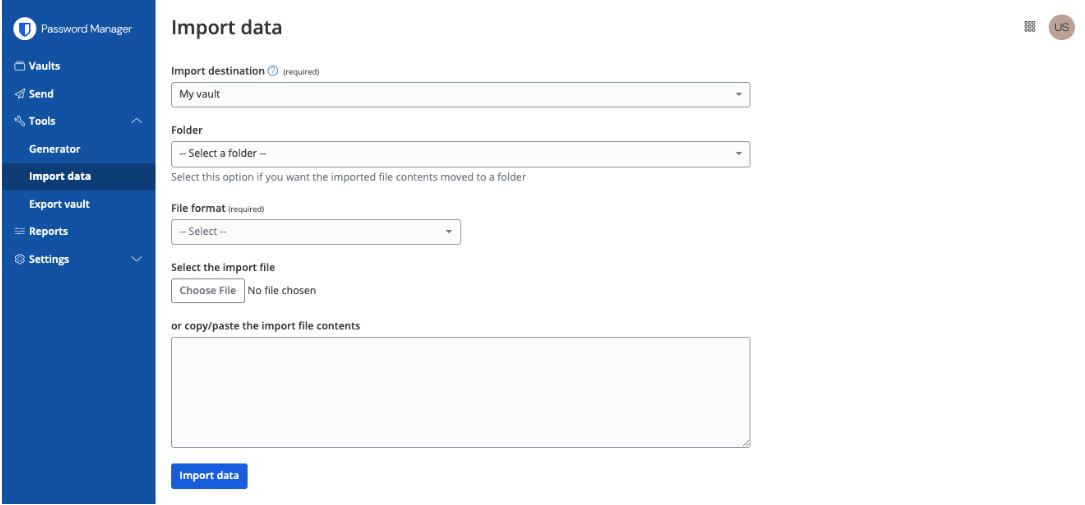
Importar dados Import data
Importar dados
Preencha os seguintes campos nos menus suspensos:
Destino da importação: selecione o destino da importação, como seu cofre individual ou um cofre de organização ao qual você tenha acesso.
Pasta ou coleção: selecione se deseja que o conteúdo importado seja movido para uma pasta específica ou uma coleção de organização à qual você tenha acesso.
Formato do arquivo: selecione o formato de arquivo de importação do Keeper.
Selecione Escolher arquivo e adicione o arquivo a ser importado ou copie/cole o conteúdo do arquivo na caixa de entrada.
Selecione Importar dados para iniciar a importação. Se estiver importando um arquivo .json protegido por senha, insira a senha na janela Confirmar importação do cofre que será exibida.
Após a importação bem-sucedida, exclua o arquivo de origem da importação do seu computador. Isso protegerá você caso seu computador seja comprometido.

Sua senha mestra não pode ser redefinida nem recuperada. A criptografia de conhecimento zero da Bitwarden significa que nem mesmo nós podemos acessá-la. No entanto, você pode configurar opções de recuperação de conta ou Acesso de Emergência para conceder a contatos confiáveis a capacidade de restaurar seu cofre. É altamente recomendável armazenar sua senha mestra com segurança e habilitar a autenticação de dois fatores para proteção adicional.
Bitwarden offers several advanced two-step login methods:
Company-wide Duo Security with Duo Push, SMS, phone call, and security keys.
Individual use of Duo Security and TOTP codes.
YubiKey OTP (any 4/5 series device or YubiKey NEO/NFC).
Hardware security key (FIDO2 Passkey).
Backups can be created, managed and retrieved at any time by exporting individual or organization vault data. This process can be automated with CLI scripting.
You can use encrypted exports to make secure long-term backups of your vault data that are encrypted with your account encryption key.
Alternatively, you can use a program such as PeaZip to create an encrypted archive of the file after exporting a plaintext file from Bitwarden.
You can learn more about PeaZip here:
http://www.peazip.org/
https://github.com/giorgiotani/PeaZip
Warning
Disclaimer: PeaZip is a third-party program and is not supported by Bitwarden. These links were shared with you as an alternative for use at your own risk.
Bitwarden can securely auto-fill your login information into websites using the browser extension and mobile apps (Android and iOS) using associated URIs. To auto-fill on desktop, use the keyboard shortcut, right-click context menu, or enable 'Autofill on page load' in the browser extension settings menu. For items without a corresponding URI, navigate to the vault item and tap the auto-fill button.
If you use Bitwarden Authenticator, Bitwarden will automatically copy a login's TOTP code to the clipboard when the login is auto-filled by any of the methods outlined in the Auto-fill Logins in Browser Extensions Help Center article.
The Bitwarden Password Manager is the best password security tool for Microsoft Edge. Since it's open source, security experts continuously review the code to keep your information safe. Additionally, setup is quick and simple — grab the Edge extension, create your account, and you're ready to go. From there, Bitwarden works behind the scenes to manage your passwords and automatically fill your login information, keeping everything in sync across all your devices in real-time.
First, create and verify your Bitwarden account with your email address. Then, visit the Microsoft Edge add-on marketplace to install the Bitwarden extension. Once installed, you'll see the Bitwarden icon in your browser's extension area – click it and sign in with your account details. After that, you're set! Browse while Bitwarden automatically saves your passwords and synchronizes them across all your devices.
Humble brag, but we think Bitwarden is one of the best free password managers for Firefox. It's rare to find a transparent open-source architecture with a powerful free tier that’s easy to use. Bitwarden has all the features you want when surfing online, unlike other password managers that only offer a limited free version. It's easy to start. All you have to do is install the Bitwarden Firefox extension, create an account, and surf—the extension does the work for you, securely saving and auto-filling passwords as you search. With premium features like secure password generation, storage for unlimited passwords, and seamless sync across all your devices, Bitwarden gives you everything you need to keep your passwords safe without any hassle.
Getting started with Bitwarden is simple and quick. After creating and verifying your account at bitwarden.com, simply install the Bitwarden extension through Firefox's add-on marketplace. Once installed, you'll notice the Bitwarden icon in your browser's toolbar. Click it, log in with your credentials, and you're ready to go. From there, Bitwarden works in the background, saving logins and passwords as you browse, automatically syncing them across all your devices for easy access.
Bitwarden Password Manager is the best free option. It’s open source, user-friendly, and packed with features to protect your data, including unlimited password storage, end-to-end encryption, and multi-device syncing.
Bitwarden is an ideal choice for individual and family password management due to its strong security, cross-platform support, and ease of use. It simplifies sharing passwords and data securely among trusted family members, and offers robust encryption and two-factor authentication for enhanced protection.
Bitwarden offers affordable plans for any budget. The user friendly interface and comprehensive import options make it easy to transition from other password managers. Try Bitwarden for free and discover how easy it is to keep your most precious data secure whether your home, at work, or on the go.
Yes, Bitwarden is considered the best password manager by millions of happy users worldwide. Bitwarden syncs across devices and works across platforms. It’s secure, open-source, and undergoes constant expert review to keep it hack-resistant. You can even self-host it if you'd appreciate another layer of privacy, which isn't an option with many other password managers.
Saving logins and passwords shouldn’t be hard. Bitwarden makes it easy by offering standout features like secure password generation and support for multiple vaults without the steep price tag of competitors like 1Password or LastPass.
The Bitwarden Password Manager is the best free Vivaldi password manager available. It's transparently open source, simple to onboard, and has all the essentials you need to launch well—including unlimited passwords, end-to-end vault encryption, and multi-device syncing.
It's incredibly simple to set up and launch Bitwarden. Simply create your account, confirm your email, and visit the Chrome Web Store to install the extension—just make sure you've enabled it in your Vivaldi settings. After you complete the download, the Bitwarden icon appears in your browser's toolbar. Click to log in. Once you've logged in, you're good to go—Bitwarden will handle the rest, safely storing and syncing your passwords across all your devices as you browse.
Start by creating a Bitwarden account and verifying your email address. Next, visit the Chrome Web Store or Opera Add-ons store to download the Bitwarden Password Manager extension. Follow the prompts to add it to Opera. Once installed, you'll find the Bitwarden icon in your toolbar. Log in with your account details, and you're ready to manage your credentials securely across your favorite websites.
Begin by creating a Bitwarden account and verifying your email address. Next, head to the Chrome Web Store to download the Bitwarden Password Manager extension, following the on-screen prompts to add it to Brave. Once installed, you'll see the Bitwarden icon in your toolbar—just log in with your account details, and you'll be ready to surf and sync your credentials from all of your favorite sites.
The Bitwarden Password Manager is built into DuckDuckGo, so it’s easy to get started. Here’s how you can enable it in your browser:
First, access your DDG browser settings and select "Autofill." Then, choose "Bitwarden" as your password manager and follow the integration wizard's prompts. You'll need to have Bitwarden installed and be logged in. Then, go to “Bitwarden” and “Preferences” through the menu bar, scroll to "App Settings," and enable "Allow DuckDuckGo browser integration." Once the connection is established, you'll see a confirmation message in your DuckDuckGo settings.
Bitwarden offers a variety of different installation options for the desktop application. You can download and view instructions for installation on the Bitwarden Download Page as well as listed below.
Note that some options are not capable of automatic updates and are labeled as such. You should always keep Bitwarden applications up to date.
Windows(10 and 11 - x86 and x64)
Standard Installer
Bitwarden-Installer.exe
Portable App for Flash Drives
Bitwarden-Portable.exe NO AUTO-UPDATES
Windows Store https://www.microsoft.com/store/apps/9PJSDV0VPK04
Chocolatey Package Manager
Bashchoco install bitwarden
macOS(Mojave 10.14 and later)
Standard Installer
Bitwarden.dmg
Mac App Store
https://itunes.apple.com/app/bitwarden/id1352778147
Homebrew Package Manager
Bashbrew install bitwarden
Linux(x64 only)
Standard Installer
Bitwarden-x86_64.AppImage
Ubuntu, Debian, Linux Mint, etc.
Bitwarden-amd64.deb
NO AUTO-UPDATES
Fedora, CentOS, RHEL, openSUSE, etc.
Bitwarden-x86_64.rpm
NO AUTO-UPDATES
Snap Package Manager
Bashsudo snap install bitwarden
When creating a password protected vault export, the encryption key is generated through PBKDF2 and stretched using HKDF. KDF iterations are currently hard-coded to 100,000, which is the same default for a Bitwarden account and Bitwarden Sends.
Bitwarden always encrypts and/or hashes your data on your local device before it is sent to the cloud servers for syncing. The Bitwarden servers are only used for storing and synchronizing encrypted Vault data. It is not possible to get your unencrypted data from the Bitwarden cloud servers. Specifically, Bitwarden uses AES 256-bit encryption as well as PBKDF-SHA256 to secure your data. For more information, see the Bitwarden Security Whitepaper
Your data is never sent to the Bitwarden Cloud without first being encrypted on your local device. Bitwarden uses TLS/SSL to secure communications between Bitwarden clients and user devices to the Bitwarden Cloud. Bitwarden’s TLS implementation uses 4096-bit X.509 certificates for server authentication and key exchange and a strong cipher suite for bulk encryption. Our servers are configured to reject weak ciphers and protocols. Bitwarden also implements HTTP Security headers such as HTTP Strict Transport Security (HSTS), which will force all connections to use TLS. For more information, see the Bitwarden Security Whitepaper.
Bitwarden uses AES-CBC 256-bit encryption for your Vault data, and PBKDF2 SHA-256 to derive your encryption key. For more information, see the Bitwarden Security Whitepaper.
To stay safe from data breaches, you need to create strong and unique passwords for every account, and the best way to manage them is to use a secure password generator and storage solution, like Bitwarden.
A trusted password manager makes it easy to protect yourself and your online data. It allows you to generate and store long, complex passwords for each site while only having to remember one master password (the one that unlocks your password manager account).
Bitwarden is the ideal choice as it offers affordable plans for individuals and businesses with cross-platform access for mobile, browser, and desktop applications. Bitwarden generates, stores, and secures your most important digital assets in an end-to-end encrypted vault.
Bitwarden is available on all modern devices and platforms, including desktops (Windows, MacOS, and Linux), browser extensions (Google Chrome, Mozilla Firefox, Safari, Microsoft Edge, Brave, Safari, Vivaldi, Tor Browser, and Opera), mobile (iOS and Android), Command Line Interface (CLI), and by using the web vault.
To explore all Bitwarden download options, go to https://bitwarden.com/download/.
You can set the Bitwarden desktop app to automatically open on startup.
Select the Start (Windows Logo) button, select All apps, and scroll to find the Bitwarden shortcut.
Right-click the Bitwarden desktop app, select More, and then select Open file location.
With the file location open, press the Windows logo key + R, type shell:startup, then select OK. This opens the startup folder.
Copy and paste the shortcut to the Bitwarden desktop app from the file location to the startup folder.
Bitwarden protects against online attacks through the master password, 2FA, API rate limiting, and vault timeout options.
Offline attacks are protected by a user's master password, multiple layers of encryption on vaults at rest—including column level encryption on sensitive fields through keys held on an HSM, and transparent data encryption for the entire database at rest.
Bitwarden is the most trusted password management solution by security and industry experts as well as millions of users around the world for many reasons, including;
Bitwarden is open source software. All of our source code is hosted on GitHub and is free for anyone to review. Thousands of software developers follow Bitwarden's source code projects (and you should too!).
Bitwarden is audited by reputable third-party security firms as well as independent security researchers.
Bitwarden does not store your passwords. Bitwarden stores encrypted versions of your passwords that only you can unlock. Your sensitive information is encrypted locally on your personal device before ever being sent to our cloud servers.
Bitwarden has a reputation. Bitwarden is used by millions of individuals and businesses. If we did anything questionable or risky, we would be out of business!
Still don't trust us? You don't have to. Open source is beautiful. You can easily host the entire Bitwarden stack yourself. You control your data. Learn more here.
If you are a Bitwarden Password Manager for Business (Teams or Enterprise) customer, please contact the sales team to ask about training opportunities.
Teams & Enterprise plans include 24/7 priority support. All employees, regardless of member role, may contact the support team directly at bitwarden.com/contact. For more information on available resources for account owners and administrators, see the Proof-of-Concept Project Checklist.
Users in Bitwarden organizations can be granted a variety of member roles and access controls in order to manage their permissions and access. You can set member roles and access controls when you invite users to your organization, or at any time from the Manage → Members screen in your organization. For more information see the Help Center article.
Typically, this is because am app's vault data has fallen behind a web vault or other app's. Performing a vault sync should bring everything up to date. For more information, see https://bitwarden.com/help/vault-sync/
Getting started with Bitwarden is quick and easy! Follow these steps:
Import passwords from any prior password manager
Follow this guide to get the most out of your trial
Start onboarding your employees
First, sign up for a Bitwarden account and confirm your email address.
Open Chrome.
Next, head to the Chrome Web Store to install the Bitwarden password manager extension.
Once installed, you'll notice the Bitwarden icon in your browser's toolbar.
Click it, and sign in with your account credentials.
From there, you're all set to browse the web using Chrome, while Bitwarden automatically saves your passwords and syncs them across your devices, like Android
The free Bitwarden app extension for Google Chrome is the best password manager for everyday use. It's open-source, easy to use, and is constantly undergoing rigorous security checks from top cybersecurity experts around the world. Users can also self-host using Bitwarden for an extra layer of security.
Multiple vaults, seamless syncing, and extensive free features also help Bitwarden stand out from expensive, lower-value alternatives like 1Password and LastPass.
Bitwarden is best for Chrome users looking for a no-cost password management solution. It's secure, simple, and has a completely transparent open source architecture allowing constant security validation and review. It's easy to start—simply add the Bitwarden extension to Chrome, set up your account, and you're ready to go. The extension works quietly in the background, handling password storage and doing select autofill tasks as you browse—effortlessly syncing your saved credentials across your devices in less than a second.
A visualização das informações de faturamento varia conforme você esteja consultando uma assinatura Individual ou de Organização. Para instruções passo a passo, confira o artigo de ajuda Atualizar suas informações de faturamento para guiar você pelos dois processos.
Seus dados nunca são excluídos. Se você cancelar, a conta de cada membro volta para um plano individual gratuito, e eles mantêm o acesso ao cofre pessoal. As coleções compartilhadas ficam inativas, mas podem ser recuperadas se você assinar novamente.
Sem problema. Ao convidá-lo, ele vinculará a conta existente ao seu plano Families e receberá imediatamente o upgrade para Premium. O cofre pessoal e as senhas salvas dele serão totalmente transferidos, para que nada seja perdido.
Não. Cada membro tem seu próprio cofre privado, ao qual só ele tem acesso. As senhas compartilhadas ficam em uma coleção compartilhada separada. Os membros só veem o que você compartilha explicitamente com eles. Suas senhas pessoais são sempre somente suas.
Sim. O Bitwarden Families comporta até 6 membros e não exige que eles morem com você. Você pode convidar um dos seus pais, um irmão ou qualquer pessoa em quem confie. Cada um recebe sua própria conta Premium no seu plano.
O Bitwarden Families comporta até 6 usuários. Isso normalmente inclui pais, filhos e outros familiares que moram na mesma casa. Cada pessoa recebe sua própria conta Premium com todos os recursos. Se você precisar de mais de 6 usuários ou quiser adicionar amigos ou colegas de quarto que não façam parte da sua família imediata, considere o plano Bitwarden Teams para pequenos grupos.
Changing your account email address will not change the address that received 2FA codes if you are using two-step login via email.
Open the web vault, select the profile icon and choose Account Settings from the dropdown.
On the My Account page, find the Change Email section.
Enter your current Master Password to prove you have the authority to take this action, and specify the New Email you'd like to change to.
Select the Continue button.
Bitwarden will email a verification code to the specified email address. Check your inbox for the code and enter it into the Code text input displayed in your web vault to finalize the change.
If you have a paid subscription, also contact us to let us know about the change so that we change your billing information.
Be sure to logout of all Bitwarden apps you use, and log back in with the new credentials. Sessions using a "stale" email address will eventually be logged out.
There is! Users with a premium subscription can proactively setup trusted emergency contacts who can access your vault in case of emergency. For more information, see Emergency Access.
As a zero-knowledge encryption solution, Bitwarden and its systems have no knowledge of, way to retrieve, or way to reset your master password. If you have already lost your master password, there is unfortunately no way for the team to recover the account. For help understanding what to do next, or what to do proactively to protect yourself from such a scenario, refer to the article on your master password.
To change your master password hint:
Open the web vault, select the profile icon and choose Account Settings from the dropdown.
From the account settings menu, select the Security page and the Master Password tab.
Enter a hint in the Master Password Hint box and select the Save button.
The Bitwarden Families plan supports up to up to a maximum of 6 users. You can launch a second Families Organization and you can be part of both.
For Organization sizes beyond 6 people you might want to consider a Teams Organization.
Every member can also launch a free 2-person organization and share permanently with a second user.
Bitwarden Teams and Enterprise organizations will automatically scale up user seats as you invite new users. You can set a seat limit on scaling to prevent your seat count from exceeding a specified number, or manually add seats as desired. Regardless of how you choose to add seats, you will need to manually remove seats you're no longer using. For more information, see the User Management Help Center article.
Abra o aplicativo 1Password no seu dispositivo.*
Clique no botão de reticências (três pontos) na parte superior da barra lateral.
Escolha “Exportar”.
Selecione a conta que deseja exportar.
Entre na sua conta.
Escolha o formato de exportação desejado. Você poderá escolher entre .1pux ou .csv.
Exporte seus dados.
Escolha o local para onde deseja exportar os dados.
Clique em “Abrir”.
*Observe que usamos como referência diretamente as instruções de exportação do 1Password para Windows. A experiência pode variar conforme o sistema operacional (SO).
Bitwarden has committed to achieving FedRAMP Class D (High) Certification, and more details are available in the announcement.
Agencies subject to FedRAMP or GovRAMP requirements are able to deploy a self-hosted version of Bitwarden on their own compliant servers. This deployment works in offline and air-gapped environments as well.
O Bitwarden Secrets Manager permite que as equipes provisionem com segurança o acesso de agentes de IA a segredos de desenvolvimento predeterminados para uso em scripts e pipelines de CI/CD. Ao substituir chaves de API em texto simples e outros segredos por strings de ID de segredo geradas pelo Bitwarden, você ajuda a impedir que agentes de IA obtenham acesso não autorizado a credenciais e ecossistemas.
Saiba mais sobre como usar o Bitwarden Secrets Manager para proteger variáveis de ambiente contra o acesso de agentes.
Uma organização terá o mesmo plano em todos os produtos que assinar. Por exemplo, se um cliente assina um plano Enterprise do Bitwarden Password Manager e decide comprar o Bitwarden Secrets Manager, ele também assinará o plano Enterprise.
Para assinar um plano do Secrets Manager diferente do que você assina atualmente com o Password Manager, basta criar uma nova organização ou conta e se inscrever no Secrets Manager seguindo estas etapas.
O Bitwarden Secrets Manager foi criado para que equipes de desenvolvimento armazenem, gerenciem e implantem segredos privilegiados de forma centralizada. O Secrets Manager é voltado para segredos de infraestrutura e tem suporte apenas no aplicativo web e nos clientes de CLI. Se você quer ajudar seus funcionários a gerenciar suas credenciais pessoais, confira o Bitwarden Password Manager.
Bitwarden Secrets Manager supports out-of-the-box integrations for GitHub Actions, Ansible, Kubernetes, and GitLab CI/CD with more being added all the time. The Bitwarden Secrets Manager Software Development Kit (SDK) is also available for building your own applications and integrations.
Absolutely! Check out this help article for more details on how to get started.
Bitwarden aims for the highest levels of availability. You can learn more about Bitwarden availability in the Security White Paper.
In addition, there are multiple secret backup options.
Integrations - Some integrations, like Bitwarden Secrets Manager Kubernetes Operator, act as a caching layer when secrets are fetched.
SDKs - Secrets can be cached locally when using an SDK. Caching any information or credentials in a local environment should be done with care and security awareness.
Self-hosting - Self-hosting Secrets Manager ensures that secrets are available in the event you cannot connect to the Bitwarden cloud.
A project is a collection of secrets that can be grouped together based on how you want to structure access by your engineering, DevOps, and cybersecurity teams.
Machine accounts represent non-human machine users, like applications or deployment pipelines, that require programmatic access to a discrete set of secrets.
Secrets refer to digital authentication credentials for sensitive parts of the IT and developer ecosystem. Secrets are sensitive key-value pairs that need to be securely stored and should never be exposed in plain-text code or transmitted over unencrypted channels.
Examples of secrets are:
SSH keys
Database passwords
SSL or TLS certificates
Private encryption keys
API keys
One-time password devices
Yes, see the SOC 3 Report for more information.
Yes, see the SOC 3 Report for more information.
Bitwarden uses zero knowledge encryption to ensure neither Bitwarden nor subprocessors have access to customer vault data. See Bitwarden Subprocessors and administrative data for more information.
Bitwarden stores encrypted Administrative Data and Vault Data. Vault data is encrypted locally on your device before being sent to Bitwarden servers and only you have the keys required to decrypt your vault. Neither Bitwarden, nor subprocessors have access to your vault data. For detailed information, view the full Privacy Policy.
Deleting a Bitwarden account or Organization permanently deletes the account or Organization and all data that is associated with it. Bitwarden does not "soft delete" any data. For administrative data, see bitwarden.com/help/administrative-data.
The Bitwarden Security and Compliance Program is based on the ISO 27001 Information Security Management System (ISMS). Bitwarden is ISO 27001 certified in compliance with ISO 27001 control sets surrounding data security. More information in the Bitwarden Security White paper.
A Bitwarden usa Dados administrativos para fornecer o Serviço Bitwarden aos seus usuários. Listamos os dados coletados na seção de segurança do nosso site de ajuda aqui: https://bitwarden.com/help/article/administrative-data/
O modelo de negócios da Bitwarden se concentra em planos pagos para empresas e indivíduos. Você pode ler mais neste blog: Definindo e sustentando valor para os usuários da Bitwarden https://bitwarden.com/blog/defining-and-sustaining-value-for-bitwarden-users/
A Bitwarden realiza regularmente auditorias de segurança abrangentes feitas por terceiros com empresas de segurança renomadas. Essas auditorias anuais incluem avaliações do código-fonte e testes de penetração em IPs, servidores e aplicações web da Bitwarden.
Sim. A Bitwarden realiza auditorias de segurança regulares por terceiros e está em conformidade com importantes regulamentações de privacidade e segurança, como GDPR, CCPA, HIPAA e SOC 2. Acesse a página Segurança e conformidade da Bitwarden para obter mais informações.
Como posso saber mais sobre o compromisso de vocês com segurança, privacidade e conformidade com padrões internacionais?
Acesse: https://bitwarden.com/compliance/ para ver como a Bitwarden protege os dados dos clientes.
A verificação de vazamentos de dados da Bitwarden (incluída em todos os planos) alerta você quando seu e-mail ou suas credenciais aparecem em vazamentos conhecidos. Usuários Premium também recebem relatórios de integridade do cofre que identificam senhas fracas, reutilizadas e comprometidas, além de recomendações práticas. Gere esses relatórios regularmente para encontrar vulnerabilidades antes dos invasores e atualize credenciais expostas imediatamente para proteger suas contas online.
Sim, o Bitwarden está em conformidade com diversas normas regulatórias. Ele segue padrões de segurança do setor e possui certificações como ISO 27001, SOC 2 Tipo II e SOC 3. O Bitwarden também está em conformidade com regulamentações de privacidade, como o Regulamento Geral de Proteção de Dados (GDPR), a Lei de Privacidade do Consumidor da Califórnia (CCPA) e a Lei de Portabilidade e Responsabilidade de Seguros de Saúde (HIPAA). Além disso, o Bitwarden cumpre o Data Privacy Framework (DPF), anteriormente conhecido como Privacy Shield, garantindo a transferência segura de dados pessoais.
Se, por algum motivo, a Bitwarden fosse hackeada e seus dados fossem expostos, suas informações ainda estariam protegidas devido a medidas de criptografia forte e hashing unidirecional com salt aplicadas aos dados do seu cofre e à sua senha mestra.
Os dados armazenados no seu computador/dispositivo são criptografados e só são descriptografados quando você desbloqueia seu cofre. Os dados descriptografados são armazenados na memória apenas e nunca são gravados em armazenamento persistente.
A Bitwarden processa e armazena todos os dados do cofre com segurança na nuvem Microsoft Azure nos EUA ou na UE usando serviços gerenciados pela equipe da Microsoft. Como a Bitwarden usa apenas ofertas de serviços fornecidas pelo Azure, não há infraestrutura de servidores para gerenciar e manter. Toda a disponibilidade, escalabilidade, atualizações de segurança e garantias são respaldadas pela Microsoft e por sua infraestrutura de nuvem. Consulte a documentação de Ofertas de Conformidade do Microsoft Azure para mais detalhes.
O Bitwarden armazena senhas na nuvem ou na sua instância auto-hospedada. Depois que você faz login em um dispositivo, o Bitwarden armazena seus dados localmente em um formato criptografado que só você pode descriptografar. Isso oferece acesso de leitura offline ao seu cofre. Para adicionar ou alterar senhas, é necessário ter acesso online.
Para obter informações sobre a abordagem do Bitwarden em relação à segurança e à arquitetura subjacente (incluindo diagramas de fluxo de dados), consulte:
Carregue seu arquivo no Bitwarden Send, defina uma senha opcional ou uma data de expiração e compartilhe o link seguro gerado. O destinatário pode acessar o arquivo sem precisar de uma conta Bitwarden, e você pode acompanhar quando o arquivo foi acessado.
Para compartilhar senhas com segurança com familiares, o Bitwarden Send oferece a solução mais simples. Crie um Send de texto com sua senha, defina uma data de expiração e uma senha de acesso opcional e compartilhe o link. Para o compartilhamento contínuo de senhas, considere um plano Bitwarden Families, que permite compartilhar itens do cofre com segurança.
Não, não é recomendável enviar senhas por e-mail, pois normalmente o e-mail não tem criptografia de ponta a ponta. E-mails podem ser interceptados, armazenados em vários servidores e permanecer nas caixas de entrada por tempo indeterminado. O Bitwarden Send oferece uma alternativa mais segura, com recursos de criptografia e exclusão automática.
Usar o Bitwarden Send, que oferece criptografia de ponta a ponta e links que se autodestroem, é um dos métodos mais seguros para compartilhar senhas. Ao contrário de e-mails ou mensagens de texto, o Bitwarden Send criptografa seus dados e permite definir datas de expiração e limites de acesso.