

Coming in spring 2023, the new Bitwarden Secrets Manager delivers a simpler, easier way for developers, DevOps, and cybersecurity teams to secure and manage secrets at scale. The beta offering will include easy onboarding and deployment, centralised management of developer and infrastructure secrets, and powerful, open-source security with end-to-end encryption. Sign up to become a beta tester and receive more information on Bitwarden Secrets Manager!

A strong master password provides the first and most important level of protection to safeguard your vault data. Beyond this, Bitwarden adds additional layers of encryption and protection – called multi-factor encryption – when your vault syncs with the Bitwarden cloud. Learn how multi-factor encryption works to reinforce security and protect your vault information.
Enjoying this update? Subscribe today.
Receive the latest product updates, hand-picked articles, community highlights, and more.
Access your Bitwarden vault without a password
In the latest release, Bitwarden extended the Log in with device capability to let you log in without using your master password in your browser extensions, desktop app, and more. Learn how this enhanced feature works, how it maintains security, and what the future of passwordless looks like for Bitwarden users around the world.
How to create custom fields for Bitwarden vault entries
There are a variety of vault entry options that come out of the box with your Bitwarden account, such as Name, Username, Password, Authenticator Key, URL, and more. But let’s say you need to add an entry that’s unique, such as an SSH key or custom fields to auto-populate web forms. Bitwarden makes this easy with the ability to create custom fields. Follow the simple step-by-step process to get started.
Bitwarden design: updating admin views in the web vault
In the latest February release, Bitwarden built a series of updates to improve usability for organisation administrators and owners. Improvements were made to the Vault page, the Members page, and the Groups page to make navigating and managing your Bitwarden organisation faster and easier. New columns were added to each of them to show listed items’ attributes at a glance. Read the article to learn more about the latest updates to the Bitwarden design.
For those vault items that need serious care, some users might opt to go down the peppering route to give them an added layer of security. Peppering involves adding or subtracting a string of characters to a password entry that isn't part of the password but is known only by you. Although peppering is a very simple idea to implement, it does have a few implications that you must take into consideration. Learn more about the two types of peppering and the caveats to be aware of.
Filling in digit-specific passwords
With cybercrime on the rise, institutions invent new and creative ways to strengthen account authentication, such as prompting users to enter specific password characters upon logging in. In this example, if your password is b!tw@ard3nr0k$, your bank may prompt you to enter the 2nd, 8th, 10th, and 13th characters of your password, which would be !, t, r, and $. While this may make it harder to crack, it undoubtedly adds friction to the user login experience. Fortunately, Bitwarden now offers an easy way for users to quickly identify digit-specific password characters in the browser extension app.
As an open-source project, the global Bitwarden community plays an important role in contributing to a world free from breaches and hacks. Special thanks to the following community members who shared useful tips to help others get the most out of their Bitwarden experience.
A big thank you to community member Bernd Schoolmann, for partnering with Bitwarden to implement an additional encryption option, Argon2, as well as Argon2 KDF configuration options. Below are the links to explore the updates yourself!

https://github.com/bitwarden/clients/pull/4468

https://github.com/bitwarden/mobile/pull/2293
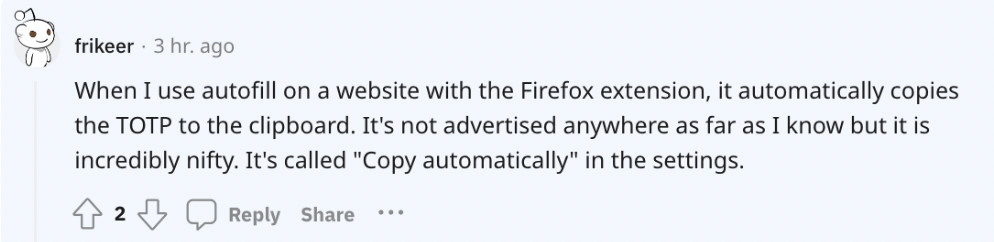
Thank you @frikeer for sharing your approach to auto-pasting TOTP codes.
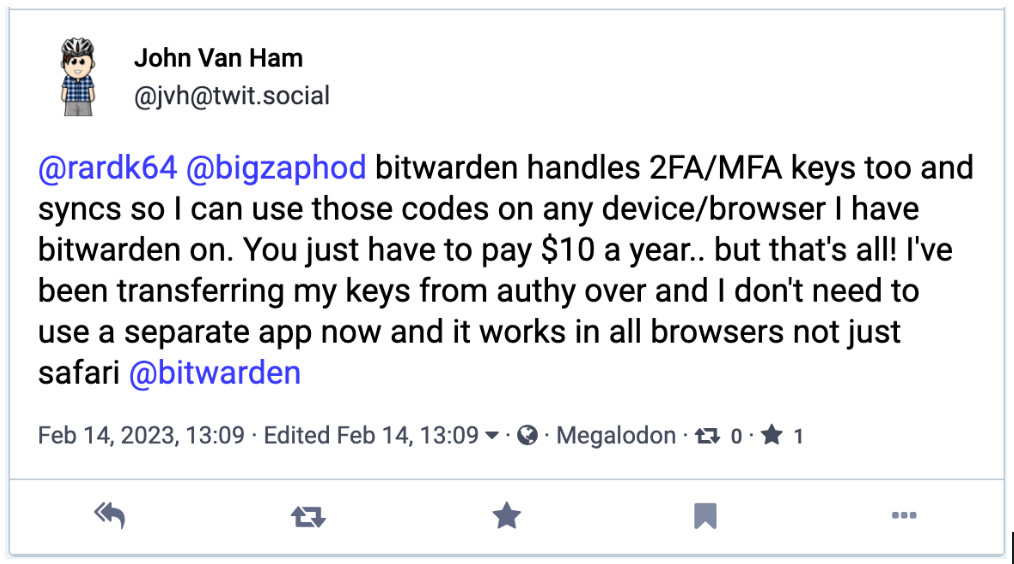
Thank you @jvh@twit.social for commenting on how you simplify two-factor authentication with Bitwarden.


Weekly Live Demo: Every Wednesday at 12 pm EDT
Hacker’s Guide to VIP Security: 9 March at 12 pm EDT
Managed Service Provider (MSP) Demo: 16 March at 12 pm EDT
Managed Service Provider (MSP) Demo: 23 March at 12 pm EDT
Monthly Vault Hours: 31 March at 12 pm EDT
That’s it for now. Let us know what you think about this newsletter, including potential topics you’d like to see.
Until next time,
Team Bitwarden
Bitwarden is Certified as a Best Place to Work in 2023!
Interested in joining the Bitwarden team? Visit our careers page to explore open roles.