
Only Bitwarden provides full control
Bitwarden is built for business and provides complete security and management from credential creation to retirement.
Centralized ownership means you are in control. Shared items don't go missing during employee transitions, and unshared items can be easily reassigned by admins.
A sharing structure built for scaling allows for secure sharing between multiple teams while maintaining least privilege.
Comprehensive reporting on the entire vault, including employees' unshared items, helps you keep your business secure.
Learn more below
Key takeaways from this article:
Lifecycle ownership: Credential security requires clear ownership from creation through rotation, sharing, and deprovisioning.
Beyond create/delete: Effective programmes include governance, visibility, and controls that prevent orphaned access and unmanaged secrets.
IAM alignment: Credential lifecycle management complements identity and access management by improving how credentials are issued and maintained.
Enterprise readiness: Centralised tools and repeatable processes help scale credential management without relying on ad hoc human workflows.
Security & flexibility: Integrating modern credential tools improves compliance posture and reduces risk during onboarding, role changes, and offboarding.
Managing credentials is one of the most important aspects of maintaining and safeguarding business security and data. However, many organisations are still struggling with how to handle credentials beyond their initial creation.
Just as every employee experiences a user “lifecycle” that starts with hiring and onboarding, credentials also have a life cycle, from creation to deletion. This is part of a comprehensive process known as identity lifecycle management, which is also a key component of maintaining security and access control, ensuring authorised users have proper access to digital assets, systems, tools, applications, and resources to be successful and secure.
The first step in establishing effective credential management is establishing centralised credential ownership. Without a clear ownership structure, credentials become scattered, untracked, or even lost when employees change roles or leave.
By centralising ownership, organisations gain:
Full visibility to ensure all user credentials are accounted for and meet security policies
Comprehensive reporting where insights into all credentials are available for audits and compliance
Complete event logging where every action taken on credential usage is tracked
Seamless offboarding so credentials are easily transferred to another user when an employee leaves, preventing orphaned or inaccessible credentials
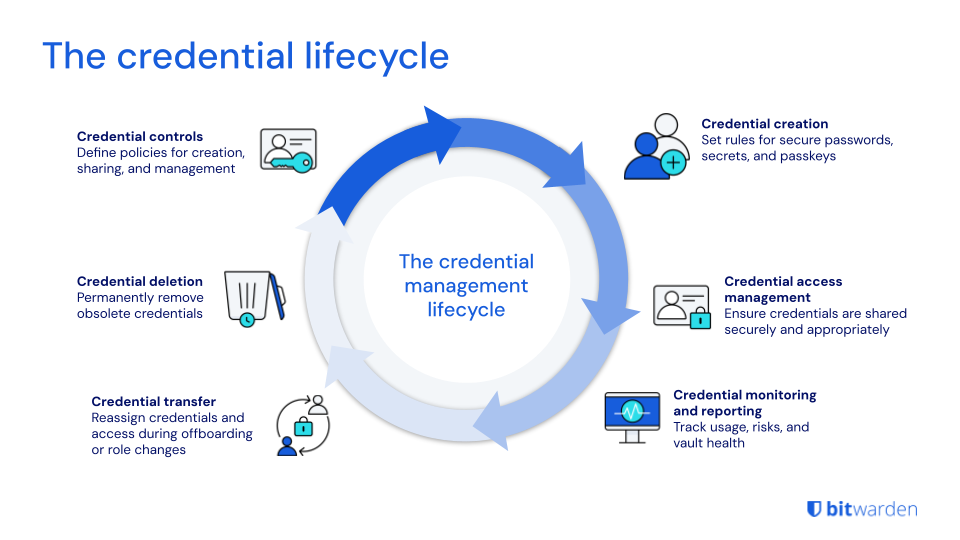
Much like every employee has a journey within their organisation, digital credentials also undergo a journey that starts with creation, with several stages in between, and ends in deletion.
The main phases of the credential lifecycle include:
Credential controls
Build a centralised approach to credential management. Define key policies for how credentials are created, shared, and managed. These include policies around collection management and individual vault policies so credentials are organised and compliant from the start.
Credential creation
Creating any credential – whether it’s a password, secret, SSH key, API key, passkey, or any other sensitive information. For example, setting a policy around password length ensures credentials follow standard and secure creation processes.
Credential management
Ensure your users and teams are sharing credentials that follow secure guidelines and policies. This means only the right people have the right credentials at the right time.
Credential monitoring and reporting
Monitor for risks by tracking how credentials are used, accessed, and any other patterns that could signal security risks. Bitwarden vault health and member access reports help you stay on top of credential health.
Credential transfers
For offboarded users or users changing departments, their credentials may need to be transferred to new owners. This is an important part of the offboarding, deprovisioning, or departmental change process to ensure access is reassigned quickly.
Credential deletion
When a credential is no longer needed, it needs to be properly and permanently deleted so it is not left lingering in the system without admin oversight.
Without a well-defined credential management strategy that starts with centralised credential control, many organisations leave themselves vulnerable to data breaches, credential misuse, and unauthorised access. Here are some examples:
Lack of visibility and oversight
According to Forrester, 80% of data breaches are caused by misusing privileged accounts. Imagine your organisation has just experienced a data breach – what happens if you need to conduct a security audit of the access rights of users inside and outside your organisation? Mismanaging digital credentials can lead to significant security risks, making it crucial to have robust policies and tools in place to protect and manage these credentials effectively.
The SSO security gap
The credential lifecycle takes into account that not all applications support SSO. Many legacy systems, third-party services, and cloud applications do not integrate with SSO providers. Employees also often need to access external vendor portals, partner sites, or other SaaS tools that are not connected to their organisation’s SSO system. Not to mention unapproved applications – employees often sign up for SaaS tools independently, without admin approval. As such, these applications would not be integrated with the SSO system. This is where credential management provides redundancy and business continuity, ensuring full coverage and admin oversight across all applications and use cases.
Offboarding risk
A recent study by Wing Security found that 63% of businesses may have former employees with access to organisational data. Offboarding employees may, on the surface, seem like a simple admin task. But without proper processes that take into account not only data but credential access, organisations are at risk of:
Data breaches
Intellectual property theft
Offboarded users who still have access to credentials
Lost or forgotten credentials left by offboarded users
Shared credentials that can no longer be accessed by current users
By controlling ownership from the start, organisations can proactively manage security risks, streamline access, and maintain complete oversight throughout the entire credential lifecycle.
A modern approach to secure sharing
Competing password managers fail to treat credentials as dynamic pieces of data. For example, some vendors force users into a rigid sharing model, making it impossible to assign individual vault credentials to multiple vaults. A marketing team that needs just one credential from the product team will need to be assigned to the entire product team vault.
Others completely lack the ability for centralised vault control and management. This decentralised model, where every credential is owned by an individual user, means users may have private credentials not visible to admins, leading to orphaned records and posing major security risks. Managing all of this – while fine for smaller companies – becomes nearly impossible to scale at enterprise level.
Bitwarden offers a better way, one that takes into account the fact that enterprise credentials are vital, dynamic sources of data and that enterprises require both security and flexibility for credential management. By emphasising the importance of digital credentials in secure sharing practices, Bitwarden ensures that sensitive information is protected from cyber threats through robust policies and tools.
Unlike competitors with rigid sharing models or completely decentralised vaults, Bitwarden allows credentials to securely live in multiple vaults simultaneously, without compromising security. This means teams can access the credentials they need without unnecessary exposure to entire vaults. In addition, Bitwarden offers comprehensive administrative controls, so organisations can centrally manage credentials while still allowing user-centric usage as needed. This balance makes Bitwarden more enterprise-friendly, scalable, and adaptable.
Start of the lifecycle
Full control from day one
Bitwarden enterprise and collection management policies give you an opportunity at initial setup to immediately determine who has access to what. Establishing these policies right at the start sets you up for greater consistency later on. For example, customers who choose to turn on the Centralise organisation ownership policy prevents employees from saving vault items to a personal vault, giving admins complete oversight over credentials.
With the Bitwarden password generator, admins can enforce strong password policies and enable end users to easily and securely create passwords that align with those policies. Likewise, the password generator works seamlessly with the browser extension autofill feature, allowing users to create a strong and unique password right at account setup and save it directly within their vaults. As users visit a login page, Bitwarden immediately recognises the stored credential – now, instead of manually typing passwords, the autofill feature inserts credentials securely.
Everything in between the lifecycle
Secure sharing
Bitwarden offers the most comprehensive and robust collection management settings on the market. These collection settings offer a range of management strategies for collections and vault items. Want complete control over all organisational credentials and full administrative oversight? Or is your strategy to lean more into a flexible, user self-service experience that supports least privilege? These settings allow you to adjust according to your company’s policies.
Monitoring and reporting
With Bitwarden vault health reports, member access reports, and event logs, admins gain full visibility into all credentials in use, including details such as which have been shared, who’s accessing them, and whether they are at risk (weak, reused, breach-related passwords, missing MFA, and more)
End of the lifecycle
Offboarding credential recovery and transfer
When a user offboards, their accounts are revoked to prevent unauthorised access. The following Bitwarden features give admins full visibility and control over how to reassign or transfer credentials when an employee leaves the company or changes departments:
Member access reports provide details on all items a user had access to
Event logs and SIEM show what credentials a user recently accessed
Unmanaged collections are presented so admins know what needs to be reassigned, minimising orphaned credentials
Centralise organisation ownership policy - ensure all collections and items are under admin oversight
Credential deletion
When a credential is no longer needed, the Bitwarden features around least privilege access, robust credential management, and administrative control make it easy to securely delete credentials from the system, ensuring no unused credentials are left to compromise security. Use the Bitwarden event log feature to track and confirm that a credential was successfully and permanently deleted.

Don’t let credential lifecycle management planning be an afterthought – many organisations fail to address it until an employee leaves or a data breach occurs. Think ahead to stay ahead. Here are tips to get your teams started.
Ask questions
How do we currently manage credentials when an employee leaves the company or moves to a new role?
How do we track shared credentials across teams?
How do we know what applications are being accessed outside our identity provider? Are we able to prevent unauthorised access?
What happens if a credential is mishandled or shared with the wrong person?
Consider long-term benefits
Establishing a credential lifecycle plan can save time and reduce security risks, especially during high-risk events such as offboarding.
Credential management helps enforce zero trust, which trusts no one and assumes a breach is constantly imminent or has occurred, requiring every user to pass a verification process before they are given access.
In a time when employee turnover is reaching new heights (a recent Fast Company article calls it an “employee exodus,”) your team needs to consider how you manage your workforce, their security, and – most importantly – their credentials. This isn’t just an HR shift, but an organisational security concern.

The credential lifecycle is too often overlooked and conversations around who owns organisation credentials start too late. In reality, these are essential aspects of identity and access management. Bitwarden provides built-in enterprise password management features that help organisations prepare well beyond merely credential creation and deletion. Bitwarden also integrates modern credential management tools to enhance security and flexibility. These enterprise features help establish best practices around reporting, sharing, and transferring, ensuring organisations protect their data from beginning to end. Learn more by starting a free 14-day business trial.
Privileged access management (PAM)
Privileged access management (PAM) is a critical component of credential management that focuses on controlling and monitoring access to sensitive systems and data. PAM solutions provide granular access control, ensuring that only authorised users can perform specific actions within systems. They also track and log all activities, creating an audit trail for security and compliance purposes. By implementing PAM, organisations can mitigate security risks, protect sensitive data, and ensure that user access is limited to only the permissions necessary to perform their job functions. This approach not only enhances security but also helps organisations comply with regulatory requirements and maintain a robust security posture.
Access management and credential management
Access management and credential management are closely related concepts that work together to ensure secure access to systems and data. Access management involves controlling who can access which digital assets and what they can do within systems once authenticated. Credential management, on the other hand, involves the secure handling of user credentials, including passwords, certificates, tokens, and keys. By implementing a credential management system and access management policies, organisations can ensure that user identities are verified, access privileges are limited, and sensitive data is protected from unauthorised access. This integrated approach helps maintain a secure and efficient environment, reducing the risk of data breaches and ensuring that only authorised users can access critical systems and information.