
To: Employees
Subject: Action needed – new encryption standards for Bitwarden
[Company] Bitwarden users,
We use Bitwarden for secure password management as part of our security protocol. It has become an essential tool for ensuring the security of our organisation and maintaining good credential practices.
Earlier this year, new security recommendations were issued by industry groups in response to increased hacking threats. As encryption-cracking devices become more powerful, encryption settings need to become stronger – all part of the constant arms race between security professionals and hackers.
Bitwarden is following these new recommendations, and when you log in to the Bitwarden web app you may see a message saying your KDF Iterations setting is too low. This setting is part of the encryption process and everyone who uses Bitwarden needs to update it.
Follow these directions to ensure vault security:
Export your vault to create a backup. Follow the instructions here under Create an encrypted export for Web vault. Use the Password protected option and choose a password you remember, such as your current master password.
Update your KDF iterations setting
Log in to the Bitwarden web app at [vault.bitwarden.com or your company’s self-hosted URL]
Go to Account Settings (click on the round icon in the top right)
Go to Security > Keys tab
In the KDF iterations box, change the number to 600000
Click the Change KDF button and confirm with your master password
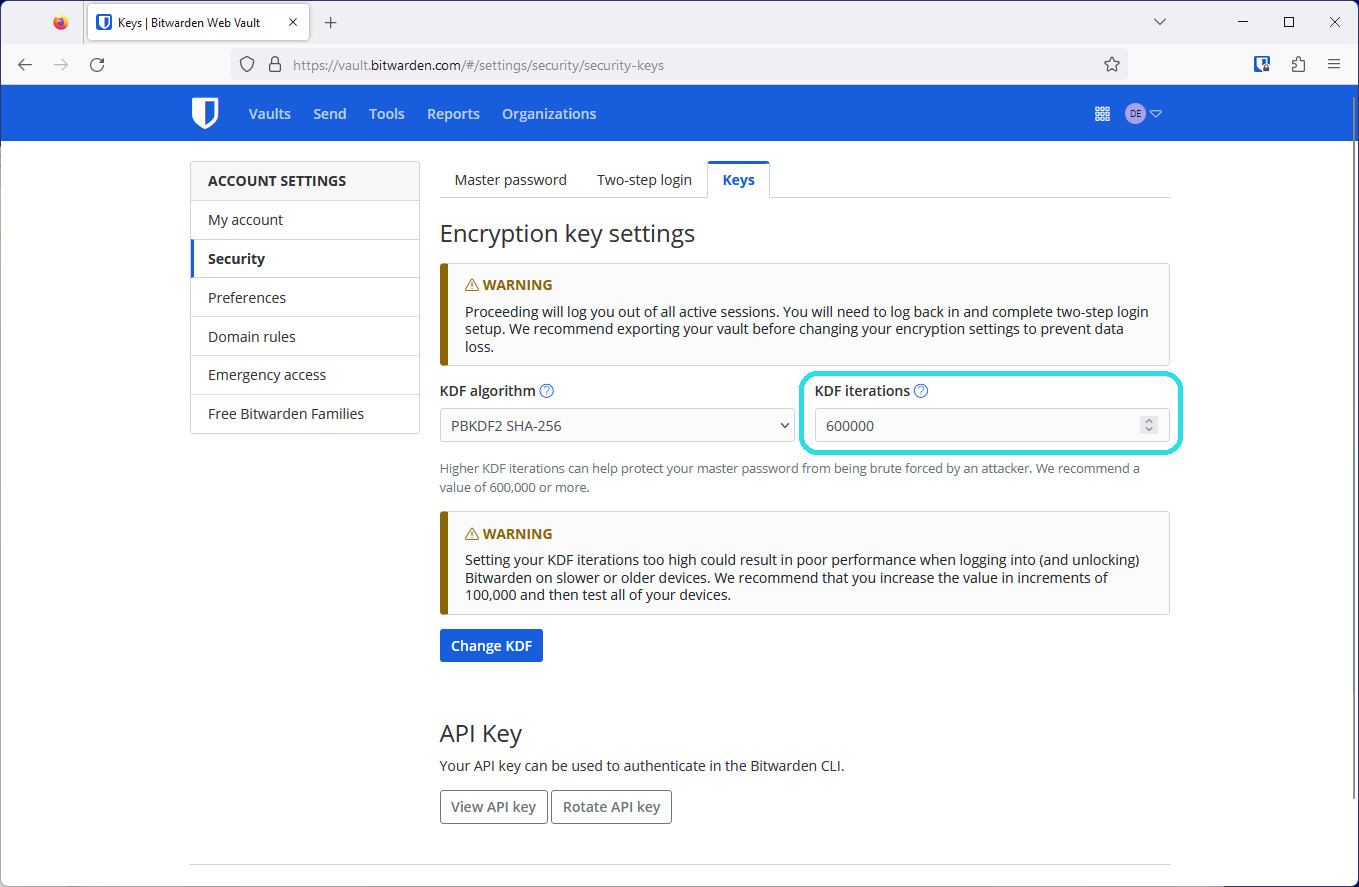
The Encryption key settings in the Bitwarden web app
Log back in again on all your devices

This setting cannot be changed by administrators as it is protected by your master password in your end-to-end encrypted Bitwarden account. Thank you for taking action, updating these settings, and playing your part in [Company’s] security!
[IT admin name, title]
Q:What is a KDF iteration and what does it do? A: A KDF iteration is part of the encryption process and refers to how many times the key derivation function algorithm runs before you can access your vault. Combined with a strong master password, a higher number of iterations improves your vault’s resistance to hackers. Learn more about encryption security in this blog: Bitwarden security fundamentals and multifactor encryption
Q: What recommendations changed and why? A: The OWASP Foundation is a respected leader in open security standards made up of teams of security professionals and encryption experts. Due to advances in hardware available to hackers today, OWASP increased its recommendations for the iterations settings for the PBKDF2 algorithm to improve resistance to brute-force hacking attempts.
Q: What do I need to do? A: Update your KDF Iterations setting to 600,000 at minimum. Ensure you’ve backed up your vault, then make the change in the Account Settings > Security > Keys window in the web app. In all, it should take less than five minutes to update this setting.
Q: Is this something the administrators can do for me? A: Because the process of changing KDF iterations uses your master password, only the logged-in user can change these settings.
Q: Do all organisation members need to update their KDF iterations to keep the organisation secure? A: It is recommended that every member of an organisation update their KDF iterations to provide the best security for the organisation and their individual vaults.
Q: Why should I back up my vault? A: Changing KDF iterations will log you out of Bitwarden on every device, so having a backup of your vault is helpful in case you cannot log back in. It is good practice to keep your master password and two-step login recovery codes in a safe place. For more information, please visit Guide: How to create and store a backup of your Bitwarden vault.
Q: What are other actions I can take to improve my account security? A: The best way to improve your security is to ensure that you have a long, strong master password. After this, enable two-step login for a second factor of protection.