# Example email to users regarding KDF Iterations setting
Email template for admins to send to employees with instructions for updating KDF Iterations settings
---
*To: Employees*
*Subject: Action needed - new encryption standards for Bitwarden*
*[Company]* Bitwarden users,
We use Bitwarden for secure password management as part of our security protocol. It has become an essential tool for ensuring the security of our organization and maintaining good credential practices.
Earlier this year new security recommendations were put out by industry groups in response to increased hacking threats. As encryption-cracking devices become more powerful, encryption settings need to become stronger - all a part of the constant arms race between security professionals and hackers.
Bitwarden is abiding by these new recommendations, and when you log into the Bitwarden web app you may see a message saying your KDF Iterations setting is too low. This setting is part of the encryption process and everyone that uses Bitwarden needs to update it.
Follow these directions to ensure vault security:
1. Export your vault to create a backup. Follow the [instructions here](https://bitwarden.com/it-it/help/encrypted-export/#create-an-encrypted-export/) under **Create an encrypted export** for Web vault. Use the **Password protected**option and choose a password you remember, like your current master password.
2. Update your KDF iterations setting
1. Log into the Bitwarden web app at *[vault.bitwarden.com or your company’s self-hosted URL]*
2. Go to Account Settings (click on the round icon in the upper right)
3. Go to Security > Keys tab
4. In the KDF iterations box, change the number to 600000
5. Click the Change KDF button and confirm with your master password
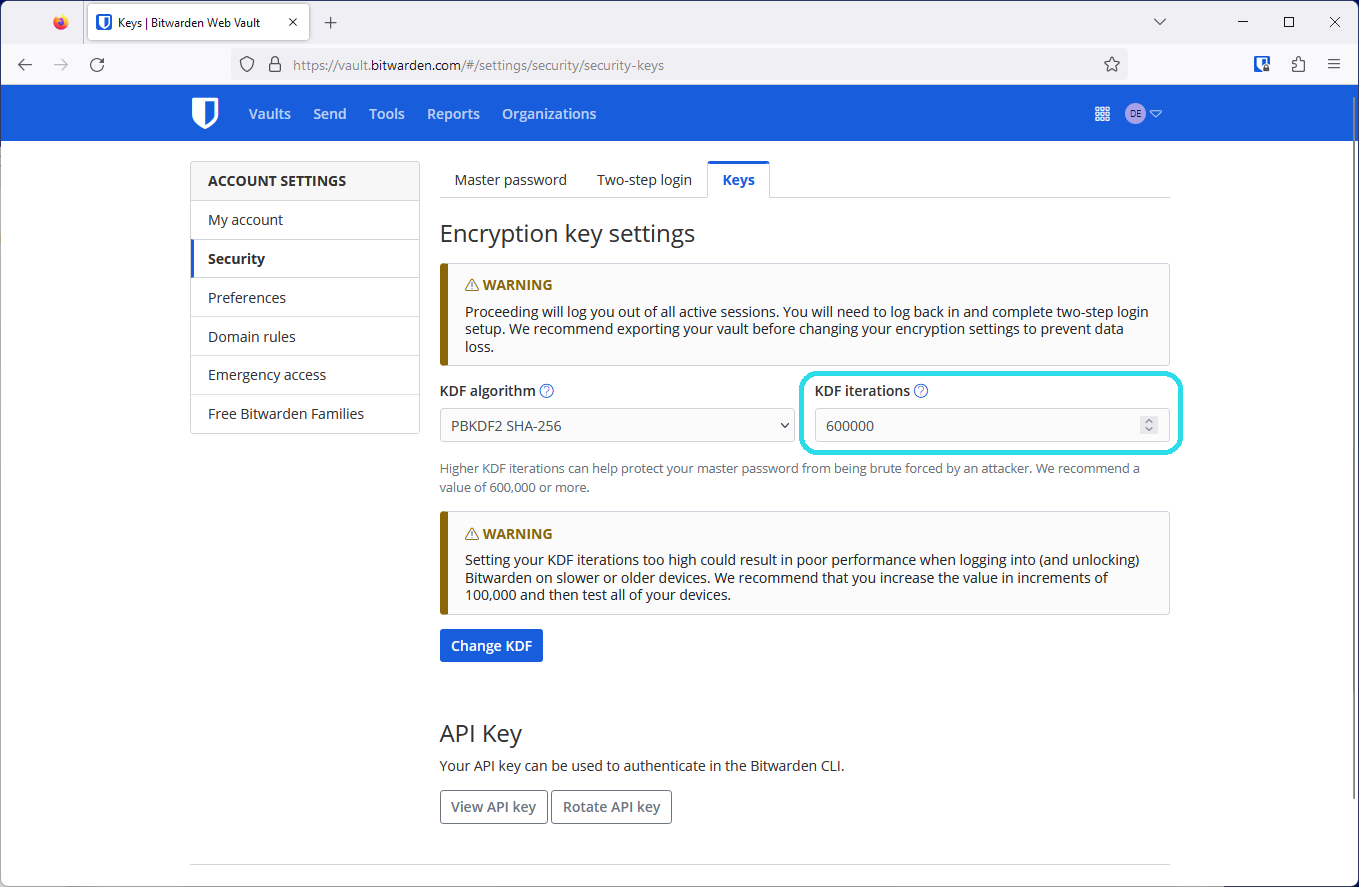
3. Log back in again on all your devices
This setting cannot be changed by admins as it is protected by your master password in your end-to-end encrypted Bitwarden account. Thank you for taking action, updating these settings, and being a part of *[Company’s] *security!
*[IT admin name, title]*
## Frequently asked questions
**Q:** **What is a KDF iteration and what does it do?
A:** A KDF iteration is part of the encryption process and refers to how many times the key derivation function algorithm runs before you can access your vault. Combined with a strong master password, a higher amount of iterations improves your vault’s resistance to hackers. Learn more about encryption security in this blog: [Bitwarden security fundamentals and multifactor encryption](https://bitwarden.com/it-it/blog/bitwarden-security-fundamentals-and-multifactor-encryption/)
**Q: What recommendations changed and why?
A:**The [OWASP Foundation](https://owasp.org/) is a respected leader in open security standards made up of teams of security professionals and encryption experts. Due to advances in hardware available to hackers today, OWASP increased their recommendations for the iterations settings for the [PBKDF2 algorithm](https://bitwarden.com/it-it/help/kdf-algorithms/#pbkdf2/) to improve resistance to brute-force hacking attempts.
**Q: What do I need to do?
A:**Update your KDF Iterations setting to 600,000 at minimum. Ensure [you’ve backed up your vault](https://bitwarden.com/it-it/help/encrypted-export/), then make the change in the Account Settings > Security > Keys window in the web app. In all it should take less than five minutes to update this setting.
**Q: Is this something the admins can do for me?
A:**Because the process of changing KDF iterations uses your master password, only the logged in user can change these settings.
**Q: Do all organization members need to update their KDF iterations to keep the organization secure?
A:**It is recommended that every member of an organization update their KDF iterations to provide the best security for the organization and their individual vaults.
**Q: Why should I back up my vault?**
**A:**Changing KDF iterations will log you out of Bitwarden on every device, so having a backup of your vault is helpful in case you cannot log back in. It is good practice to keep your master password and two-step login recovery codes in a safe place. For more information, please visit [Guide: How to create and store a backup of your Bitwarden vault.](https://bitwarden.com/it-it/resources/guide-how-to-create-and-store-a-backup-of-your-bitwarden-vault/)
**Q: What are other actions I can take to improve my account security?
A:**The best way to improve your security is to ensure that you have a [long, strong master password](https://bitwarden.com/it-it/blog/how-long-should-my-password-be/). After this, [enable two-step login](https://bitwarden.com/it-it/help/setup-two-step-login/) for a second factor of protection.
## Ottieni subito una sicurezza per le password potente e affidabile. Scegli il tuo piano.
## Personale
### Hai appena iniziato?
*Ottieni una gestione di base delle password oggi stesso. Sempre gratis.*
[Crea un account gratuito](https://bitwarden.com/go/start-free/)
---
### Premium
**$1.65** *al mese*
*Con fatturazione annuale a 19,80 USD*
Scopri le funzionalità premium
- Autenticatore integrato
- Allegati file
- Accesso di emergenza
- Blocco del phishing
- Report di sicurezza e altro
Condividi gli elementi della cassaforte con un altro utente
[Crea un account Premium](https://bitwarden.com/go/start-premium/)
---
### Famiglie
**$3.99** *al mese*
*Fino a 6 utenti, con fatturazione annuale a 47,88 USD*
Proteggi gli accessi della tua famiglia
- 6 account premium
- Condivisione illimitata
- Raccolte illimitate
- Spazio di archiviazione dell’organizzazione
Condividi gli elementi della cassaforte tra sei persone
[Inizia la prova gratuita per Famiglie](https://bitwarden.com/go/start-families-trial/)
---
Prezzi indicati in USD e basati su un abbonamento annuale. Tasse escluse.
## Business
### Teams
*Per team e aziende in crescita che devono muoversi rapidamente.*
**$4** *al mese / per utente, con fatturazione annuale*
**Nessun compromesso**
Tutte le funzionalità Premium, più funzionalità avanzate come:
- Condividi le credenziali in modo sicuro
- Controlla le attività con i log eventi
- Sincronizza la directory esistente
- Automatizza il provisioning con SCIM
[Avvia la prova gratuita](https://bitwarden.com/go/start-teams-trial/)
---
### Enterprise
*Per aziende che necessitano di protezione e controllo avanzati.*
**$6** *al mese / per utente, con fatturazione annuale*
**Massima protezione**
Tutte le funzionalità Premium e Teams, più funzionalità di livello enterprise come:
- Controllo granulare degli accessi
- Integrazione SSO senza password
- Recupero account semplificato
- Flessibilità di self-hosting
- Mitigazione dei rischi con Access Intelligence [novità]
- Piano Families gratuito per tutti gli utenti
[Avvia la prova gratuita](https://bitwarden.com/go/start-enterprise-trial/)
---
### Parla con il team vendite
*Per le grandi organizzazioni, parla con un esperto di un piano su misura e scopri come Bitwarden può:*
*al mese*
- Ridurre il rischio di cybersecurity
- Aumentare la produttività
- Integrarsi perfettamente
Bitwarden si adatta ad aziende di qualsiasi dimensione per portare la sicurezza delle password nella tua organizzazione
[Parla con il team vendite](https://bitwarden.com/talk-to-sales)
---
Prezzi indicati in USD e basati su un abbonamento annuale. Tasse escluse.